在此頁面上:瞭解如何從屬性和事件建立區段定義,以建立對象,並選擇串流、批次或邊緣評估方法,以便在Adobe Journey Optimizer中鎖定目標。
建立區段定義 create
在此範例中,您建置對象來鎖定生活在亞特蘭大、舊金山或西雅圖且出生於1980年之後的所有客戶。 所有這些客戶必須在過去7天內購買過。
-
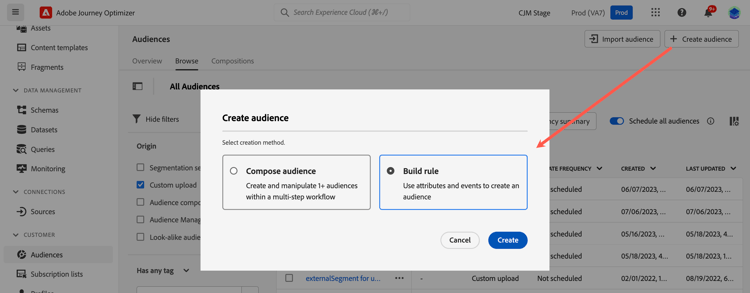
從 對象 功能表,按一下 建立對象 按鈕並選取建置規則。
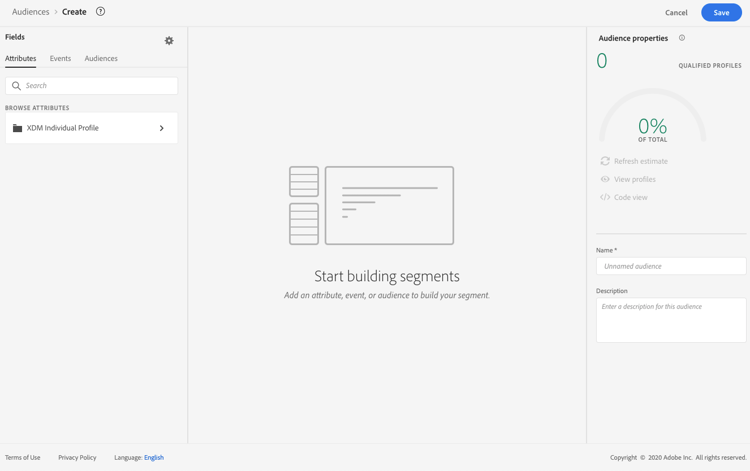
區段定義畫面可讓您設定定義對象的所有必要欄位。 在Segmentation Service檔案中瞭解如何設定對象。
-
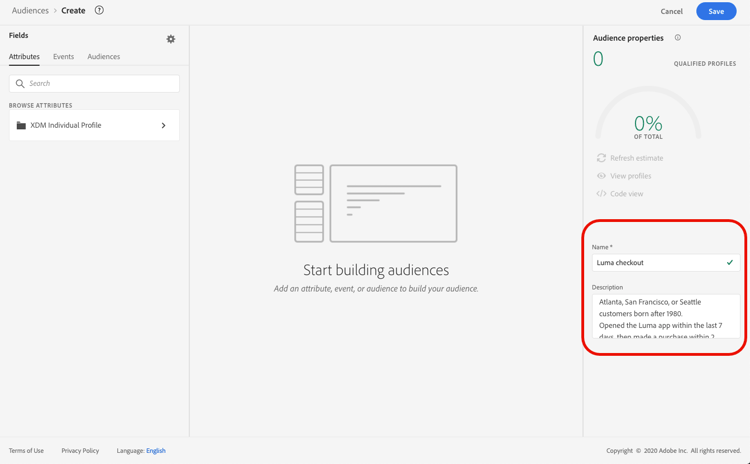
在 對象屬性 窗格中,提供對象的名稱和說明(選擇性)。
-
將所需欄位從左窗格拖放至中央工作區,然後視需要加以設定。
區段定義的基本建置區塊是 屬性 和事件。 此外,現有對象中包含的屬性和事件可作為新定義的元件。 進一步瞭解Segmentation服務檔案
note NOTE 請注意,左窗格中可用的欄位會依貴組織已設定的 XDM Individual Profile 和 XDM ExperienceEvent 結構描述而有所不同。 在Experience Data Model (XDM)檔案中進一步瞭解。 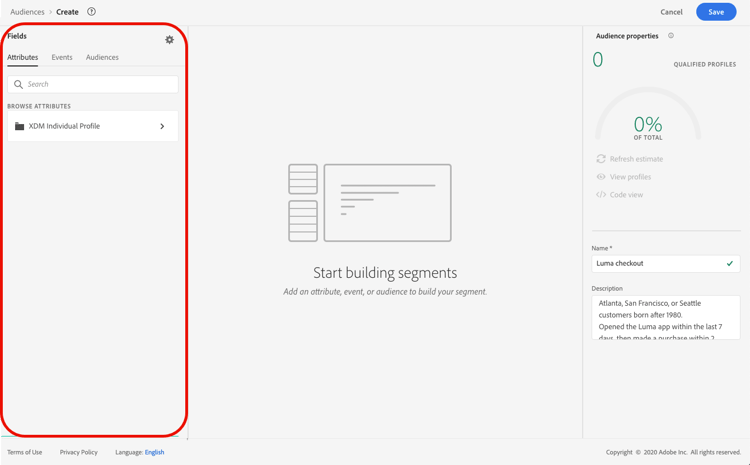
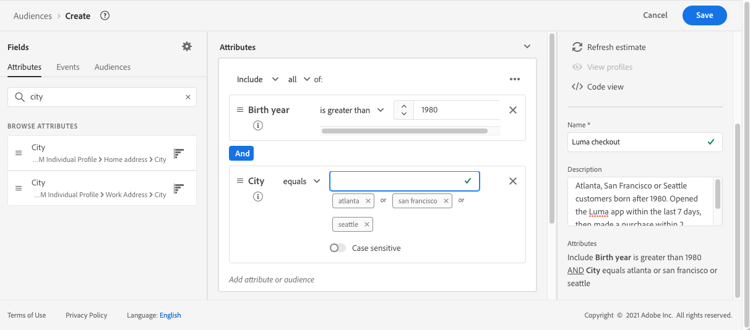
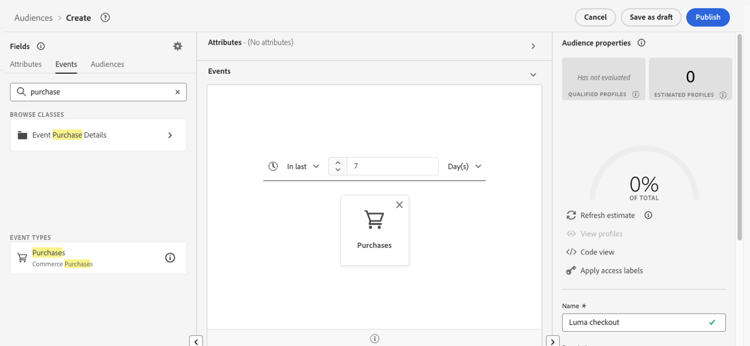
在此範例中,我們需要依賴 屬性 和 事件 欄位來建置對象:
-
屬性:在1980年後出生的亞特蘭大、舊金山或西雅圖的設定檔。
note NOTE frequencyMap屬性不支援在區段定義中使用,且無法當作對象細分條件的一部分使用。 對於以頻率為基礎的鎖定目標,請考慮根據商業規則使用頻率限定規則。 -
事件:過去7天內購買過的設定檔。
-
-
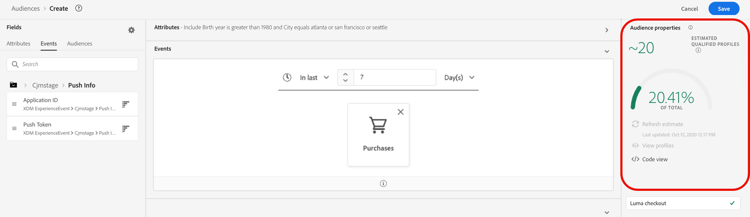
當您在工作區中新增及設定新欄位時,對象屬性窗格會自動更新,內含屬於該對象的預估設定檔資訊。
-
對象準備就緒後,按一下儲存。 它會顯示在Adobe Experience Platform對象清單中。 請注意,搜尋列可協助您搜尋清單中的特定對象。
對象現在已準備好用於您的歷程。 如需詳細資訊,請參閱本區段。
客群評估方法 evaluation-method-in-journey-optimizer
在Adobe Journey Optimizer中,使用下列三種評估方法之一,從區段定義產生對象。
當新資料流入系統時,對象的設定檔清單會即時保持最新。
串流細分是持續進行的資料選擇流程,其會根據使用者活動來更新客群。 在建置區段定義並儲存產生的客群後,區段定義會在 Journey Optimizer 中套用至傳入的資料。 這表示當個人設定檔資料變更時,將會在對象中新增或移除該個人,以確保您的目標對象永遠相關。 在Adobe Experience Platform檔案中進一步瞭解。
| note important |
|---|
| IMPORTANT |
| 評估方法與事件資料功能是獨立的概念。 區段可設定為串流,同時以批次方式處理特定事件型別。 自2024年11月1日起,Journey Optimizer不支援追蹤和意見回饋資料集中的傳送和開啟事件,以在任何客戶沙箱或組織中執行真正的串流分段。 這些事件仍可用於批次區段,但如果包含在串流區段中,則會以批次方式評估這些事件,且無法透過串流資格提供確定性的當天排除。 當區段定義符合Adobe Experience Platform的串流區段資格標準時,點按和其他追蹤事件可用於串流區段。 追蹤集合本身不會停止。 傳送事件產生的相關排除、跳出和延遲事件也會受到影響。 對於隱藏使用案例,請使用原生頻率上限或其他可用的商業規則。 若要回應先前在相同歷程中傳送的支援訊息,請使用回應事件,而不是將邏輯重建為對象。 |
每24小時評估對象的設定檔清單。
批次細分透過區段定義一次處理所有設定檔資料,建立對象的快照,可儲存和匯出以供使用。 與串流細分不同,批次細分不會持續即時更新對象清單。 在批次程式後傳入的新資料,在下一個批次程式前不會反映在對象中。 嘗試強制立即更新不會覆寫每日週期。 如需立即的增量更新,請考慮使用串流或隨選細分選項。
如需詳細資訊,請參閱Adobe Experience Platform劃分服務檔案
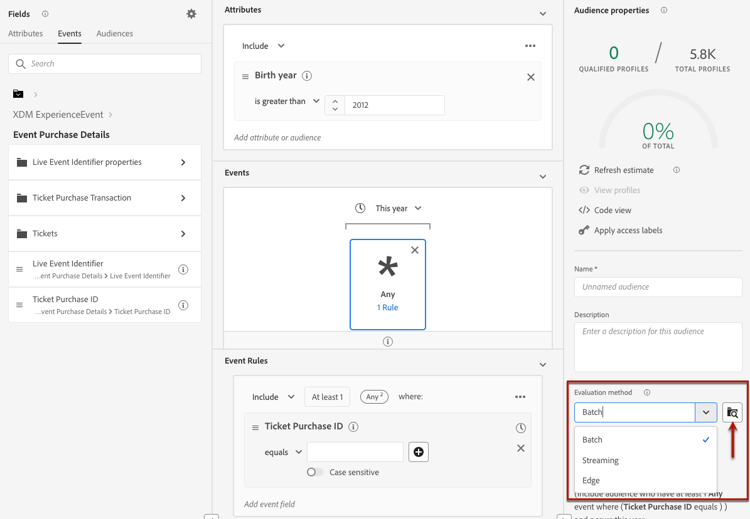
如果您知道要使用的評估方法,請使用下拉式清單選取它。 您也可以按一下帶有放大鏡的瀏覽圖示資料夾圖示,以檢視可用區段定義評估方法的清單。 如需詳細資訊,請參閱Adobe Experience Platform Segmentation Service檔案。
在您首次定義對象後,設定檔將在其符合資格時新增到對象。 最多可能需要 24 小時才能從先前的資料回填客群。 回填客群之後,該客群會持續保持在最新狀態,並隨時準備好進行目標定位。
彈性的受眾評估 flexible
Adobe Experience Platform受眾入口網站可讓您依需求針對選取的受眾執行細分工作,以確保在Journey Optimizer歷程和行銷活動中定位受眾之前,您始終擁有最新的受眾資料。
透過彈性的對象評估,您可以:
- 根據您的最新資料建立全新的區段。
- 即時評估對象以確保準確性。 若要這麼做,請選擇您要評估的對象,然後選取「評估對象」,前提是這些對象符合特定條件(例如以人物為基礎、分段服務來源)。
- 在Adobe Journey Optimizer行銷活動或歷程中使用評估過的對象來精確鎖定目標。
您可以一次評估最多20個對象,不符合資格的對象會自動排除。 如需詳細資訊,請參閱Adobe Experience Platform Segmentation Service檔案。
隨選彈性對象評估與其他細分工作一起排入佇列,最多可能需要4小時。 提交請求時,無法立即取得對象。 區段作業完成後,對應的匯出作業會自動執行。 在歷程或行銷活動中根據評估狀態來監控評估狀態並驗證產生的對象狀態。
批次評估與對象新鮮度 batch-evaluation-and-audience-freshness
計畫批次對象用作序列:
- 已擷取Source資料。
- 批次細分會評估區段定義。
- 已建立對象快照。
- 設定檔快照或匯出資料會傳播至使用服務。
- 歷程或行銷活動會執行。
批次對象是快照,而不是持續重新計算清單。 評估後收到的資料要等到稍後評估才會反映出來,而且歷程或排程的行銷活動可以使用舊版快照,而評估或匯出傳播仍在進行中。 請勿將45到60分鐘的緩衝視為通用保證。 對於批次對象,請在分段完成後約兩個小時讓對象準備好使用。 實際時間會因沙箱、對象規模、擷取量、匯出處理和系統載入而不同。 對於設定為每日週期的「讀取對象」歷程,請在批次對象評估後使用觸發器,而不是依賴固定的緩衝區。 此選項僅適用於每日週期。 確認每個沙箱中的實際分段和匯出持續時間。
排程API會公開沙箱的批次分段排程。 使用此處記錄的排程設定端點來檢閱或更新batch_segmentation排程,然後驗證後續的評估和快照,然後再依賴新的時間進行生產歷程或行銷活動。 排程變更因沙箱而異。
作法影片 video-segment
瞭解Journey Optimizer如何使用規則產生閱聽眾,並瞭解如何使用屬性、事件和現有閱聽眾來建立閱聽眾。
This section contains structured knowledge intended to support interpretation, retrieval, and question answering related to this topic.
For complete understanding, this information should be combined with the documentation on this page. Neither source is intended to stand alone; the page describes the feature, while this section provides additional context that helps disambiguate terminology, intent, applicability, and constraints.
- TL;DR: This page explains how to build a segment definition from attributes and events to create an audience, choose its streaming, batch, or edge evaluation method, and evaluate audiences on demand for targeting in Journey Optimizer.
Intents:
- Create an audience with the Build rule method from the Audiences menu
- Use attributes and events (and components from existing audiences) as building blocks of a segment definition
- Choose the streaming, batch, or edge evaluation method for the audience
- Run on-demand (flexible) evaluation of selected audiences before targeting them
- Understand backfilling timing after an audience is first defined
Glossary:
- Segment definition: A new audience definition created with Adobe Experience Platform Segmentation Service using the Build rule method (product-specific)
- Build rule: The audience creation method selected from Create audience that opens the segment definition screen (product-specific)
- Attributes: One of the two basic building blocks of segment definitions, for example the city where profiles live or the birth year (product-specific)
- Events: One of the two basic building blocks of segment definitions, for example a purchase made within the last 7 days (product-specific)
- Streaming segmentation: Evaluation method where the audience profile list is kept up to date in real time as new data flows in (product-specific)
- Batch segmentation: Evaluation method where the audience profile list is evaluated every 24 hours as a snapshot (product-specific)
- Edge segmentation: Evaluation method that evaluates segments instantaneously on the edge for same-page and next-page personalization (product-specific)
- Flexible audience evaluation: The Audience Portal ability to run a segmentation job on demand for selected audiences (product-specific)
Guardrails:
- The
frequencyMapattribute is not supported for use in segment definitions and cannot be used as part of audience segmentation criteria; for frequency-based targeting, consider frequency capping rules under business rules. - As of November 1st, 2024, streaming segmentation no longer supports the use of send and open events from Journey Optimizer tracking and feedback datasets; this applies to all customer sandboxes and organizations.
- Send and open events can still be used in batch segments, but if included in a streaming segment they are evaluated in a batch manner; clicks and other tracking events remain available for streaming segmentation.
- Edge segmentation can currently evaluate only select query types.
- Batch segmentation is evaluated every 24 hours; attempts to force an immediate update do not override the daily cycle.
- After an audience is first defined, backfilling the audience from prior data can take up to 24 hours.
- Flexible audience evaluation lets you evaluate up to 20 audiences at a time, and ineligible audiences are automatically excluded.
Terminology:
- Canonical name: Segment definition — Acronym: n/a — variants: segment
- Do not confuse: “Streaming segmentation” (real-time updates) ≠ “Batch segmentation” (evaluated every 24 hours) ≠ “Edge segmentation” (instantaneous on the edge)
FAQ:
- Q: How do I start creating a segment definition? — From the Audiences menu, click Create audience and select Build rule.
- Q: Can I use the
frequencyMapattribute in a segment definition? — No; it is not supported and cannot be used as segmentation criteria. Consider frequency capping rules under business rules instead. - Q: Can I still use send and open events in streaming segmentation? — No; as of November 1st, 2024, streaming segmentation no longer supports send and open events from Journey Optimizer tracking and feedback datasets, though they remain usable in batch segments.
- Q: How long does backfilling take? — Backfilling the audience from prior data can take up to 24 hours after the audience is first defined.
- Q: How many audiences can I evaluate on demand at once? — You can evaluate up to 20 audiences at a time with flexible audience evaluation, and ineligible audiences are automatically excluded.
Personas:
- marketer: Can create a segment definition by selecting Create audience and then Build rule from the Audiences menu. Can drag attributes and events into the workspace, then choose a streaming, batch, or edge evaluation method for the audience. Can run flexible audience evaluation on up to 20 audiences at a time before targeting them in journeys or campaigns. The page states that backfilling the audience from prior data can take up to 24 hours after the audience is first defined. Where: “Create a segment definition”.
Onboarding:
- Level: Beginner
- First minimal step: From the Audiences menu, select Create audience, then select Build rule.
- Success check: The audience displays in the list of Adobe Experience Platform audiences after it is saved.
- Next: After creating and saving the audience, before using it in journeys: About Adobe Experience Platform audiences (audience/about-audiences.md); When responding to a message sent earlier in the same journey instead of rebuilding the logic as an audience: Reactions events (building-journeys/reaction-events.md)