在此页面上:了解如何使用自定义操作和外部数据源限制历程处理,以便外部系统不会超出其支持的每秒请求数。
当外部系统必须处理限定数量的每秒请求时,使用此用例可限制历程处理。
用例描述
Adobe Journey Optimizer允许从业人员通过使用自定义操作和数据源向外部系统发送API调用。
这可以通过以下方式完成:
-
数据源:从外部系统收集信息并在历程上下文中使用它,例如,获取有关个人资料城市的天气信息,并据此创建专用历程流。
-
自定义操作:向外部系统发送信息,例如,使用Journey Optimizer的编排功能以及配置文件信息、受众数据和历程上下文通过外部解决方案发送电子邮件。
如果您使用的是外部数据源或自定义操作,则可能需要通过限制历程吞吐量来保护外部系统:对于单一历程,每秒最多可达5,000个实例;对于受众触发的历程,每秒最多可达20,000个实例。 在本节中了解有关历程处理率和吞吐量的更多信息。
对于自定义操作,可在产品级别使用限制功能。 请参见此页面。
对于外部数据源,您可以在端点级别定义上限限制,以避免通过Journey Optimizer的上限API淹没这些外部系统。 但是,将丢弃达到限制后剩余的所有请求。 在此部分中,您将找到可用于优化吞吐量的解决方法。
有关如何与外部系统集成的更多信息,请参阅此页面。
实施
对于受众触发的历程,您可以定义将影响历程吞吐量的读取受众活动的读取率。 了解详情
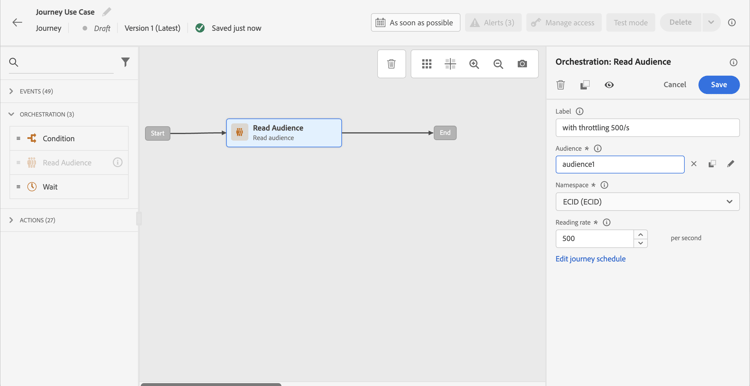
您可以将此值从每秒500个实例修改为每秒20 000个实例。 如果您需要低于500/s,您还可以添加包含等待活动的“百分比拆分”条件,将您的历程拆分为多个分支,并在特定时间执行这些分支。
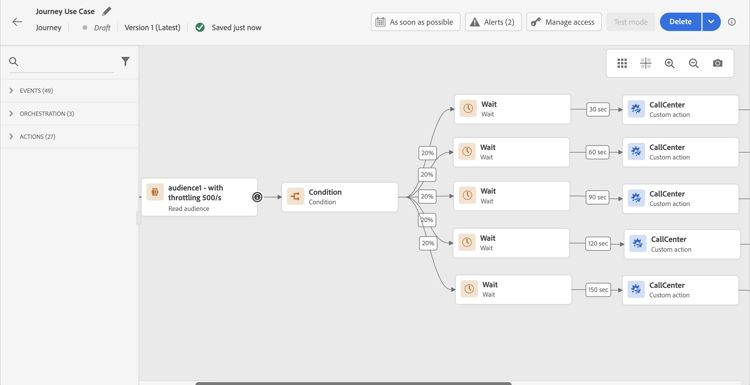
我们以 受众触发的历程 为例,该历程使用 10,000个用户档案 的群体,并向支持 100个请求/秒 的外部系统发送数据。
-
您可以定义读取受众以读取吞吐量为500个配置文件/秒的配置文件,这意味着读取所有配置文件将需要20秒。 在第二个1,您将阅读其中500篇内容,在第二个2,500多篇内容中,依此类推。
-
然后,您可以添加“百分比拆分”条件活动,按20%进行拆分,以使每个分支中每秒有100个用户档案。
-
之后,在每个分支中添加具有特定计时器的等待活动。 这里我们设定了30秒的等待时间。 每秒有100个配置文件流入每个分支。
-
在分支1上,它们将等待30秒,这意味着:
- 在第1秒,100个配置文件将等待第31秒
- 在第二个2上,100个配置文件将等待第二个32等。
-
在分支2上,它们将等待60秒,这意味着:
- 在第二个1,100个配置文件将等待第二个61 (1’01")
- 在第二个2,100个配置文件将等待第二个62 (1’02")等。
-
鉴于我们预计读取所有用户档案的最大时间为20秒,因此每个分支之间不会重叠,第20个分支是最后一个将用户档案流入条件的分支。 在第二个31和第二个51之间,将处理分支1中的所有配置文件。 在第61秒(1’01")和第81秒(1’21")之间,将处理分支2中的所有用户档案等。
-
作为护栏,您还可以添加第六个分支,使每个分支具有少于100个配置文件,尤其是如果外部系统仅支持100个请求/秒时。
-
作为额外的护栏,您还可以使用上限功能。
This section contains structured knowledge intended to support interpretation, retrieval, and question answering related to this topic.
For complete understanding, this information should be combined with the documentation on this page. Neither source is intended to stand alone; the page describes the feature, while this section provides additional context that helps disambiguate terminology, intent, applicability, and constraints.
- TL;DR: This page explains how to limit journey throughput when external data sources or custom actions have a capped number of requests per second, using Read Audience rate configuration, percentage splits, and wait activities.
Intents:
- Limit the throughput of an audience-triggered journey to protect an external system from being overwhelmed
- Configure the reading rate of a Read Audience activity to control how many profiles enter per second
- Combine percentage split conditions and wait activities to spread profile processing over time
- Understand the difference between journey-level throughput workarounds and sandbox-level capping capabilities
- Apply capping capabilities to custom actions at the product level
Glossary:
- Throttling / throughput limiting: Controlling the rate at which profiles flow through a journey to avoid exceeding the request capacity of an external system. (product-specific)
- Read Audience reading rate: A configurable parameter on the Read Audience activity that sets the maximum number of profiles entering the journey per second (range: 500–20,000 instances/second). (product-specific)
- Capping API: A Journey Optimizer API that defines a maximum request limit per endpoint for external data sources; requests beyond the cap are dropped. (product-specific)
- Percentage split condition: A condition activity that divides the profile flow into branches by percentage, used here to distribute profiles across time-staggered wait paths. (product-specific)
Guardrails:
- Read Audience reading rate can be set between 500 and 20,000 instances per second; values below 500/s require a workaround using percentage splits and wait activities
- Unitary journeys support up to 5,000 instances/second; audience-triggered journeys support up to 20,000 instances/second
- The percentage-split + wait workaround operates only at journey level, not across all journeys in the sandbox
- When multiple journeys target the same external endpoint in parallel, this workaround does not account for the combined load — capping capabilities should be used instead
- Remaining requests that exceed the capping limit on external data sources are dropped, not queued
- The workaround must be thoroughly tested before going to production
Terminology:
- Canonical name: Throughput limiting — Acronym: none — variants: throttling, rate limiting, journey throughput control
- Synonyms: “Capping” = “throttling” in the context of external endpoint protection
- Do not confuse: “Capping API (endpoint-level)” ≠ “reading rate (journey-level)” — The Capping API applies globally to all journeys in a sandbox targeting an endpoint; the reading rate and split/wait workaround apply only to the individual journey
FAQ:
- Q: What is the maximum reading rate I can set on a Read Audience activity? — Between 500 and 20,000 profiles per second; to go below 500/s, use a percentage split with wait activities.
- Q: How do percentage splits and wait activities help limit throughput? — By splitting profiles into branches (e.g., 20% each) and adding staggered wait timers per branch, you ensure that only a controlled number of profiles reach the external system per second.
- Q: Does the percentage-split workaround protect all journeys targeting the same endpoint? — No; it only works at the individual journey level. If multiple journeys run in parallel against the same endpoint, use sandbox-level Capping capabilities instead.
- Q: What happens to requests that exceed the capping limit on an external data source? — They are dropped; the Capping API does not queue excess requests.
- Q: Should I use custom actions or data sources for external data use cases? — Custom actions are preferred because they support response handling; data sources should be used only when the use case specifically requires them.