在此页面上:了解如何在优化活动中使用定位规则,通过可选的回退路径,确定性地将特定受众路由到正确的历程路径。
定位规则允许您根据特定受众区段确定客户必须符合哪些特定规则或资格才有资格进入历程路径之一。
与实验(随机分配给定路径)不同,定位是确定性的,可确保正确的受众或用户档案进入指定的路径。
要在历程中设置定位,请执行以下步骤。
-
从 业务流程 部分中,将 优化 活动拖放到历程画布中。
-
添加可选标签,这对于在报告和测试模式日志中标识活动很有用。
-
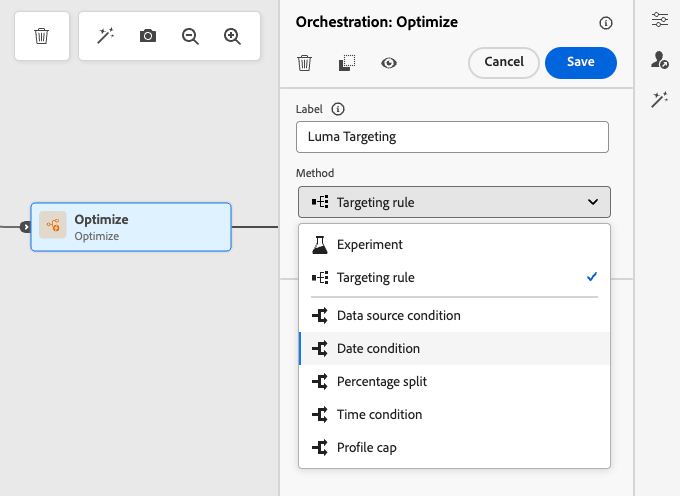
从 方法 下拉列表中选择定位规则。
优化活动中的
-
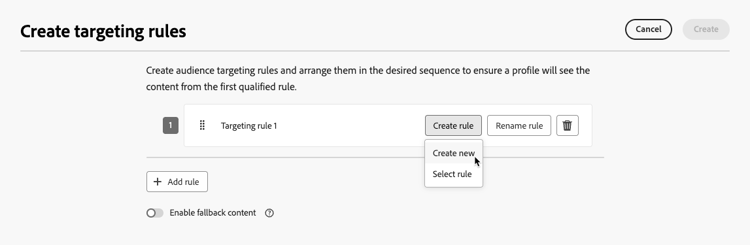
单击创建定位规则。
-
单击创建规则 > 新建,然后使用规则生成器定义您的条件。
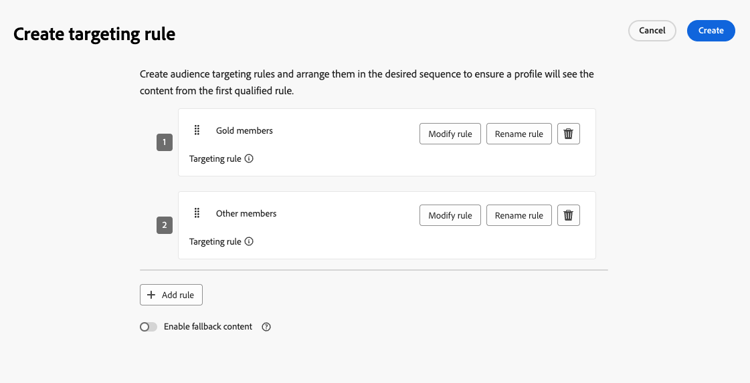
例如,为忠诚度计划的金会员定义规则(
loyalty.status.equals("Gold", false)),为其他会员定义规则(loyalty.status.notEqualTo("Gold", false))。金会员和非金会员的
-
您还可以单击创建规则 > 选择规则以选择从 规则 菜单创建的现有定位规则。 了解详情
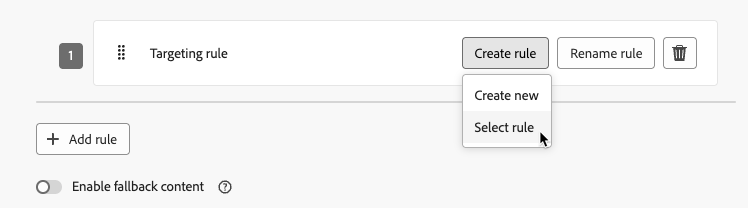
在这种情况下,组成规则的公式将简单地复制到历程活动中。 从 规则 菜单对该规则进行的任何后续更改将不会影响历程的副本。
note availability AVAILABILITY 通过专用Journey Optimizer菜单创建定位规则目前可供已购买Decisioning附加产品的组织使用,其他组织也可应要求使用这些规则(限量发布)。 此容量将逐步推广到所有客户。 在此期间,请联系您的Adobe代表以获取访问权限。 -
添加规则后,您仍可以对其进行修改。 选择 编辑内联 以使用规则生成器随时更新它,或选择 选择规则 以选取其他现有规则。
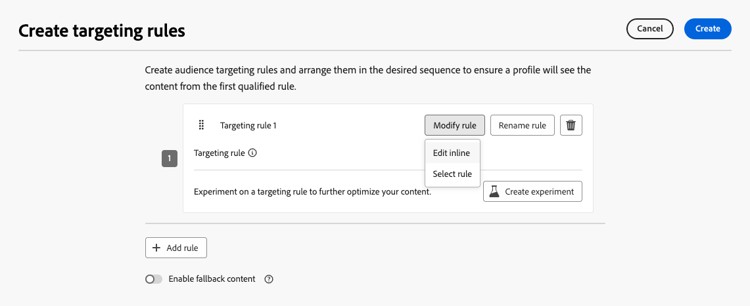
note NOTE 编辑内联规则不会影响其源自的现有规则。 -
根据需要选择 启用回退路径 选项。 此操作会为不符合以上定义的任何定位规则的受众创建回退路径。
note NOTE 如果不选择此选项,则任何不符合定位规则的受众都不会进入回退路径并退出历程。 -
单击 创建 以保存您的定位规则设置。
-
返回历程,拖放特定操作以自定义每个路径。 例如,创建一个电子邮件,为金会员提供个性化优惠,并为所有其他会员提供移动消息提醒。
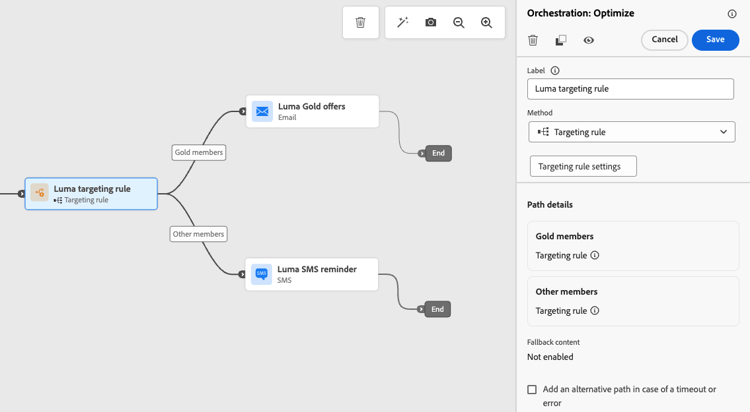
-
如果您在定义规则设置时选择了 启用回退内容 选项,请为自动添加的回退路径定义一个或多个操作。
不合格配置文件的
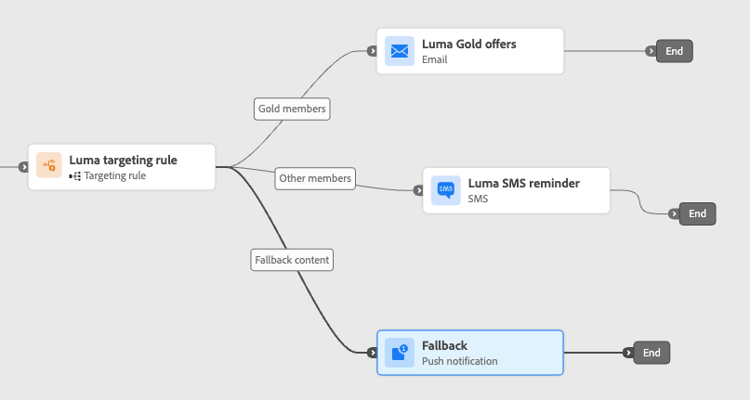
-
或者,在超时或错误的情况下使用 添加替代路径 以定义在出现问题时的替代操作。 了解详情
-
为对应于由定位规则设置定义的每个组的每个操作设计适当的内容。
在此示例中,设计一封电子邮件,其中为金会员提供特殊优惠,并为其他会员提供移动消息提醒。
-
当测试完成且验证为当前和通过时,发布您的历程。
历程处于实时状态后,将处理为每个区段指定的路径,以便Gold成员使用电子邮件选件输入路径,而其他成员使用移动设备消息提醒输入路径。
使用历程报告跟踪旅程的成功情况。 了解详情
定位规则用例 uc-targeting
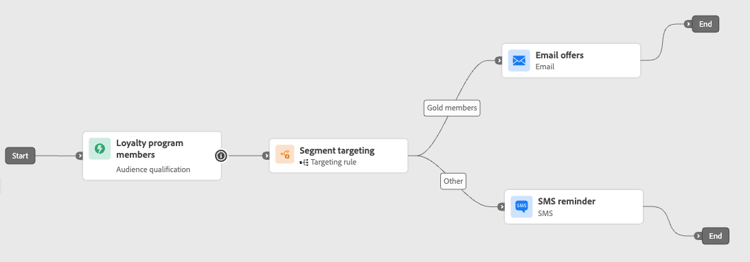
以下示例显示如何将 Optimize 活动与 定位规则 方法结合使用,以个性化不同子受众的路径。
金会员状态忠诚会员可以通过电子邮件接收个性化优惠,而所有其他会员将被定向到移动设备消息提醒。
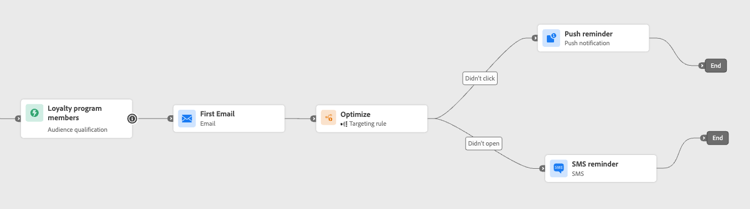
已打开电子邮件但未单击的客户会收到推送通知,而那些根本没有打开的客户则会收到移动消息。
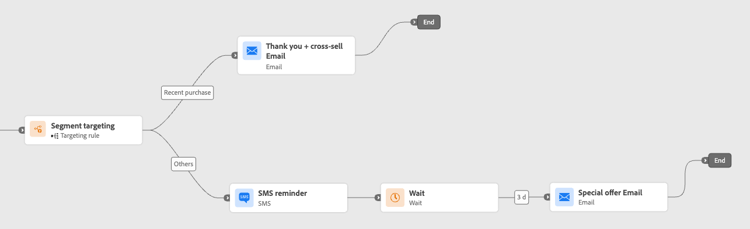
最近购买过产品的客户可能会进入一个简短的“感谢您+交叉销售”路径,而那些没有购买历史的客户则会进入一个更长的培养历程。
This section contains structured knowledge intended to support interpretation, retrieval, and question answering related to this topic.
For complete understanding, this information should be combined with the documentation on this page. Neither source is intended to stand alone; the page describes the feature, while this section provides additional context that helps disambiguate terminology, intent, applicability, and constraints.
- TL;DR: This page explains how to use path targeting in Adobe Journey Optimizer journeys to deterministically route specific audience segments into designated journey paths based on defined rules.
Intents:
- Configure deterministic path targeting using the Optimize activity with a Targeting rule method
- Create new targeting rules or reuse existing rules from the Rules menu
- Define a fallback path for profiles that do not qualify for any targeting rule
- Personalize journey paths for distinct audience segments (e.g., loyalty tiers, behavior, purchase history)
- Modify inline targeting rules without affecting the original rule definition
Glossary:
- Optimize activity: A journey canvas activity used to split profiles into different paths, either via experimentation (random) or targeting (deterministic) (product-specific)
- Targeting rule: A deterministic qualification condition that decides which journey path a profile enters, based on profile or audience attributes (product-specific)
- Fallback path: An alternate journey path for profiles that do not satisfy any of the defined targeting rules (product-specific)
Guardrails:
- The journey must be validated and errors resolved before testing. Publication requires completed testing and current, passed validation.
- Creating targeting rules from the dedicated Journey Optimizer Rules menu requires the Decisioning add-on or is available on demand (Limited Availability).
- When a rule is selected from the Rules menu and copied into the journey, subsequent changes to the original rule do not affect the journey’s copy.
- Editing a rule inline does not modify the original rule it was sourced from.
- If the fallback path option is not enabled, profiles that do not qualify for any targeting rule exit the journey entirely.
Terminology:
- Canonical name: Path targeting
- Do not confuse: “Targeting” ≠ “Experimentation” (targeting is deterministic; experimentation is random assignment)
FAQ:
- Q: What is the difference between path targeting and experimentation? — Targeting is deterministic: profiles enter a path based on defined rules. Experimentation is random assignment of a given path.
- Q: What happens to profiles that do not qualify for any targeting rule? — If the fallback path option is enabled, they enter the fallback path. If not enabled, they exit the journey entirely.
- Q: Can I reuse an existing rule from the Rules menu? — Yes, but the rule formula is copied into the journey activity; subsequent changes to the original rule in the Rules menu will not affect the journey’s copy.
- Q: Does editing a targeting rule inline change the original rule? — No, editing inline only updates the rule within the journey activity and does not affect the source rule.