在此页面上:了解如何在个性化编辑器中插入和重用表达式片段,如何使用隐式变量,在循环中使用片段,自定义可编辑字段,以及中断Adobe Journey Optimizer中的继承。
使用 个性化编辑器 时,您可以利用已创建或已保存到当前沙盒中的所有表达式片段。
片段是可重复使用的组件,可以在Journey Optimizer营销活动和历程中引用。 此功能允许预先构建多个自定义内容块,营销用户可以使用这些内容块在改进的设计过程中快速组合内容。 了解有关片段的更多信息
使用表达式片段 use-expression-fragment
要向内容添加表达式片段,请执行以下步骤。
-
打开个性化编辑器,然后在左窗格中选择 片段 按钮。
该列表显示了当前沙盒上已创建或另存为片段的所有表达式片段。 了解如何创建片段
它们按创建日期排序:最近添加的表达式片段首先显示在列表中。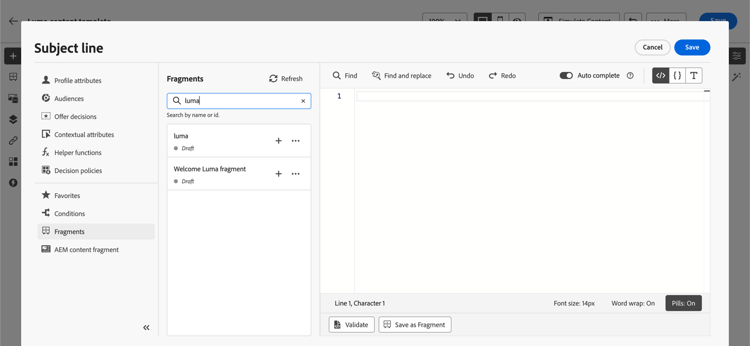
您也可以刷新此列表。
note NOTE 如果在编辑内容时修改或添加了某些片段,则列表将使用最新更改进行更新。 -
将光标放在内容中的所需位置,然后单击表达式片段旁边的+图标以将相应的片段ID插入到编辑器中。
note NOTE 您还可以将表达式片段添加到电子邮件或内容模板的 <head>部分。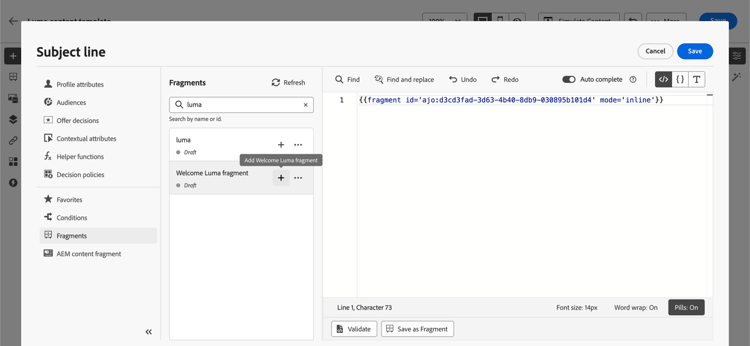
note caution CAUTION 您可以将任何 草稿 或 实时 片段添加到您的内容中。 但是,如果历程或营销活动中正在使用 草稿 状态的片段,您将无法激活该历程或营销活动。 在历程或营销活动发布中,草稿片段将显示错误,您需要批准它们才能发布。 -
添加片段ID后,如果您打开相应的表达式片段并从界面中编辑它,则将同步更改。 它们会自动传播到包含该片段ID的所有草稿或实时历程/营销活动。
-
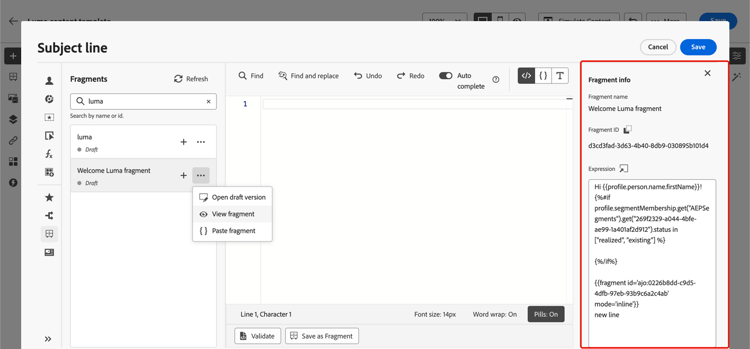
单击片段旁边的 更多操作 按钮。 从打开的上下文菜单中,选择 查看片段 以获取有关该片段的更多信息。 还显示片段ID,可从此处复制。
-
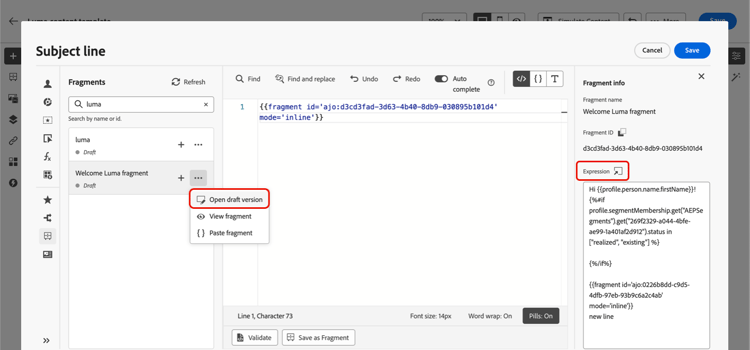
您可以在另一个窗口中打开表达式片段以编辑其内容和属性 — 使用上下文菜单中的 打开片段 选项或从 片段信息 窗格中编辑。 了解如何编辑片段
-
然后,您可以使用个性化编辑器的所有个性化和创作功能,像往常一样自定义和验证内容。
-
在某些情况下,您只需要计算变量,因此您可能希望隐藏表达式片段的内容。 为此,请使用
render属性并将其设置为false。 例如:code language-none Hi {{profile.person.name.firstName|fragment id='ajo:fragmentId/variantId' mode ='inline' render=false}}
使用隐式变量 implicit-variables
隐式变量增强了现有片段功能,以提高内容重用和脚本用例的效率。 片段可以使用输入变量并创建可在营销活动和历程内容中使用的输出变量。
例如,此功能可用于根据当前营销活动或历程初始化电子邮件的跟踪参数,并将这些参数用于添加到电子邮件内容的个性化链接。
可以使用以下用例:
-
在片段中使用输入变量。
当在营销活动/历程操作内容中使用片段时,它能够在片段之外利用声明的变量。 示例如下:
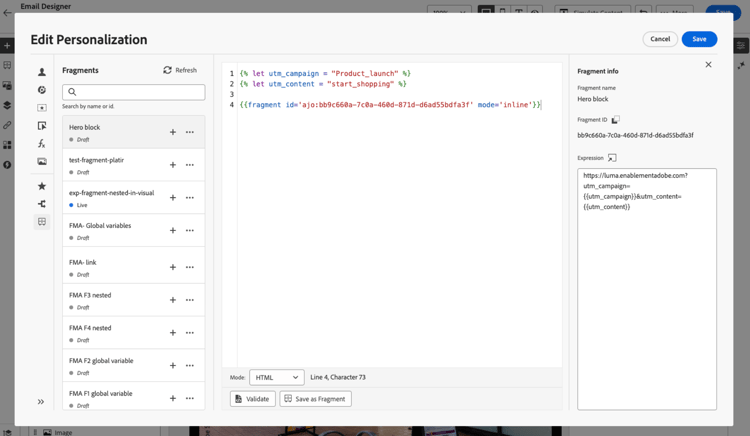
我们可以看到,以上在营销活动内容中声明了
utm_content变量。 当使用片段 主页块 时,将显示一个链接,其中将附加utm_content参数值。 最终结果为:https://luma.enablementadobe.com?utm_campaign= Product_launch&utm_content= start_shopping。 -
使用片段中的输出变量。
在片段中计算或定义的变量可在您的内容中使用。 在以下示例中,片段 F1 声明了一组变量:
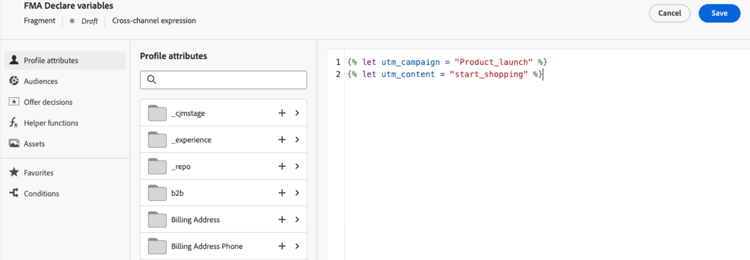
在电子邮件内容中,您可以进行以下个性化设置:
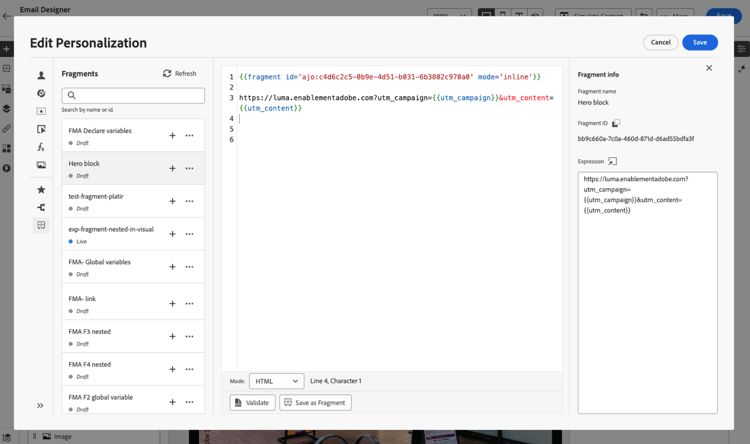
片段F1初始化以下变量:
utm_campaign和utm_content。 然后,消息内容中的链接将会附加这些参数。 最终结果为:https://luma.enablementadobe.com?utm_campaign= Product_launch&utm_content= start_shopping。
在循环中使用表达式片段 fragments-in-loops
在{{#each}}循环中使用表达式片段时,了解变量范围设置的工作原理非常重要。 表达式片段可以访问消息内容中定义的全局变量,但它们不能接收特定于循环的变量作为参数。
支持的模式:使用全局变量 global-variables-in-loops
表达式片段可以引用在片段之外定义的全局变量,即使从循环中调用片段也是如此。 当需要在迭代环境中使用片段时,建议使用此方法。
示例:在循环中使用具有全局变量的片段
在您的消息内容中,定义一个全局变量并使用引用该变量的片段:
在表达式片段(fragment123)中,您可以引用globalDiscount变量:
此模式之所以有效,是因为全局变量在整个消息中(包括片段内)都可访问,而与循环上下文无关。
不支持:将循环变量作为片段参数传递 loop-variables-limitations
不能将当前迭代项(如上例中的product)作为参数传递给表达式片段。 片段无法从周围的{{#each}}块直接访问循环作用域的变量。
示例:什么不工作
片段无法接收product作为参数并在内部使用它,因为当前实现中不支持为特定于循环的变量传递参数。
建议的解决方法 fragments-in-loops-workarounds
当需要对来自循环的数据使用表达式片段时,请考虑以下方法:
-
直接在消息中包含逻辑:不要将片段用于特定于循环的逻辑,而是直接在
{{#each}}块中添加个性化代码。code language-handlebars {{#each context.journey.actions.GetProducts.items as |product|}} <div class="product"> <h3>{{product.name}}</h3> <p>Price: ${{product.price}}</p> {{#if product.price > 100}} <span class="premium-badge">Premium Product</span> {{/if}} </div> {{/each}} -
使用循环之外的片段:如果片段内容不依赖于循环,请在迭代块之前或之后调用片段。
code language-handlebars {{fragment id='ajo:fragment123/variant456' mode='inline'}} {{#each context.journey.actions.GetProducts.items as |product|}} <div class="product"> <h3>{{product.name}}</h3> <p>Price: ${{product.price}}</p> </div> {{/each}} -
设置多个全局变量:如果需要跨迭代向片段传递不同的值,请在每次片段调用之前设置全局变量(但这限制了灵活性)。
自定义可编辑字段 customize-fields
如果表达式片段的某些部分已使用变量设置为可编辑,则可以使用特定语法覆盖其默认值。 了解如何使您的片段可自定义
要自定义字段,请执行以下步骤:
-
从 片段 菜单将片段插入到您的代码中。
-
在语法末尾使用
<fieldId>="<value>"代码覆盖变量的默认值。在以下示例中,我们将ID为“sports”的变量的值替换为“yoga”值。 只要引用“sport”变量,这就会在片段内容中显示“瑜伽”。
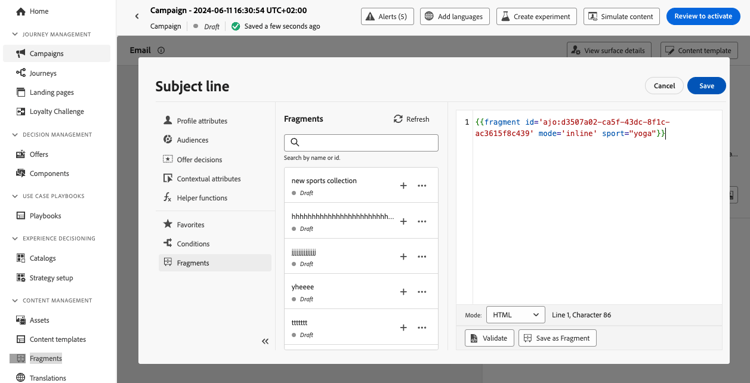
此部分中提供了示例,说明如何在创建电子邮件时将可编辑字段添加到表达式片段并覆盖其值。
使用动态片段解析 dynamic-resolution
您可以在运行时为每个收件人动态解析片段ID,而不是在设计时静态嵌入片段ID。 根据用户档案属性、数据集查找或上下文数据,这允许不同的用户档案在同一营销活动或历程中接收完全不同的内容块。
中断继承 break-inheritance
向个性化编辑器添加片段ID时,将同步对原始表达式片段所做的更改。
但是,您也可以将表达式片段的内容粘贴到编辑器中。 从上下文菜单中,选择 粘贴片段 以插入该内容。
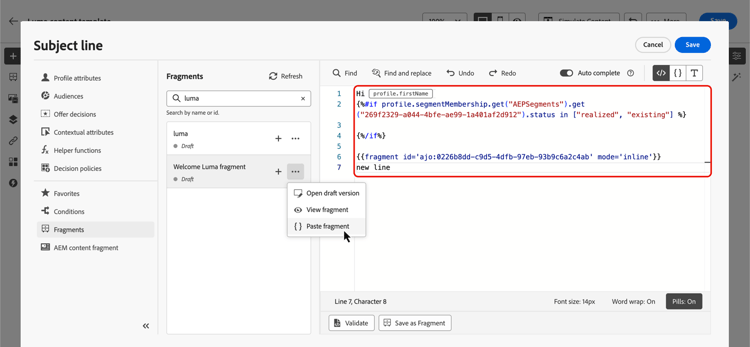
在这种情况下,来自原始片段的继承将被中断。 片段的内容将会复制到编辑器中,并且更改不再同步。
它会变成一个不再链接到原始片段的独立元素;您可以像代码中的任何其他元素一样编辑它。
This section contains structured knowledge intended to support interpretation, retrieval, and question answering related to this topic.
For complete understanding, this information should be combined with the documentation on this page. Neither source is intended to stand alone; the page describes the feature, while this section provides additional context that helps disambiguate terminology, intent, applicability, and constraints.
- TL;DR: This page explains how to insert, customize, and manage expression fragments in the personalization editor — including implicit variables, using fragments inside loops, editable fields, dynamic resolution, and breaking inheritance.
Intents:
- Insert an expression fragment from the Fragments menu and understand automatic change propagation
- Use implicit variables: input variables (declared outside the fragment, used inside) and output variables (declared inside the fragment, used in surrounding message content)
- Use expression fragments inside loops — leverage global variables for fragment access; understand the limitation on passing loop-scoped variables as parameters
- Override editable fields in a customizable fragment using
<fieldId>="<value>"syntax - Resolve fragment IDs dynamically at runtime based on profile attributes, dataset lookups, or context data
- Break inheritance by pasting fragment content directly into the editor
Glossary:
- Expression fragment: A reusable personalization expression component referenced by ID across campaigns and journeys; changes to the fragment propagate automatically to all content referencing it. (product-specific)
- Implicit variables: Variables that extend the fragment functionality — input variables (declared in campaign/journey content, consumed inside the fragment) and output variables (declared inside the fragment, available in the surrounding message content). (product-specific)
- Input variable: A variable declared outside the fragment (in campaign or journey content) that the fragment can reference and use internally.
- Output variable: A variable declared or computed inside a fragment that becomes available for use in the surrounding message content after the fragment is called.
- Editable fields: Fragment variables exposed to allow the inserting user to override default values using
<fieldId>="<value>"syntax, without editing the fragment source. (product-specific) - Dynamic fragment resolution: The ability to resolve a fragment ID at runtime (based on profile attributes, dataset lookups, or context data) rather than embedding a static fragment ID at design time. (product-specific)
- Break inheritance: Using “Paste fragment” from the contextual menu copies the fragment’s content into the editor as a standalone element that no longer synchronizes with the original fragment. (product-specific)
Guardrails:
- Maximum 30 fragments can be added in a given delivery.
- Fragments can only be nested up to 1 level.
- A journey or campaign cannot be activated or published if it contains a fragment with Draft status; draft fragments must be approved before publication.
- Expression fragments cannot receive loop-scoped variables (the current
{{#each}}iteration item) as parameters — this is a known limitation. Use global variables or inline logic as a workaround. - If a fragment containing multiple line breaks is used in Mobile message or push content, line breaks are preserved; test the content before sending.
Terminology:
- Canonical name: expression fragment — variants: fragment, expression fragment
- Synonyms: “fragment ID” = the identifier used to reference the fragment in expressions
- Do not confuse: inserting a fragment by ID (referenced; changes propagate automatically to all content) ≠ breaking inheritance / paste fragment (content copied into editor; standalone element, no longer linked to original)
- Do not confuse: input variables (declared outside the fragment, consumed inside) ≠ output variables (declared inside the fragment, consumed outside in surrounding message content)
- Do not confuse: Draft fragment (can be added to content but blocks journey/campaign publication until approved) ≠ Live fragment (fully published; safe for active journeys and campaigns)
FAQ:
- Q: How many fragments can be added in a single delivery? — Up to 30 fragments.
- Q: Can fragments be nested inside other fragments? — Yes, but only up to 1 level of nesting.
- Q: What happens if I use a Draft fragment in a journey or campaign? — You can add a Draft fragment to content, but you cannot activate or publish the journey or campaign until the fragment is approved and its status changes to Live.
- Q: Can an expression fragment receive the current loop item (e.g.,
productin{{#each}}) as a parameter? — No. Expression fragments cannot receive loop-scoped variables as parameters. Use global variables declared outside the loop (which the fragment can access), or include the personalization logic directly within the loop instead of using a fragment. - Q: What is breaking inheritance and when should I use it? — Breaking inheritance means using “Paste fragment” from the contextual menu to copy the fragment’s content directly into the editor. The pasted content becomes a standalone element that no longer synchronizes with the original fragment — use this when you need to customize the content beyond what editable fields allow, knowing future changes to the original fragment will not propagate to this copy.