在此页面上:了解什么是源连接器,以及它们如何将您的CRM、云存储和数据库中的数据引入Adobe Journey Optimizer,助您打造个性化的数据驱动客户历程。
什么是源? what-is-source
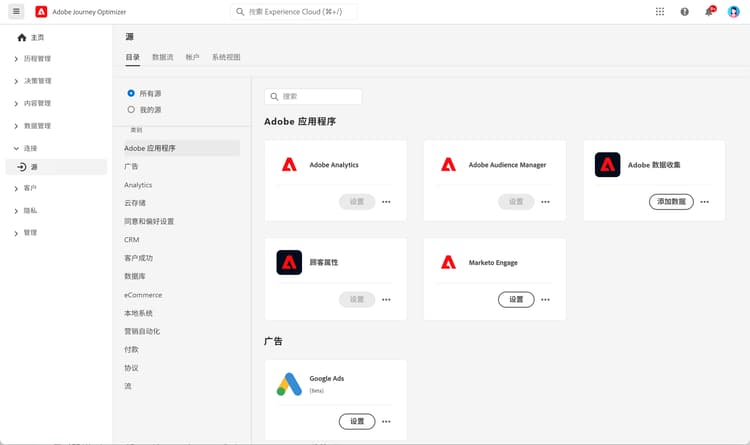
源是将外部数据接入 Adobe Journey Optimizer 的连接器。 通过源,您可以从现有系统(如 CRM 平台、云存储或数据库)导入客户信息,并将这些数据用于创建个性化的客户历程。
请将源视为 Journey Optimizer 与外部数据系统之间的桥梁。 它们会自动同步数据,以便您始终拥有最新的客户信息来支持您的营销活动。
源为何重要 why-sources-matter
源对于在 Journey Optimizer 中创建个性化、数据驱动型客户体验至关重要。 原因如下:
- 统一客户视图 - 整合多系统数据,全面掌握每个客户的完整画像
- 实时个性化 - 运用实时数据,在历程中及时传递相关消息
- 自动化数据同步 - 无需手动导入,即可保持客户信息的最新状态
- 高效工作流 - 一次连接,数据即可自动流入历程
例如,您可通过源导入电子商务平台的购买历史记录,随后创建根据客户购买历史发送个性化产品推荐的历程。
您可以使用源做什么 sources-use-cases
Journey Optimizer 中源的常见用例包括:
- 从 CRM 系统导入客户数据 - 同步来自 Salesforce 或 Microsoft Dynamics 等平台的联系人信息、偏好设置及互动历史记录
- 连接购买数据 - 从电商平台获取订单历史与产品偏好,用于个性化产品建议
- 集成忠诚度计划数据 - 获取积分余额与会员等级信息,以回馈互动最积极的客户
- 同步行为数据 - 导入网站互动与应用程序使用模式,触发相关历程
- 更新轮廓属性 - 通过云存储或数据库的数据保持客户轮廓的实时性
常见源类型 source-types
Journey Optimizer 支持多种源类型,可与您的现有系统连接:
Adobe 应用程序:
- Adobe Analytics
- Adobe Audience Manager
- Adobe Campaign
- Adobe Commerce
云存储:
- Amazon S3
- Azure Blob Storage
- Google 云存储
- SFTP
数据库:
- Amazon Redshift
- Google BigQuery
- Microsoft SQL Server
- MySQL
- PostgreSQL
CRM 和营销自动化:
- Microsoft Dynamics
- Salesforce
- Salesforce Marketing Cloud
忠诚度和奖励:
- Talon.One
- Capillary
- Kobie
- LAVA
➡️ 完整列表请参阅 Experience Platform 源目录
开始之前 prerequisites
在配置源之前,请确保您具有:
- 适当的权限 - 在 Adobe Experience Platform 中管理源的访问权限
- 源系统凭据 - 用于连接外部系统的身份验证信息
- 了解您的数据 - 明确所需数据字段及其在 Journey Optimizer 轮廓中的映射关系
➡️了解访问控制和权限
源的工作方式 how-sources-work
Adobe Journey Optimizer 使用 Adobe Experience Platform 中的源框架。 基本工作流程如下:
- 连接 - 设置外部数据系统的身份验证
- 选择数据 - 选择需导入的数据内容及同步频率
- 字段映射 - 定义外部数据字段与 Journey Optimizer 轮廓属性的对应关系
- 计划 - 设置自动数据更新间隔
- 监控 - 跟踪数据流状态并解决同步问题
配置完毕后,源将在后台自动运行,确保您的客户数据实时更新,随时可在历程中使用。
_change_request_type 字段是必需的。 支持的值为 u(更新插入)或 d(删除)。 这些值必须为小写的 u 和 d,而不是大写的 U 和 D。 详细了解编排的营销活动护栏和限制了解详情 learn-more
观看此视频,了解源连接器及其在 Journey Optimizer 中的配置方法:
有关配置和管理源的详细信息,请参阅 Adobe Experience Platform 源文档。
后续步骤 next-steps
现在您已了解源的概念及其重要性:
- 请浏览源目录查找适合您系统的连接器
- 学习如何 创建源连接
- 了解数据映射与转换
- 了解如何在历程中使用导入的数据
- 查看数据管理快速入门概述,了解各种源是如何融入 Journey Optimizer 的完整数据设置中的
This section contains structured knowledge intended to support interpretation, retrieval, and question answering related to this topic.
For complete understanding, this information should be combined with the documentation on this page. Neither source is intended to stand alone; the page describes the feature, while this section provides additional context that helps disambiguate terminology, intent, applicability, and constraints.
- TL;DR: This page explains what source connectors are, why they matter, the common source types, and how sources bring external data from CRM, cloud storage, and databases into Journey Optimizer for personalized journeys.
Intents:
- Understand what a source is and how it brings external data into Journey Optimizer
- Identify the common source types available for Adobe applications, cloud storage, databases, CRM and marketing automation, and loyalty and rewards
- Confirm the prerequisites needed before configuring sources
- Understand the basic sources workflow from connection through monitoring
- Configure file-based Change Data Capture sources for Orchestrated campaigns correctly
Glossary:
- Source: A connector that brings external data into Adobe Journey Optimizer from systems such as CRM platforms, cloud storage, or databases (product-specific)
- Sources framework: The Adobe Experience Platform framework that Journey Optimizer uses to power sources (product-specific)
_change_request_type: A field required for file-based Change Data Capture sources used with Orchestrated campaigns, indicating the change operation (product-specific)
Guardrails:
- Before configuring sources, you need appropriate permissions to manage sources in Adobe Experience Platform, source system credentials, and an understanding of which data fields you need and how they map to Journey Optimizer profiles.
- For file-based Change Data Capture sources used with Orchestrated campaigns, the
_change_request_typefield is required, and its supported values must be lowercaseu(upsert) ord(delete), not uppercaseUandD. - Once configured, sources run automatically in the background to keep customer data fresh.
Terminology:
- Canonical name: Source — variants: source connector, sources
- Synonyms: “source” = “source connector”
- Do not confuse: “
u(upsert)” ≠ “d(delete)” — both must be lowercase
FAQ:
- Q: What is a source in Journey Optimizer? — A connector that brings external data from systems such as CRM platforms, cloud storage, or databases into Journey Optimizer and makes that data available for personalized journeys.
- Q: Do I have to import data manually? — No; once configured, sources sync data automatically in the background so customer information stays current.
- Q: What do I need before I configure a source? — Appropriate permissions to manage sources in Adobe Experience Platform, source system credentials, and an understanding of your data fields and how they map to profiles.
- Q: What values does the
_change_request_typefield accept for Orchestrated campaign Change Data Capture sources? — Lowercaseufor upsert ordfor delete; uppercaseUandDare not supported.