在此页面上:在内置的Adobe Experience Platform数据源上设置字段组,以便您可以在历程中检索和使用实时客户档案数据。
Adobe Experience Platform 数据源定义与 Adobe 实时客户轮廓的连接。 此数据源是内置数据源,经过预先配置,无法删除。 此数据源旨在检索和使用来自Real-time Customer Profile Service的数据(例如,检查进入历程的人员是否为女性)。 有关Adobe Real-time Customer Profile的详细信息,请参阅Adobe Experience Platform文档。
要允许与Real-time Customer Profile Service的连接,我们必须使用键来识别人员,并使用命名空间来将键进行上下文化。 因此,仅当历程以包含键和命名空间的事件开始时,才能使用此数据源。 了解详情。
您可以编辑名为“ProfileFieldGroup”的预配置字段组、添加新字段组并删除任何草稿或实时历程中未使用的字段组。 了解详情。
将字段组添加到内置数据源的主要步骤详述如下:
-
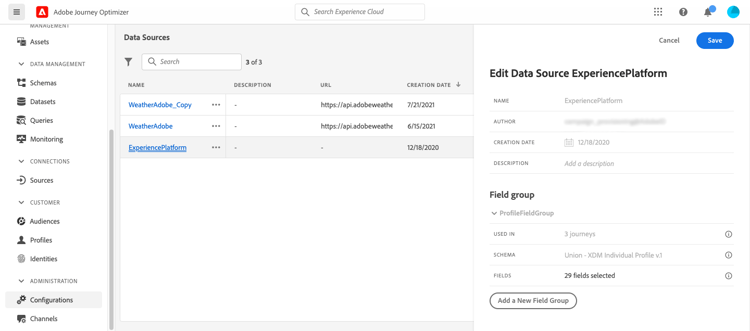
从数据源列表中,选择内置 Adobe Experience Platform 数据源。
这将打开屏幕右侧的数据源配置窗格。
-
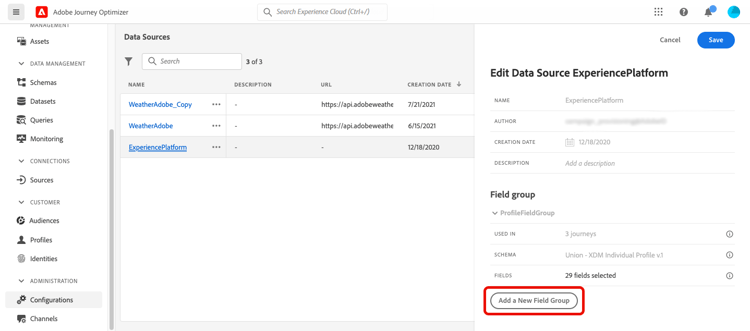
选择 添加新字段组 以定义要检索的新字段系列。
-
从 架构 下拉列表中选择架构。 架构创建在Adobe Experience Platform中执行,而不是在Adobe Journey Optimizer中执行。
note NOTE Journey Optimizer Data Source配置中仅支持XDM基于个人资料的架构。 有关详细信息,请参阅XDM个人配置文件类。 -
选择要使用的字段,并保存更改。
This section contains structured knowledge intended to support interpretation, retrieval, and question answering related to this topic.
For complete understanding, this information should be combined with the documentation on this page. Neither source is intended to stand alone; the page describes the feature, while this section provides additional context that helps disambiguate terminology, intent, applicability, and constraints.
- TL;DR: This page explains how to add field groups to the built-in, pre-configured Adobe Experience Platform data source so you can retrieve and use Real-time Customer Profile data in your journeys.
Intents:
- Add field groups to the built-in Adobe Experience Platform data source
- Select an XDM Individual Profile-based schema and choose the fields to retrieve
- Edit the pre-configured ProfileFieldGroup or create new field groups
- Remove field groups that are not used in any draft or live journeys
- Understand the key and namespace requirement for using this data source
Glossary:
- Adobe Experience Platform data source: The built-in, pre-configured data source that defines the connection to Adobe Real-time Customer Profile and cannot be deleted (product-specific)
- ProfileFieldGroup: The pre-configured field group on the Adobe Experience Platform data source that you can edit (product-specific)
- Key: The identifier used to identify a person for the connection to the Real-time Customer Profile Service (product-specific)
- Namespace: The value that contextualizes the key (product-specific)
Guardrails:
- This data source is built-in and pre-configured, and cannot be deleted.
- You can only use this data source if your journeys start with an event containing a key and a namespace.
- Only XDM Individual Profile-based schemas are supported in the Journey Optimizer Data Source configuration.
- Using experience events in journey expressions/conditions is not supported.
- Schema creation is performed in Adobe Experience Platform, not in Adobe Journey Optimizer.
- You can remove the field groups that are not used in any draft or live journeys.
- The Delete icon for a field group is only available if the field group is not used in any Live, Draft or Finished journey; check the Used in field.
Terminology:
- Canonical name: Adobe Experience Platform data source — Acronym: n/a — variants: built-in data source, pre-configured data source
- Synonyms: “Adobe Experience Platform data source” = “built-in data source”
- Do not confuse: “schema” (created in Adobe Experience Platform) ≠ “field group” (defined in Journey Optimizer to select which fields to retrieve)
FAQ:
- Q: Can this data source be deleted? — No, it is built-in and pre-configured and cannot be deleted.
- Q: What must my journey include to use this data source? — Your journey must start with an event containing a key and a namespace.
- Q: Which schemas can I select? — Only XDM Individual Profile-based schemas are supported in the Journey Optimizer Data Source configuration.
- Q: When can I delete a field group? — The Delete icon is only available if the field group is not used in any Live, Draft or Finished journey; refer to the Used in field to check if this is the case.
- Q: Can I use experience events in journey expressions or conditions with this data source? — No, using experience events in journey expressions/conditions is not supported; consider alternative methods for that use case.