在此页面上:了解直邮渠道的工作方式,以便您生成第三方提供商用于向客户发送实体邮件的提取文件。
直邮是一种离线渠道,允许您生成第三方直邮服务提供商向客户发送邮件所需的提取文件并进行个性化设置。
在创建直邮营销活动或历程时,Journey Optimizer 会自动生成一个文件,其中包含所有定位的轮廓和所选数据,如邮政地址和轮廓属性。 此文件将会被发送到您选择的服务器,以便您选择的第三方直邮服务提供商可以访问该文件,该提供商将为您处理实际的邮寄过程。
您需要与所选的第三方直邮提供商合作,从您的客户处获得任何必要的同意(如有),以便您的客户可以从您那里接收邮件。
使用邮寄服务受适用的第三方直邮提供商的附加条款与条件的约束。 Adobe 无法控制您使用第三方产品,因此无需承担责任。 有关直邮营销活动邮寄的任何问题或协助请求,请与您选择的第三方直邮提供商联系。
开始之前 before-you-start
在创建直邮消息之前,请配置文件路由和直邮渠道配置。 您还需要在 Adobe Experience Platform 中拥有受众和配置文件数据(例如邮寄地址)。
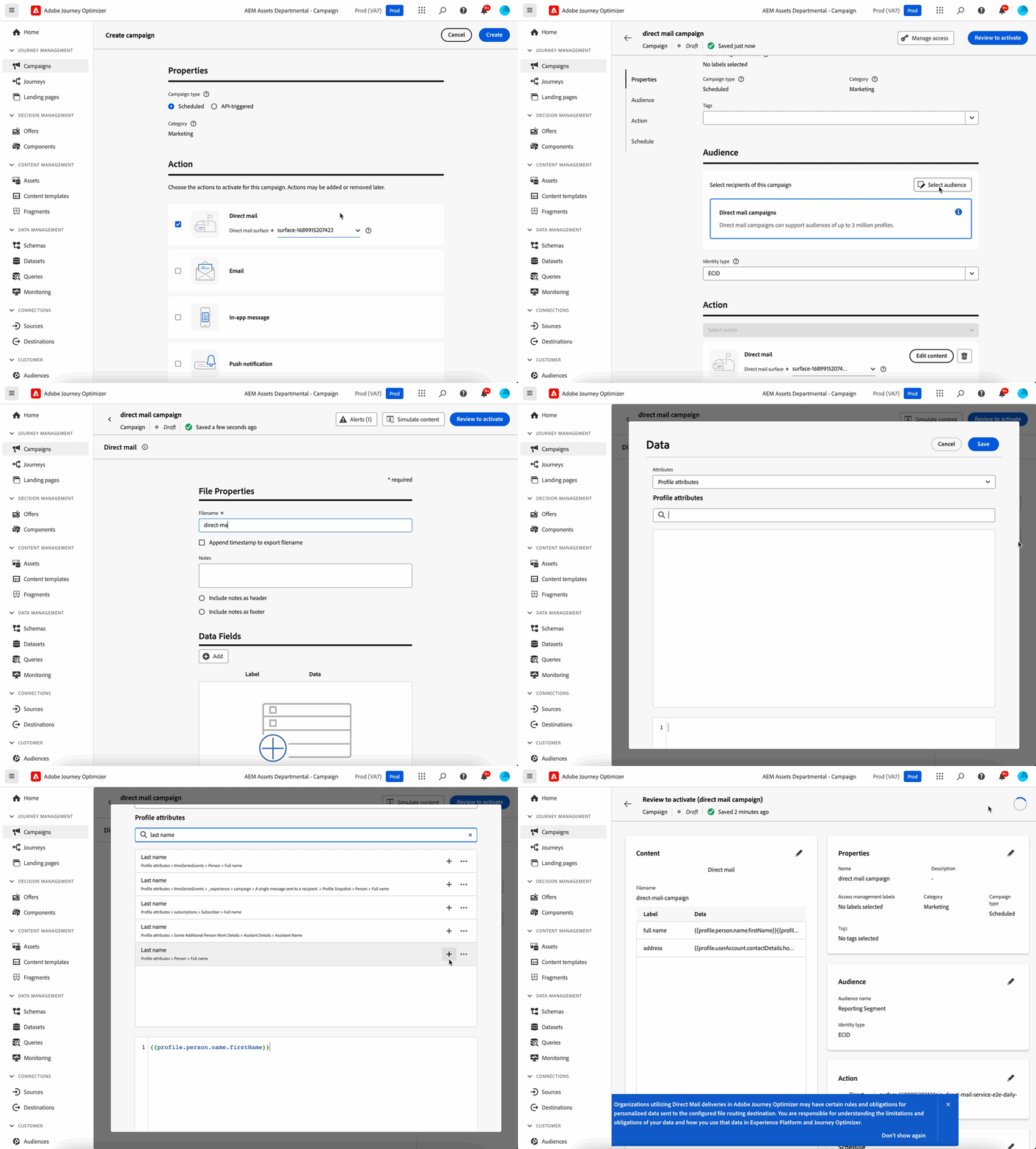
发送直邮消息的主要步骤如下:

其他资源 additional-resources
操作说明视频 how-to-video
了解如何利用 Adobe Journey Optimizer 中的直邮渠道在您的历程中自动安排直邮投放。
如需查看相同步骤的书面演示,请参阅直邮渠道教程。
关于直邮的常见问题,请参阅上文中的其他资源部分。
This section contains structured knowledge intended to support interpretation, retrieval, and question answering related to this topic.
For complete understanding, this information should be combined with the documentation on this page. Neither source is intended to stand alone; the page describes the feature, while this section provides additional context that helps disambiguate terminology, intent, applicability, and constraints.
- TL;DR: This overview explains how the direct mail offline channel works, generating personalized extraction files that third-party direct mail providers use to send physical mail to your customers.
Intents:
- Understand that direct mail is an offline channel handled by a third-party provider
- Understand how extraction files are generated and sent to a server
- Learn what to configure before creating direct mail messages
- Understand where direct mail messages can be created
Glossary:
- Direct mail: An offline channel that personalizes and generates the extraction files required by third-party direct mail providers to send mail to your customers (product-specific)
- Extraction file: The automatically generated file containing all targeted profiles and selected data, such as postal addresses and profile attributes, sent to the server of your choice so that it is accessible by your chosen third-party direct mail provider (product-specific)
- Third-party direct mail provider: The external provider to which the file is made accessible, who handles the actual mailing process (product-specific)
Guardrails:
- Before creating direct mail messages, you must configure file routing and a direct mail channel configuration.
- You need audiences and profile data, such as postal addresses, in Adobe Experience Platform.
- Direct mail messages can be created in journeys and campaigns, but they are not available for use in API-triggered campaigns.
- Obtaining any required customer consents is handled with your chosen third-party direct mail provider.
- Use of mailing services is subject to additional terms and conditions from the applicable third-party direct mail provider; Adobe does not control or take responsibility for your use of third-party products.
Terminology:
- Canonical name: Direct mail — Acronym: n/a — variants: direct mail channel, direct mail message
- Do not confuse: “Journey Optimizer” (generates the extraction file and sends it to the server of your choice) ≠ “third-party direct mail provider” (handles the actual mailing)
FAQ:
- Q: What is the direct mail channel? — An offline channel that personalizes and generates extraction files for third-party providers to send physical mail.
- Q: What do I need before creating direct mail messages? — File routing and a direct mail channel configuration, plus audiences and profile data such as postal addresses in Adobe Experience Platform.
- Q: Where can direct mail messages be created? — In journeys and campaigns; they are not available for use in API-triggered campaigns.
- Q: Who performs the actual mailing? — Your chosen third-party direct mail provider, to which the file is made accessible, handles the actual mailing process.