在此页面上:了解如何通过定义投放级别、目标维度和执行地址为编排的活动设置渠道配置,以及如何向链接添加URL跟踪参数。
在设置Target Dimension后,您需要配置 渠道配置 并定义相应的执行详细信息。 这允许您定义:
-
邮件传递的级别:例如,为每个收件人发送一封邮件,例如为每个人发送一封电子邮件。
-
执行地址:用于发送的特定联系人字段,如电子邮件地址或电话号码。
要配置渠道配置,请执行以下操作:
-
首先创建和配置您的渠道配置。
您还可以更新现有的渠道配置。
-
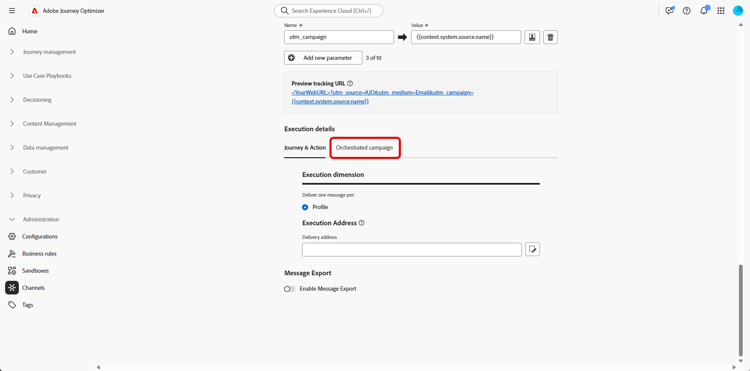
从 渠道配置 的 执行详细信息 部分,访问 协调的营销活动 选项卡。
-
单击 已启用 以使其与编排的营销活动兼容。
-
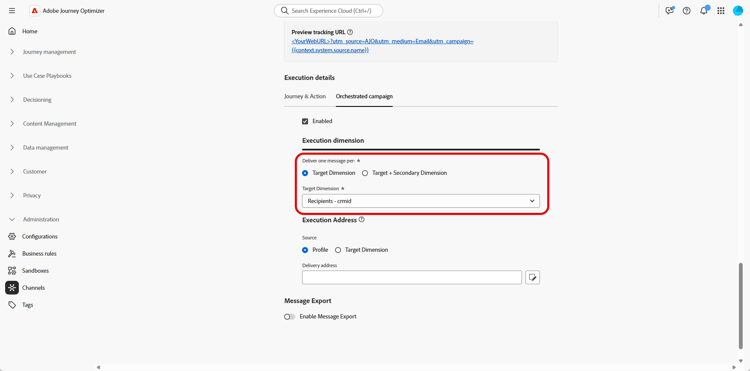
选择您的交付方式:
-
定位Dimension:发送给主要实体,例如recipient。
-
目标+辅助Dimension:使用主要实体和辅助实体发送,例如,收件人+合同或收件人+航班。
选择此选项可支持多实体协调营销活动,其中一个配置文件可以接收多条消息 — 在链接表中,每条合格行一条您选择为次要Dimension(例如,链接到 收件人 的航班,或链接到 航班 的航班详细信息,具体取决于您的数据模型)。
-
-
从下拉菜单中选择您之前创建的目标Dimension。
-
如果您选择了 Target +辅助Dimension 作为投放方法,请选择 辅助Dimension 以定义消息投放的上下文。
-
在 执行地址 部分下,选择应使用哪个 Source 获取投放地址,如电子邮件地址或电话号码:
-
配置文件:如果投放地址(如电子邮件)直接存储在主客户配置文件中,请选择此选项。
在将消息发送到主客户而不是特定的关联实体时非常有用。
-
目标Dimension:如果投放地址存储在主实体(例如,收件人)中,请选择此选项。
当每个收件人都有自己的投放地址(如不同的电子邮件或电话号码)时,此变量将非常有用。
-
辅助Dimension:使用 Target +辅助Dimension 作为投放方法时,请选择您之前配置的相关辅助Dimension。
例如,如果辅助维度表示预订或订阅,则可以从该级别获取执行地址,如电子邮件。 当用户档案在预订或订阅服务时使用了不同的联系人详细信息时,这一点非常有用。
note NOTE 用于辅助维度的架构必须具有主键。 辅助维度不支持复合主键。
-
-
从 传递地址 字段中,单击

-
配置完毕后,单击提交。
您的渠道现在可以与 协调的营销活动 一起使用,将根据所选的目标维度来投放消息。
URL跟踪参数 url-tracking
配置渠道配置时,您可以定义URL跟踪参数,通过将元数据附加到跟踪链接来监控电子邮件促销活动的性能 — 用于分析和报告目的。
为此,可以使用{{context.system.source.*}}语法访问特定于编排的营销活动的上下文属性:
context.system.source.id:编排的营销活动IDcontext.system.source.name:编排的营销活动名称context.system.source.versionId:编排的活动版本IDcontext.system.source.actionId:渠道操作节点IDcontext.system.source.actionName:渠道操作节点名称context.system.source.channel:渠道类型(电子邮件、移动设备、推送)context.system.IdentityNamespace:使用了身份命名空间
例如:
www.YourLandingURL.com?utm_source=AJO&utm_campaign={{context.system.source.id}}&utm_content={{context.system.source.actionName}}
在本节中了解有关URL跟踪参数的更多信息。
This section contains structured knowledge intended to support interpretation, retrieval, and question answering related to this topic.
For complete understanding, this information should be combined with the documentation on this page. Neither source is intended to stand alone; the page describes the feature, while this section provides additional context that helps disambiguate terminology, intent, applicability, and constraints.
- TL;DR: This page explains how to configure a Channel configuration for Orchestrated campaigns by setting the delivery method, target dimension, and execution address, and how to add URL tracking parameters to tracked links.
Intents:
- Enable a Channel configuration for compatibility with Orchestrated campaigns.
- Choose a delivery method between Target Dimension and Target + Secondary Dimension.
- Select a previously created Target Dimension and, when applicable, a Secondary Dimension.
- Choose the source used to fetch the delivery address (Profile, Target Dimension, or Secondary Dimension) and select the specific delivery address field.
- Add URL tracking parameters using orchestrated campaign contextual attributes.
Glossary:
- Channel configuration: the configuration that defines how and to whom messages are delivered, including delivery level and execution address (product-specific)
- Execution details: the section of a Channel configuration where delivery method, target dimension, and execution address are set (product-specific)
- Target Dimension: delivery method that sends to the primary entity, e.g., recipient (product-specific)
- Target + Secondary Dimension: delivery method that sends using both primary and secondary entities, e.g., recipient + contract, or recipient + flights (product-specific)
- Secondary Dimension: the linked table selected to support multi-entity Orchestrated campaigns, where one profile can receive several messages, one per qualifying row (product-specific)
- Execution Address: the section where the Source used to fetch the delivery address (email address or phone number) is chosen (product-specific)
- Delivery address: the specific field selected to use for message delivery, chosen via the edit icon in the Delivery address field (product-specific)
Guardrails:
- The schema used for the secondary dimension must have a primary key; composite primary keys are not supported for secondary dimensions.
Terminology:
- Canonical name: Channel configuration — variants: Channel Configuration
- Do not confuse: “Target Dimension” (send to the primary entity, e.g., recipient) ≠ “Target + Secondary Dimension” (send using both primary and secondary entities, supporting one message per qualifying row in the linked Secondary Dimension table)
- Do not confuse: “Execution Address” (the section where the Source for the delivery address is chosen) ≠ “Delivery address” (the specific field selected for message delivery)
FAQ:
- Q: What must be enabled before a Channel configuration can be used with Orchestrated campaigns? — Enabled must be clicked in the Orchestrated campaigns tab of the Execution details section.
- Q: What are the two delivery methods available? — Target Dimension (primary entity only) and Target + Secondary Dimension (primary and secondary entities).
- Q: Where can the execution address be sourced from? — From Profile, Target Dimension, or Secondary Dimension, depending on where the delivery address is stored.
- Q: Are composite primary keys supported for secondary dimensions? — No, the schema used for the secondary dimension must have a primary key, and composite primary keys are not supported.
- Q: How are URL tracking parameters defined for Orchestrated campaigns? — Using contextual attributes with the
{{context.system.source.*}}syntax, such ascontext.system.source.idorcontext.system.source.actionName.
Examples:
- URL tracking parameter example for Orchestrated campaigns:
www.YourLandingURL.com?utm_source=AJO&utm_campaign={{context.system.source.id}}&utm_content={{context.system.source.actionName}}
Related pages:
- For creating and configuring the Channel configuration: Follow the steps detailed in this page (email/surface-personalization.md)
- For selecting a previously created Target Dimension: previously created Target Dimension (orchestrated/target-dimension.md)
- For learning more about URL tracking parameters: this section (email/url-tracking.md)
Personas:
- admin: Can enable a Channel configuration for Orchestrated campaigns by selecting Enabled, then choose Target Dimension or Target + Secondary Dimension as the delivery method. Can select the Source for the execution address from Profile, Target Dimension, or Secondary Dimension, then select the specific Delivery address field. The page states that the schema used for the secondary dimension must have a primary key, and composite primary keys are not supported. Where: “Configure your Channel configuration”.
Onboarding:
- Level: Intermediate
- First minimal step: Create and configure your Channel configuration.
- Success check: Your channel is ready to use with Orchestrated campaigns, and messages are delivered according to the selected target dimension.
- Previous: After setting up your Target Dimension: Create your Targeting dimension (orchestrated/target-dimension.md); To create and configure your Channel configuration: Personalize email configuration settings (email/surface-personalization.md)
- Next: To learn more about URL tracking parameters: Configure URL tracking (email/url-tracking.md)