在此页面上:创建操作营销活动并定义其核心属性,如名称、描述、标记和访问标签,以便在配置操作之前识别、组织和控制对营销活动的访问。
要创建操作营销活动并定义其属性,请执行以下步骤:
-
浏览到 营销活动 菜单并选择 操作 选项卡。
-
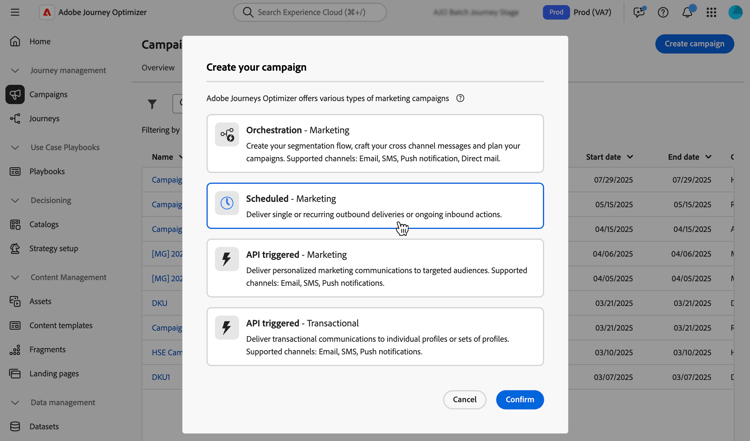
单击 创建营销活动 按钮并选择 计划 — 营销 营销活动类型。
-
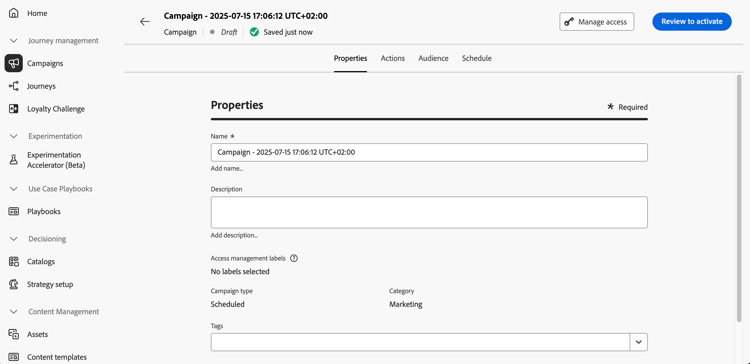
在 属性 选项卡中,输入营销活动的名称和描述。
-
使用 标记 字段将Adobe Experience Platform统一标记分配给您的营销活动。 这样,您就可以轻松地对营销活动进行分类,并改进营销活动列表中的搜索。 了解如何使用标记。
-
如果已为操作营销活动定义和选择自定义元数据字段,则它们显示在 属性 选项卡的 元数据字段 部分中。 填写这些信息以跟踪特定的业务信息,如业务线、产品或成本中心。 标有星号的字段为必填字段。 了解有关自定义元数据的更多信息
note availability AVAILABILITY 此功能为限量发布版。 请联系 Adobe 代表获取访问权限。 -
您可以根据访问标签限制对此营销活动的访问。 要对访问权限添加限制,请浏览页面顶部的 管理访问权限 按钮。 确保仅选择您具有权限的标签。 了解有关对象级访问控制的详细信息。
后续步骤 next
创建和配置操作营销活动后,即可配置其操作。 了解详情
This section contains structured knowledge intended to support interpretation, retrieval, and question answering related to this topic.
For complete understanding, this information should be combined with the documentation on this page. Neither source is intended to stand alone; the page describes the feature, while this section provides additional context that helps disambiguate terminology, intent, applicability, and constraints.
- TL;DR: This page explains how to create an Action campaign of type Scheduled - Marketing and define its properties: name, description, tags, custom metadata fields, and access labels.
Intents:
- Create an Action campaign of type Scheduled - Marketing
- Enter a name and a description for the campaign
- Assign Adobe Experience Platform Unified Tags to classify the campaign and improve search from the campaigns list
- Fill in custom metadata fields to track business information
- Limit access to the campaign based on access labels
Glossary:
- Tags: Adobe Experience Platform Unified Tags assigned to a campaign to classify it and improve search from the campaigns list. (product-specific)
- Metadata fields: Custom fields, when defined and selected for Action campaigns, displayed in the Properties tab to track business information such as line of business, product or cost center. (product-specific)
- Access labels: Labels used to limit access to the campaign, set with the Manage access button. (product-specific)
Guardrails:
- Metadata fields marked with an asterisk are required.
- When adding an access limitation, select only labels you have permission for.
Prerequisites and permissions:
- Custom metadata fields on Action campaigns are available in Limited Availability; contact your Adobe representative to gain access.
Terminology:
- Canonical name: Action campaign properties — variants: campaign properties
- Acronym: OLAC — Object level access control
FAQ:
- Q: Which campaign type do I select to create an Action campaign? — Browse to the Campaigns menu, select the Action tab, click Create campaign, and select the Scheduled - Marketing campaign type.
- Q: Why do I not see the Metadata fields section? — The section is displayed if custom metadata fields have been defined and selected for Action campaigns. This capability is available in Limited Availability.
- Q: How do I limit access to a campaign? — Use access labels with the Manage access button; select only labels you have permission for.
- Q: What are tags used for? — To classify campaigns and improve search from the campaigns list.
Related pages:
- Tags: Learn how to work with tags (start/search-filter-categorize.md#tags)
- Custom metadata: Learn more on custom metadata (administration/custom-metadata.md)
- Access labels: Learn more about Object Level Access Control (administration/object-based-access.md)
- Next step, action: Configure the campaign action (campaigns/campaign-action.md)