Nesta página: defina uma configuração de canal LINE, a partir da interface ou da API, para que o Adobe Journey Optimizer possa se autenticar com a API de Mensagens LINE e enviar mensagens aos seus clientes.
-
Acesse o menu Canais > Configurações gerais > Configurações de canal e clique em Criar configuração de canal.
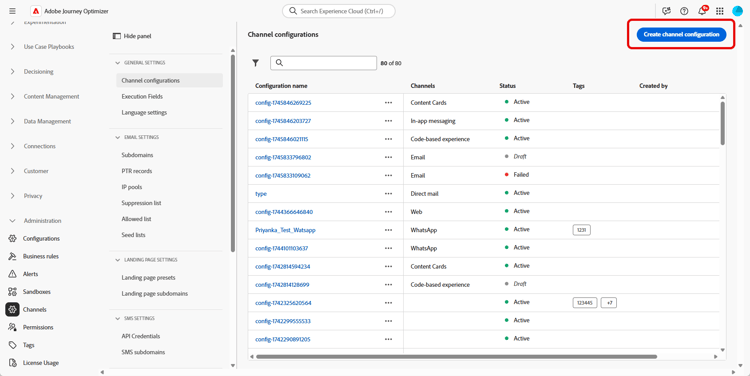
-
Insira um nome e uma descrição (opcional) para a configuração e selecione o canal a ser configurado.
note NOTE Os nomes devem começar com uma letra (A-Z). Ele só pode conter caracteres alfanuméricos. Também é possível usar os caracteres de sublinhado _, ponto.e hífen-. -
Para atribuir rótulos de uso de dados personalizados ou de núcleo à configuração, você pode selecionar Gerenciar acesso. Saiba mais sobre OLAC (Controle de Acesso em Nível de Objeto).
-
Selecione o canal LINE.
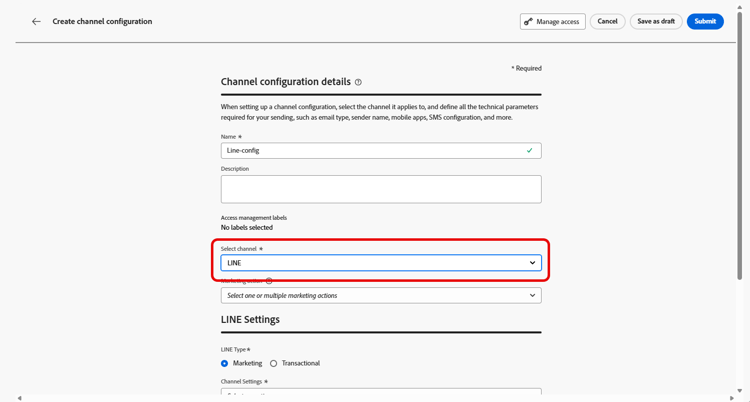
-
Selecione Ação de marketing(s) para associar políticas de consentimento às mensagens que usam essa configuração. Todas as políticas de consentimento associadas à ação de marketing são utilizadas para respeitar as preferências dos clientes. Saiba mais
-
Selecione o tipo de mensagem para a configuração:
- Marketing: para mensagens promocionais, como promoções semanais para uma loja de varejo. Essas mensagens exigem o consentimento do usuário e devem estar em conformidade com a política do LINE em relação à aceitação de usuários.
- Transacional: para mensagens não comerciais, como confirmações de pedidos, notificações de redefinição de senha ou atualizações de entrega. Essas mensagens podem ser enviadas até mesmo para usuários que cancelaram a assinatura de comunicações de marketing, mas estão estritamente limitados a contextos transacionais específicos.
-
Selecione suas Configurações de canal.
Entre em contato com o representante da Adobe para definir suas Configurações de canal.
-
Selecione a ID de usuário do LINE que deseja mapear. Esse é o identificador usado para vincular mensagens a usuários individuais no canal LINE.
note NOTE A ID de usuário LINE mapeada aqui já deve existir no Real-Time Customer Profile dos seus clientes. Capture a ID de usuário do LINE (por exemplo, por meio do Logon do LINE ou do LIFF SDK), assimile-a no Adobe Experience Platform e junte-a a um identificador conhecido com o Serviço de identidade para que Journey Optimizer possa acessar o perfil unificado. Saiba mais sobre a identidade no Journey Optimizer. Para obter um exemplo completo de unificação de IDs de usuário LINE com perfis de clientes usando o Serviço de Identidade, consulte o artigo da comunidade Unificação de IDs de usuário LINE com perfis de clientes usando a Identificação de identidade da AEP. -
Digite seu Nome do Remetente, como o nome da sua marca.
-
Envie suas alterações.
Agora é possível selecionar sua configuração ao criar a mensagem LINE.
Definir a API de configurações do canal LINE line-api
Essa API define as configurações de canal que armazenam a autorização e os detalhes de configuração necessários para a conexão com a API de mensagens LINE. Essas configurações permitem que o Adobe Journey Optimizer autentique e envie mensagens por meio do LINE usando as credenciais fornecidas.
Ponto de extremidade
POST https://platform.adobe.io/journey/imp/config/channel-settings
Solicitar corpo
{
    "name": "your_defined_name",
    "channelRegistryId": "line",
    "channel": "line",
    "channelSettings": {
        "channelId": "your_line_channel_id",
        "channelSecret": "your_line_channel_secret"
    }
}
Resposta das Configurações de Canal
{
"id": "3603ed66-ae86-42b8-8a90-d4b4e54e7c3b",
"name": "your_defined_name",
"channelRegistryId": "line",
"channel": "line",
"channelSettings": {
    "channelId": "your_line_channel_id",
    "channelSecret": "your_line_channel_secret"
    },
    "channelPublicationId": "v1_line",
    "createdAt": "2025-07-30T12:00:00.000Z",
    "modifiedAt": "2025-07-30T12:00:00.000Z",
    "isFromLatestVersion": true,
    "_etag": "\"eab98d24-18af-48ae-90f9-e59d4f8cfb2b\""
}
This section contains structured knowledge intended to support interpretation, retrieval, and question answering related to this topic.
For complete understanding, this information should be combined with the documentation on this page. Neither source is intended to stand alone; the page describes the feature, while this section provides additional context that helps disambiguate terminology, intent, applicability, and constraints.
- TL;DR: This page explains how to create a LINE channel configuration, from the interface or the API, so that Journey Optimizer can authenticate with the LINE Messaging API and send messages to your customers.
Intents:
- Create a LINE channel configuration from the Channel configurations menu
- Associate consent policies to the configuration through marketing actions
- Choose the message type (Marketing or Transactional) for the configuration
- Map the LINE user ID and define the Sender Name
- Configure the LINE Channel settings through the API
Glossary:
- Channel configuration: The configuration created from Channels > General settings > Channel configurations for which you enter a name, a description (optional), and the channel to configure (product-specific)
- Marketing action: The setting used to associate consent policies to the messages using this configuration, so that customer preferences are respected (product-specific)
- Channel settings: The connection settings that store the authorization and configuration details for connecting to the LINE Messaging API (product-specific)
- LINE user ID: The identifier used to link messages to individual users within your LINE channel (product-specific)
- Sender Name: The name, such as your brand’s name, entered for the configuration (product-specific)
Guardrails:
- Configuration names must begin with a letter (A-Z) and can only contain alphanumeric characters, underscore, dot, and hyphen.
- Marketing messages require user consent and should comply with LINE’s policy regarding user opt-ins.
- Transactional messages can be sent even to users who have unsubscribed from marketing communications but are strictly limited to specific transactional contexts.
- The LINE user ID mapped here must already exist on your customers’ Real-Time Customer Profile.
- For the Channel settings field, reach out to your Adobe representative to set up your Channel settings.
- The API uses headers including a user token from your technical account, the client ID from Adobe Developer Console, the IMS Organization ID, the sandbox name, and Content-Type application/json.
Terminology:
- Canonical name: LINE channel configuration — Acronym: n/a — variants: channel configuration
- Do not confuse: “Marketing” (promotional messages requiring user consent) ≠ “Transactional” (non-commercial messages limited to specific transactional contexts)
- Do not confuse: “Channel settings” (authorization and connection details for the LINE Messaging API) ≠ “Marketing action” (associates consent policies to the configuration)
FAQ:
- Q: What characters are allowed in a configuration name? — The name must begin with a letter (A-Z) and can only contain alphanumeric characters, underscore, dot, and hyphen.
- Q: What is the difference between a Marketing and a Transactional configuration? — Marketing is for promotional messages that require user consent, while Transactional is for non-commercial messages that can reach unsubscribed users but are strictly limited to specific transactional contexts.
- Q: Does the LINE user ID need to exist beforehand? — Yes, the LINE user ID mapped in the configuration must already exist on your customers’ Real-Time Customer Profile.
- Q: How are the Channel settings set up? — Reach out to your Adobe representative to set up your Channel settings.
- Q: Can the Channel settings be configured through the API? — Yes, the page describes an API (POST to the channel-settings endpoint) that sets up Channel settings storing the authorization and configuration details needed to connect to the LINE Messaging API.