Nesta página: saiba como configurar a atividade de controle de fluxo de alerta para notificar os assinantes quando a execução atingir um ponto específico em uma campanha Orquestrada.
A atividade Alert é uma atividade Flow control. Use-a para notificar os assinantes quando a execução da campanha atingir a atividade na tela.
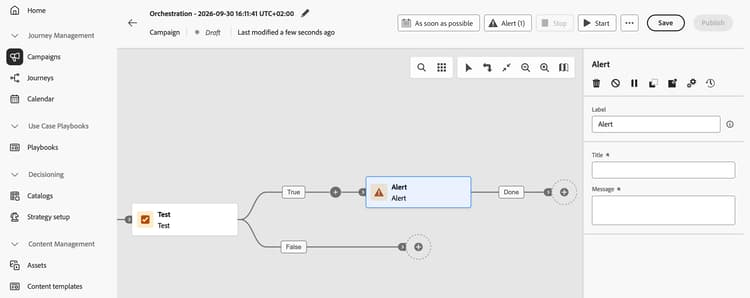
A atividade não tem acionador independente ou configuração de condição. Sua posição no fluxo e a lógica de orquestração upstream determinam quando ele é acionado. Para alertas condicionais, coloque-o na ramificação relevante de uma Atividade de teste.
Configurar a atividade de alerta alert-configuration
-
Adicione uma atividade de Alerta à tela de campanha Orquestrada.
-
Conecte-a à transição em que deseja que um alerta seja acionado.
-
Selecione a atividade e configure os seguintes campos:
- Rótulo: insira um nome para identificar a atividade na tela.
- Título (obrigatório): insira um título curto e de texto sem formatação para o alerta.
- Mensagem (obrigatório): insira uma mensagem de texto sem formatação que descreva o que os assinantes precisam saber.
O título e a mensagem são estáticos. Os tokens dinâmicos não são suportados.
Para obter informações sobre como assinar alertas na Journey Optimizer, consulte Assinar alertas.
Exemplo: alerta de população baixa low-population-example
Notificar assinantes quando um query retornar menos de 10.000 perfis:
-
Adicione uma Criar atividade de público-alvo e use o construtor de regras para definir sua consulta.
-
Adicione uma atividade Test depois dela e defina uma condição que verifique se a contagem de população é inferior a 10.000.
-
Coloque uma atividade Alert na transição para essa condição.
-
Insira um título estático, como
Low audience population, e uma mensagem, comoThe query returned fewer than 10,000 profiles.
A atividade Alert é acionada quando a condição Test é correspondente e a execução atinge o alerta. O valor 10.000 é um limite de exemplo que você configura na atividade de Teste, não um limite de produto.
This section contains structured knowledge intended to support interpretation, retrieval, and question answering related to this topic.
For complete understanding, this information should be combined with the documentation on this page. Neither source is intended to stand alone; the page describes the feature, while this section provides additional context that helps disambiguate terminology, intent, applicability, and constraints.
- TL;DR: The Alert flow control activity notifies subscribers when Orchestrated campaign execution reaches the activity.
Intents
- Configure a static alert title and message.
- Define a label to identify the activity on the canvas.
- Use a Test branch to notify subscribers when a query returns fewer than 10,000 profiles.
Glossary
- Alert (product-specific): A Flow control activity that notifies subscribers when campaign execution reaches it.
- Label: The name that identifies the activity on the canvas.
- Title: The required short, static plain-text title for the alert.
- Message: The required static plain-text message that describes what subscribers need to know.
- Test (product-specific): The activity that evaluates the population count condition in the low population example.
Guardrails
- The Alert activity has no independent trigger or condition configuration. Its position in the flow and upstream orchestration logic determine when it fires.
- Title and Message are required fields.
- The title and message are static. Dynamic tokens are not supported.
- The value of 10,000 in the low population example is a threshold configured in the Test activity, not a product limit.
Terminology
- Do not confuse: The Test activity evaluates a condition. The Alert activity fires when execution reaches it.
FAQ
- What triggers an Alert activity? Campaign execution reaching the activity triggers the alert. Upstream orchestration logic determines when it is reached.
- Can the title or message contain dynamic tokens? No. Both fields use static plain text, and dynamic tokens are not supported.
- How can an alert depend on an audience condition? Place it on the relevant Test branch. The Test activity evaluates the condition, not the Alert activity.