이 페이지에서: 동의 및 환경 설정 세부 정보 필드 그룹을 사용하여 목록의 구독자에게 메시지를 보내는 여정을 만드는 방법을 알아봅니다.
이 사용 사례의 목적은 목록 구독자에게 메시지를 보내는 여정을 만드는 것입니다.
이 예제에서는 Adobe Experience Platform의 동의 및 환경 설정 세부 정보 필드 그룹이 사용됩니다. 이 필드 그룹을 찾으려면 데이터 관리 메뉴에서 스키마를 선택하십시오. 필드 그룹 탭에서 검색 필드에 필드 그룹의 이름을 입력합니다.
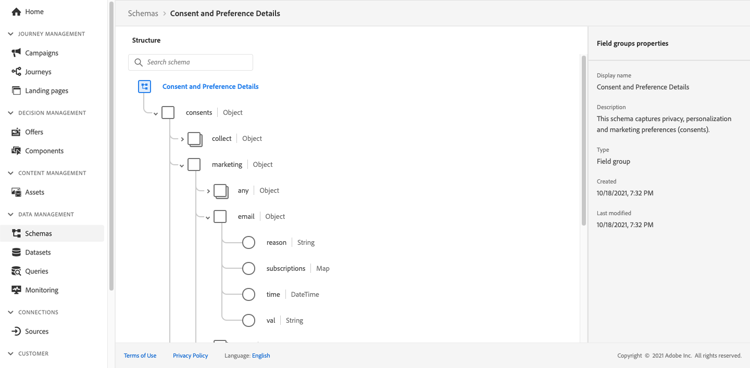
이 여정을 구성하려면 다음 단계를 수행합니다.
-
읽기 활동으로 시작하는 여정을 만듭니다. 첫 번째 여정 만들기에서 자세히 알아보세요.
-
전자 메일 작업 활동을 여정에 추가합니다. 채널 작업을 사용하는 방법을 알아보세요.
-
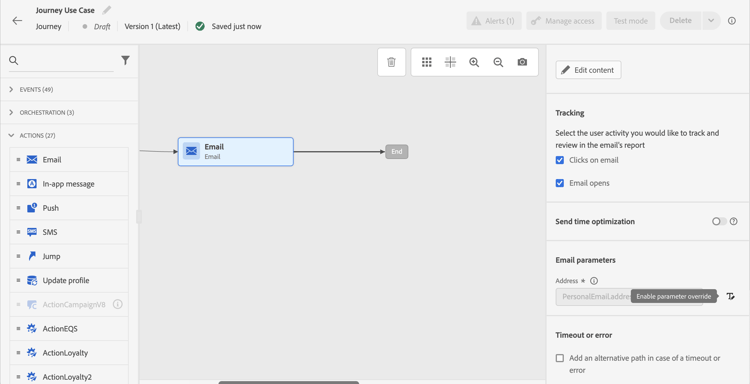
이메일 활동 설정의 이메일 매개 변수 섹션에서 기본 이메일 주소(
PersonalEmail.adress)를 목록 구독자의 이메일 주소로 바꾸십시오.-
주소 필드 오른쪽에 있는 매개 변수 재정의 사용 아이콘을 클릭한 다음 편집 아이콘을 클릭합니다.
구독자 목록 타깃팅에 대한 대상 읽기가 포함된
-
표현식 편집기에서 구독자의 이메일 주소를 검색하는 표현식을 입력합니다. 자세히 보기.
다음 예에서는 매핑 필드에 대한 참조를 포함하는 표현식을 보여 줍니다.
code language-json #{ExperiencePlatform.Subscriptions.profile.consents.marketing.email.subscriptions.entry('daily-email').subscribers.firstEntryKey()}이 예에서는 다음 함수가 사용됩니다.
table 0-row-3 1-row-3 2-row-3 함수 설명 예 entry선택한 네임스페이스에 따른 맵 요소를 참조합니다. 특정 구독 목록 참조 firstEntryKey맵의 첫 번째 시작 키 검색 구독자의 첫 번째 이메일 주소 검색 이 예제에서 구독 목록의 이름은
daily-email입니다. 이메일 주소는subscribers맵에서 구독 목록 맵에 연결된 키로 정의됩니다.식의 필드 참조에 대해 자세히 알아보세요.

-
식 추가 대화 상자에서 확인을 클릭합니다.
-
This section contains structured knowledge intended to support interpretation, retrieval, and question answering related to this topic.
For complete understanding, this information should be combined with the documentation on this page. Neither source is intended to stand alone; the page describes the feature, while this section provides additional context that helps disambiguate terminology, intent, applicability, and constraints.
- TL;DR: This page shows how to build a journey that sends an email to subscribers of a list by overriding the default email address parameter using an expression that reads subscriber addresses from a consent map field.
Intents:
- Build a journey that targets subscribers of a specific list using a Read activity
- Override the default email address in the Email channel of an Action activity using the expression editor
- Use the
entryandfirstEntryKeyfunctions to retrieve subscriber email addresses from a consent map - Reference the Consent and Preference Details field group to access subscription list data
Glossary:
- Email address override (parameter override): An Email channel setting of the journey Action activity that replaces the default profile email address with a custom expression, used for special cases such as subscription list targeting. (product-specific)
- Consent and Preference Details field group: An Adobe Experience Platform schema field group that contains subscription and consent data, including the subscriptions element; subscriber email addresses are defined as keys in the
subscribersmap, which is linked to the subscription list map. (product-specific) entryfunction: An expression function that refers to a map element by its namespace key — used here to reference a specific subscription list (e.g.,daily-email). (product-specific)firstEntryKeyfunction: An expression function that retrieves the first key of a map — used here to retrieve the first email address from the subscribers map of a subscription list. (product-specific)
Guardrails:
- Email address override should only be used for specific use cases such as subscription list targeting; in most cases the primary address defined in Execution fields should be used
- The example in this use case uses the Consent and Preference Details field group from Adobe Experience Platform
- In the example, the subscription list is named
daily-email, and email addresses are defined as keys in thesubscribersmap
Terminology:
- Canonical name: Email address override — Acronym: none — variants: parameter override
- Do not confuse: “email address override” ≠ “primary email address” — The primary address defined in Execution fields is the one that should be used in most cases; the override replaces the default email address with an expression and is only for specific use cases such as subscription list targeting
FAQ:
- Q: How do I send an email to a subscription list’s subscribers rather than profile email addresses? — Enable the parameter override on the Address field of the Email channel in the Action activity and enter an expression using
entryandfirstEntryKeyfunctions to retrieve addresses from the subscribers map of the target subscription list. - Q: What field group is required for this use case? — The example uses the Consent and Preference Details field group from Adobe Experience Platform, which includes the subscriptions element.
- Q: Should I always use email address override when targeting subscribers? — No; email address override is for specific use cases only. In most journeys, the primary address defined in Execution fields should be used.
- Q: What does the
firstEntryKeyfunction do in this context? — It retrieves the first email address key from thesubscribersmap associated with a specific subscription list.