이 페이지에서: 자동 최적화 또는 개인화된 최적화 AI 모델을 빌드하고 전환 데이터 세트에 연결하면 의사 결정 엔진이 자동으로 오퍼의 등급을 매기고 각 프로필로 가장 높게 변환한 모델을 제공할 수 있습니다.
Journey Optimizer을(를) 사용하면 AI 모델을(를) 만들어 비즈니스 목표에 따라 오퍼의 등급을 지정할 수 있습니다.
AI 모델 액세스 access-ai-models
AI 모델 목록에 액세스하려면 의사 결정 > 전략 설정(으)로 이동하여 AI 모델을(를) 선택하십시오. 인스턴스에서 만든 모든 AI 모델이 표시됩니다.
AI 모델 만들기 create-ranking-strategy
AI 모델을 만들려면 아래 단계를 수행합니다.
-
전환 이벤트가 수집될 데이터 세트를 만듭니다. 방법 알아보기
-
의사 결정 > 전략 설정 메뉴로 이동한 다음 AI 모델을 선택합니다.

지금까지 인스턴스에서 만든 모든 AI 모델이 표시됩니다.
-
AI 모델 만들기 단추를 클릭합니다.
-
고유한 이름을 지정하고 필요한 경우 AI 모델에 대한 설명을 지정합니다.
-
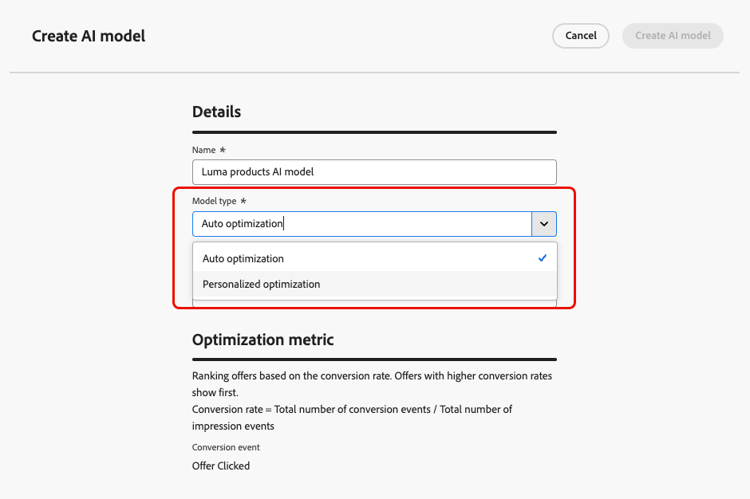
만들려는 AI 모델의 유형을 선택합니다.
- 자동 최적화은(는) 이전 오퍼 성능을 기반으로 오퍼를 최적화합니다. 자세히 알아보기
- 개인화된 최적화은(는) 대상 및 오퍼 성능을 기반으로 오퍼를 최적화하고 개인화합니다. 자세히 알아보기
-
최적화 지표 섹션에서는 오퍼의 순위를 계산하기 위해 AI 모델이 사용하는 전환 이벤트에 대한 정보를 제공합니다.
Journey Optimizer는 전환율(전환율 = 총 전환 이벤트 수 / 총 노출 이벤트 수)을 기준으로 오퍼의 순위를 매깁니다. 전환율은 두 가지 유형의 지표를 사용하여 계산됩니다.
- 노출 이벤트(표시되는 오퍼)
- 전환 이벤트(전자 메일 또는 웹을 통해 클릭을 발생시키는 오퍼).
이러한 이벤트는 제공된 Web SDK 또는 Mobile SDK를 사용하여 자동으로 캡처됩니다. Adobe Experience Platform Web SDK 개요에서 자세히 알아보세요.
accordion 사용자 지정 Customer Journey Analytics 지표에 대한 모델 최적화 중 note NOTE 이 기능은 관리자 권한이 있는 Customer Journey Analytics 고객만 사용할 수 있습니다. 시작하기 전에 Journey Optimizer 데이터 세트를 기본 데이터 보기로 내보내기 위해 Customer Journey Analytics과 Journey Optimizer을 통합했는지 확인하십시오. 데이터를 활용하는 방법 알아보기 Journey Optimizer 데이터 입력 Customer Journey Analytics 개인화된 최적화 모델은 비즈니스 목표를 정의하고 고객 데이터를 사용하여 비즈니스 지향 모델을 교육하여 개인화된 오퍼를 제공하고 KPI를 극대화할 수 있는 AI 모델의 유형입니다.
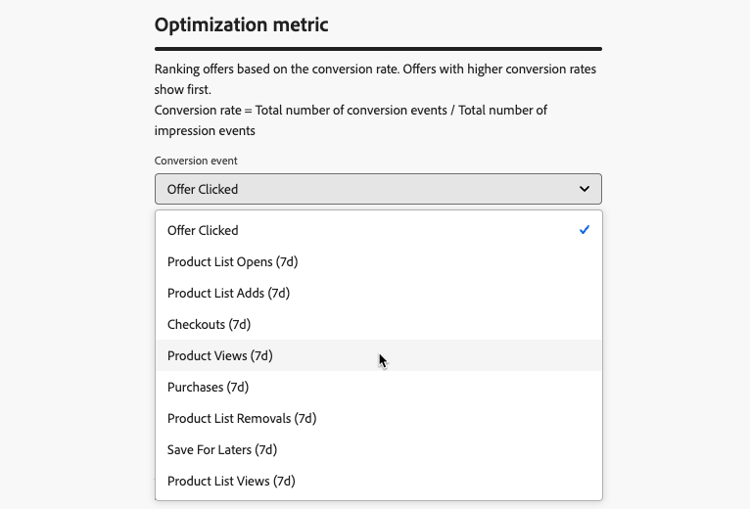
기본적으로 개인화된 최적화 모델은 오퍼 클릭 수를 최적화 지표로 사용합니다. Customer Journey Analytics을(를) 사용하여 작업하는 경우 Decisioning을(를) 사용하면 사용자 지정 지표를 활용하여 모델을 최적화할 수 있습니다.
이렇게 하려면 개인화된 최적화 모델 유형을 선택하고 전환 이벤트 드롭다운을 확장합니다. 기본 Customer Journey Analytics 데이터 보기의 모든 지표가 목록에 표시됩니다. 모델을 최적화할 지표를 선택합니다.
note NOTE 기본적으로 Customer Journey Analytics의 지표는 "마지막 터치" 속성 모델을 사용하며, 이 속성 모델은 전환 전에 가장 최근에 발생하는 접점에 크레딧의 100%를 할당합니다. 속성 모델을 수정할 수 있지만 모든 속성 모델이 AI 모델 최적화에 이상적이지는 않습니다. 모델의 정확도와 성능을 보장하기 위해 최적화 목표에 맞는 속성 모델을 신중하게 선택하는 것이 좋습니다. 사용 가능한 속성 모델 및 사용 지침에 대한 자세한 내용은 Customer Journey Analytics 설명서를 참조하세요. -
전환 및 노출 이벤트가 수집되는 데이터 세트를 선택합니다. 이 섹션에서 이러한 데이터 세트를 만드는 방법을 알아보세요.
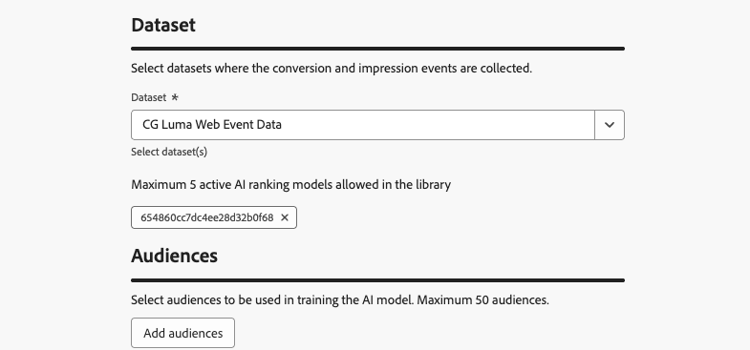
note caution CAUTION 경험 이벤트 - 제안 상호 작용 필드 그룹(이전 이름: mixin)과 연결된 스키마에서 만든 데이터 세트만 드롭다운 목록에 표시됩니다. -
개인화된 최적화 AI 모델을 만드는 경우 AI 모델을 교육하는 데 사용할 대상을 선택할 수 있습니다.
note NOTE 최대 50개의 대상을 선택할 수 있습니다. -
개인화된 최적화 AI 모델을 만드는 경우 대상 외에 또는 대신 AI 모델을 교육하는 기능으로 사용할 프로필 및 컨텍스트 특성을 선택할 수도 있습니다. 기능 유형에 대해 자세히 알아보기

note availability AVAILABILITY 프로필 기능 및 컨텍스트 기능은 현재 제한된 가용성 릴리스로 사용할 수 있습니다. 액세스 권한을 얻으려면 Adobe 담당자에게 문의하십시오. accordion 프로필 및 컨텍스트 기능 선택 note caution CAUTION 제한된 가용성에서는 새 AI 모델을 만들 때만 프로필 및 컨텍스트 기능을 추가하십시오. 기존 AI 모델을 편집하여 이러한 기능을 추가하지 마십시오. -
프로필 기능 섹션에서 프로필 기능 관리를 클릭하고 프로필 스키마에서 충성도 계층 또는 이탈 성향 점수와 같은 최대 50개의 특성을 선택합니다. 선택 항목이 오른쪽 창에 표시됩니다. 저장을 클릭합니다.
해당하는 경우 데이터 거버넌스(DULE) 정책이 선택한 프로필 기능에 자동으로 적용됩니다.
-
컨텍스트 기능 섹션에서 컨텍스트 기능 관리를 클릭하여 장치 유형, 언어 또는 국가 코드와 같이 결정 요청과 함께 전송되는 컨텍스트 특성을 정의합니다. 자동 기능(항상 포함됨)과 권장 기능(제거할 수 있음)이 미리 선택됩니다. 최대 20개의 추가 컨텍스트 기능을 추가할 수 있습니다. 저장을 클릭합니다.
컨텍스트 기능은 인바운드 채널에 사용되는 의사 결정 정책에만 사용할 수 있습니다. 웹 SDK 또는 Mobile SDK 및 데이터스트림 구성을 사용하여 의사 결정 요청에서 컨텍스트 값을 보내야 합니다.
-
-
AI 모델을 저장하고 활성화합니다. 모델이 라이브되면 교육 상태 및 성과를 모니터링할 수 있습니다.
이제 오퍼가 표시 및/또는 클릭될 때마다 Adobe Experience Platform Web SDK 또는 Mobile SDK을 사용하여 경험 이벤트 - 제안 상호 작용 필드 그룹에 의해 해당 이벤트가 자동으로 캡처되도록 할 수 있습니다.
이벤트 유형(표시된 오퍼 또는 클릭한 오퍼)을 보낼 수 있으려면 Adobe Experience Platform으로 전송되는 경험 이벤트의 각 이벤트 유형에 대해 올바른 값을 설정해야 합니다. 방법 알아보기
AI 모델 사용 use-ai-model
AI 모델이 활성화되면 선택 전략의 순위 메서드로 사용한 다음 의사 결정 정책에 해당 전략을 추가하십시오. 선택 전략 및 의사 결정 정책은 자동 최적화 또는 개인화된 최적화 모델을 사용하든 동일한 방식으로 구축됩니다.
모델이 컨텍스트 피쳐를 사용하는 경우 의사 결정 요청에도 컨텍스트 값이 있어야 합니다. 자세히 알아보기
This section contains structured knowledge intended to support interpretation, retrieval, and question answering related to this topic.
For complete understanding, this information should be combined with the documentation on this page. Neither source is intended to stand alone; the page describes the feature, while this section provides additional context that helps disambiguate terminology, intent, applicability, and constraints.
- TL;DR: Explains how to build auto-optimization or personalized optimization AI models, connect them to your conversion datasets, and use them to rank offers.
Intents:
- Find the list of AI models under Decisioning > Strategy setup > AI models.
- Create an AI model of the Auto-optimization or the Personalized optimization type.
- Select the dataset(s) where the conversion and impression events are collected.
- For a Personalized optimization AI model, select audiences to train the model and, as a Limited Availability release, profile and context features.
- Optimize a Personalized optimization model on custom Customer Journey Analytics metrics.
- Use an active AI model as the ranking method of a selection strategy, then add that strategy to a decision policy.
Glossary:
- AI model (product-specific): An item you create in Journey Optimizer to rank offers based on your business goals.
- Auto-optimization (product-specific): Type of AI model that optimizes offers based on past offer performance.
- Personalized optimization (product-specific): Type of AI model that optimizes and personalizes offers based on audiences and offer performance. Personalized optimization models allow you to define business goals and use customer data to train business-oriented models to serve personalized offers and maximize KPIs. By default, they use offer clicks as the optimization metric.
- Optimization metric (product-specific): Section that provides information on the conversion event used by the AI model to calculate the ranking of offers. Impression events and conversion events are automatically captured using the Web SDK or the Mobile SDK that has been provided.
- Conversion rate: Journey Optimizer ranks offers based on the conversion rate: Conversion rate = Total number of conversion events / Total number of impression events. It is calculated using two types of metrics, impression events and conversion events.
- Impression events: One of the two types of metrics used to calculate the conversion rate: offers that are displayed.
- Conversion events: One of the two types of metrics used to calculate the conversion rate: offers that result in clicks via email or web.
- Custom Customer Journey Analytics metrics: Metrics from your default Customer Journey Analytics data view. They are displayed in the Conversion event drop-down once the Personalized optimization model type is selected, and let you optimize the model on your own custom metrics.
- Last Touch: Attribution model used by default by metrics in Customer Journey Analytics. It assigns 100% of the credit to the touchpoint that occurs most recently before conversion.
- Experience Event - Proposition Interactions (product-specific): Field group (previously known as mixin) by which the corresponding event is to be captured each time an offer is displayed and/or clicked.
- Profile features (product-specific, Limited Availability): Attributes from your profile schema, selected to train a Personalized optimization AI model in addition to or instead of audiences.
- Context features (product-specific, Limited Availability): Context attributes sent with the decision request, selected to train a Personalized optimization AI model in addition to or instead of audiences. Automatic features (always included) and recommended features (can be removed) are pre-selected.
Guardrails:
-
Datasets: only the datasets created from schemas associated with the Experience Event - Proposition Interactions field group are displayed in the drop-down list.
-
Audiences: you can select up to 50 audiences to train a Personalized optimization AI model.
-
Profile features and context features of a Personalized optimization AI model are currently available as a Limited Availability release. Contact your Adobe representative to gain access.
- During Limited Availability, only add profile and context features when creating a new AI model. Do not edit an existing AI model to add these features.
- Profile features: you can select up to 50 attributes from your profile schema.
- If applicable, data governance (DULE) policies are automatically applied to the selected profile features.
- Context features: you can add up to 20 additional context features.
- Context features are only available for decisioning policies used in inbound channels.
Prerequisites and permissions:
-
Manage Ranking Strategies permission: you must have it to create, edit, or delete AI models.
-
Optimizing on custom Customer Journey Analytics metrics: this capability is only available to Customer Journey Analytics customers with admin rights. Make sure you have integrated Journey Optimizer with Customer Journey Analytics, in order to export Journey Optimizer datasets into your default data views.
-
Profile or context features in a Personalized optimization model: make sure the data is available before you start.
- Profile attributes must exist in your organization’s profile schema.
- Context data is sent by the Web SDK or Mobile SDK and defined in your datastream configuration. If your model uses context features, the decision request must also carry the context values.
-
Event types (offer displayed or offer clicked): to be able to send them in, you must set the correct value for each event type in an experience event that is sent into Adobe Experience Platform.
Terminology:
- Canonical names: AI model, Auto-optimization, Personalized optimization, Optimization metric.
- Canonical name: Customer Journey Analytics — Acronym: CJA
- Canonical name: Adobe Experience Platform — Acronym: AEP
- Canonical name: Experience Event - Proposition Interactions field group — variants: mixin (previous name, written on the page as “previously known as mixin”)
- Term as written on the page: data governance (DULE) policies
- Do not confuse: “Auto-optimization” ≠ “Personalized optimization” (the two AI model types).
- Do not confuse: “Profile features” ≠ “Context features”.
- Do not confuse: “Impression events” ≠ “Conversion events” (the two types of metrics of the conversion rate).
FAQ:
- Which permission do I need to create, edit, or delete AI models? You must have the Manage Ranking Strategies permission.
- Which types of AI model can I create? Auto-optimization, which optimizes offers based on past offer performance, and Personalized optimization, which optimizes and personalizes offers based on audiences and offer performance.
- On which metric does Journey Optimizer rank offers? It ranks offers based on the conversion rate, which is Total number of conversion events / Total number of impression events.
- Can I optimize a Personalized optimization model on my own metrics? By default, Personalized optimization models use offer clicks as the optimization metric. If you are working with Customer Journey Analytics, you can select a metric from your default Customer Journey Analytics data view in the Conversion event drop-down. This capability is only available to Customer Journey Analytics customers with admin rights.
- Can I add profile and context features to an existing AI model? During Limited Availability, only add profile and context features when creating a new AI model. Do not edit an existing AI model to add these features.
- How do I use an AI model once it is active? Use it as the ranking method of a selection strategy, then add that strategy to a decision policy. Selection strategies and decision policies are built the same way whether they use an auto-optimization or a personalized optimization model.
Examples:
- Profile features (Personalized optimization AI model, Limited Availability): attributes from your profile schema such as loyalty tier or churn propensity score.
- Context features (Personalized optimization AI model, Limited Availability): context attributes such as device type, language, or country code.
Best practices:
- Attribution model for custom Customer Journey Analytics metrics (recommendation): it is possible to modify the attribution model, but not all attribution models are ideal for AI model optimization. The page recommends carefully selecting an attribution model that aligns with your optimization goals to ensure model accuracy and performance.
Related pages:
- To learn more about the Manage Ranking Strategies permission: Permission levels (administration/high-low-permissions.md)
- To set up context data for profile or context features in a Personalized optimization model: Learn how to set up context data (experience-decisioning/context-data.md)
- To create the dataset where conversion events will be collected: Create a dataset to collect events (experience-decisioning/data-collection/create-dataset.md)
- To set the correct value for each event type (offer displayed or offer clicked) in an experience event sent into Adobe Experience Platform: Configure events capture (experience-decisioning/data-collection/schema-requirement.md)
- For the Auto-optimization model type: Auto-optimization models (experience-decisioning/ranking/auto-optimization-model.md)
- For the Personalized optimization model type: Personalized optimization model (experience-decisioning/ranking/personalized-optimization-model.md)
- For feature types of a Personalized optimization model: Learn more about feature types (experience-decisioning/ranking/personalized-optimization-model.md)
- For a model that uses context features, to pass the context values in the decision request: Personalized optimization model (experience-decisioning/ranking/personalized-optimization-model.md)
- To leverage Journey Optimizer data in Customer Journey Analytics before optimizing on custom metrics: Learn how to leverage Journey Optimizer data in Customer Journey Analytics (reports/cja-ajo.md)
- Once the AI model is live: monitor its training status and performance (experience-decisioning/ranking/ai-model-observability.md)
- To use the active AI model as the ranking method: selection strategy (experience-decisioning/selection-strategies.md)
- To add the selection strategy to a decision policy: decision policy (experience-decisioning/create-decision-policy.md)
Personas:
- marketer: Can create an AI model of the Auto-optimization or Personalized optimization type and select the dataset(s) where conversion and impression events are collected. For a Personalized optimization model, can select up to 50 audiences and, as a Limited Availability release, profile and context features. Can use an active AI model as the ranking method of a selection strategy, then add that strategy to a decision policy. The page states that you must have the Manage Ranking Strategies permission to create, edit, or delete AI models. Where: “Create an AI model”.
Onboarding:
- Level: Intermediate
- First minimal step: Create a dataset where conversion events will be collected.
- Success check: Once your model is live, you can monitor its training status and performance.
- Previous: To create the dataset where conversion events will be collected: Create a dataset to collect events (experience-decisioning/data-collection/create-dataset.md); To make sure the data is available before using profile or context features in a Personalized optimization model: Learn how to set up context data (experience-decisioning/context-data.md)
- Next: To use the active AI model as the ranking method: selection strategy (experience-decisioning/selection-strategies.md); Once your model is live, to monitor its training status and performance: monitor its training status and performance (experience-decisioning/ranking/ai-model-observability.md)