이 페이지에서: SMS API 자격 증명을 설정하여 Adobe Journey Optimizer에서 Infobip를 공급자로 구성하는 방법과 사용자 지정 공급자 통합을 통해 RCS 메시지를 사용하는 방법에 대해 알아봅니다.
Infobip을 Adobe Journey Optimizer과 통합하여 여정 및 캠페인의 일부로서 프로필에 모바일 메시지를 전달할 수 있습니다.
Infobip를 SMS 공급자로 구성하려면 아래 단계를 따르십시오.
SMS에 대한 API 자격 증명 구성 api-credential
Journey Optimizer을 사용하여 Infobip을 구성하려면 다음 단계를 수행합니다.
-
왼쪽 레일에서 관리
>채널(으)로 이동한 다음 API 자격 증명 메뉴를 선택하십시오. 새 API 자격 증명 만들기 단추를 클릭합니다. -
아래에 자세히 설명된 대로 SMS API 자격 증명을 구성합니다.
accordion 구성을 위한 SMS 자격 증명 목록 table 0-row-2 1-row-2 2-row-2 3-row-2 4-row-2 5-row-2 6-row-2 7-row-2 8-row-2 구성 필드 설명 SMS 공급업체 정보 피드 이름 API 자격 증명의 이름을 선택합니다. API 기본 URL 및 API 키 웹 인터페이스 홈 페이지 또는 API 키 관리 페이지에 액세스하여 자격 증명을 찾을 수 있습니다. 지역 또는 대체 도메인 끝점(예: api-ny2.infobip.com)의 경우 전체 기본 URL을 지정하고 Infobip 지원을 통해 인증 토큰을 확인합니다.
자세한 내용은 Infobip 설명서를 참조하세요주체 엔티티 ID 할당된 DLT 주체 엔티티 ID를 입력합니다. 컨텐츠 템플릿 ID 등록된 DLT 콘텐츠 템플릿 ID를 입력합니다. 유효 기간 메시지 유효 기간(시간)을 입력합니다. 이 기간 내에 메시지를 게재할 수 없는 경우 시스템에서 다시 전송을 시도합니다. 기본 유효 기간은 48시간으로 설정됩니다. 콜백 데이터 알림 URL에서 전송할 추가 클라이언트 데이터를 입력합니다. 인바운드 번호 고유 인바운드 번호를 추가합니다. 이를 통해 서로 다른 샌드박스에서 동일한 API 자격 증명을 사용할 수 있으며, 각 샌드박스는 고유한 인바운드 번호를 가지고 있습니다. -
유사 옵트아웃 옵션을 활성화하여 옵트아웃 키워드와 유사한 메시지(예: ‘CANCIL’)를 감지하고 유사 자동 회신 필드에서 확인 회신을 사용자 지정합니다.
퍼지 옵트아웃은(는) 메시지가 정의된 옵트아웃 키워드와 정확히 일치하지 않더라도 사용자가 구독을 취소하려고 함을 나타내는 SMS 메시지를 식별합니다. 일반적인 옵트아웃 구문과 특정 공격 용어를 탐지할 수 있으므로 캠페인이 사용자 환경 설정을 준수하고 규정을 준수하도록 하는 데 도움이 됩니다.
-
이 자격 증명의 인바운드 SMS를 드롭다운에서 선택한 미리 만들어진 데이터 세트로 라우팅하려면 인바운드에 대한 사용자 지정 데이터 세트 사용을 선택하십시오. 인바운드 키워드에 대한 사용자 지정 데이터 세트 사용에 대해 자세히 알아보기
note NOTE 데이터 세트 스키마는 XDM ExperienceEvent이어야 하며 다음 필드 그룹을 하나 이상 포함해야 합니다. - Adobe CJM ExperienceEvent - 메시지 상호 작용 세부 정보
- Adobe CJM ExperienceEvent - 메시지 실행 세부 정보
- Adobe CJM ExperienceEvent - 메시지 프로필 세부 정보
프로필에 대해 스키마 및 데이터 세트를 활성화해야 합니다. -
API 자격 증명 구성을 마치면 제출을 클릭합니다.
-
API 자격 증명 메뉴에서 bin 아이콘을 클릭하여 API 자격 증명을 삭제합니다.
-
기존 자격 증명을 수정하려면 원하는 API 자격 증명을 찾은 다음 편집 옵션을 클릭하여 필요한 변경을 수행합니다.
-
기존 API 자격 증명에서 SMS 연결 확인을 클릭하여 샘플 메시지를 지정된 장치로 보내 SMS API 자격 증명을 테스트하고 확인합니다.
-
숫자 및 메시지 필드를 입력하고 연결 확인을 클릭합니다.
note important IMPORTANT 공급자의 페이로드 형식에 맞게 메시지를 구조화해야 합니다. 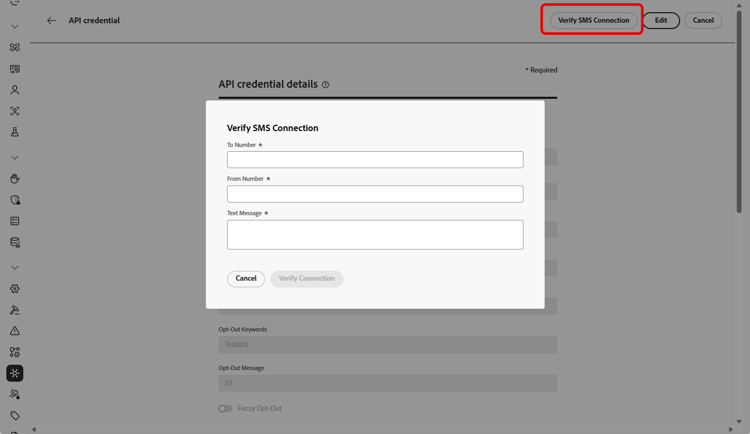
API 자격 증명을 만들고 구성한 후에는 SMS 및 MMS 메시지에 대한 채널 구성을 만들어야 합니다. 자세히 알아보기
RCS에 대한 API 자격 증명 구성
RCS 메시지는 사용자 지정 SMS 공급자 기능을 사용하여 Adobe Journey Optimizer에서 Infobip를 통해 지원됩니다. 이를 통해 캐러셀, 버튼 및 멀티미디어 컨텐츠와 같은 요소를 통합하여 검증된 비즈니스 프로필을 통해 풍부한 대화형 메시지를 전달할 수 있습니다.
➡️ Infobip이 Infobip 설명서에서 RCS를 지원하는 방법을 알아봅니다
Infobip을 사용하여 RCS 메시지를 활성화하려면 사용자 지정 SMS 공급자를 통해 새 API 자격 증명을 구성해야 합니다. RCS에는 고유한 페이로드 형식이 필요하므로 기존 Infobip SMS 자격 증명이 호환되지 않습니다.
Infobip를 사용하여 RCS를 구성하려면:
-
Infobip를 통해 RCS에 대한 비즈니스 등록
Infobip 플랫폼 내에서 RCS 온보딩 및 등록 프로세스를 완료합니다. 여기에는 RCS 발신자 프로필 설정 및 계정이 RCS를 사용할 수 있는지 확인하는 작업이 포함됩니다. Infobip 설명서에서 자세히 알아보기
-
SMS 웹후크 만들기
Journey Optimizer에서 사용자 지정 SMS Webhook 구성. 이 웹후크는 Infobip의 플랫폼에서 게재 수신, 인바운드 RCS 메시지 및 상태 업데이트를 처리합니다.
-
SMS 공급업체로 사용자 지정을 사용하여 API 자격 증명 만들기
Journey Optimizer 내에서 새 API 자격 증명을 만듭니다. SMS 공급자로 "사용자 지정"을 선택합니다. 적절한 RCS 끝점 인증 방법, 기본 URL 및 헤더를 사용합니다.
API 자격 증명을 만들고 구성한 후에는 RCS 메시지에 대한 Webhook 및 채널 구성을 만들어야 합니다. 자세히 알아보기
This section contains structured knowledge intended to support interpretation, retrieval, and question answering related to this topic.
For complete understanding, this information should be combined with the documentation on this page. Neither source is intended to stand alone; the page describes the feature, while this section provides additional context that helps disambiguate terminology, intent, applicability, and constraints.
- TL;DR: This page explains how to configure Infobip as your provider in Journey Optimizer by setting up SMS API credentials, and how to enable RCS messaging with Infobip through a Custom SMS Provider integration.
Intents:
- Configure SMS API credentials with Infobip as the SMS vendor
- Set the DLT Principal Entity ID and Content Template ID and the message validity period
- Enable Fuzzy Opt-out detection and customize the Fuzzy Auto Reply confirmation
- Route a credential’s inbound SMS to a custom dataset
- Enable RCS messaging with Infobip through a Custom SMS Provider
- Verify the SMS connection by sending a sample message to a designated device
Glossary:
- Validity Period: The message validity period in hours; if messages cannot be delivered within this timeframe, the system makes additional attempts to resend them (product-specific)
- Fuzzy Opt-out: An option that detects SMS messages resembling opt-out keywords (for example, CANCIL), including common opt-out phrases and certain offensive terms (product-specific)
- Fuzzy Auto Reply: The field where the confirmation reply for a fuzzy opt-out is customized (product-specific)
- Inbound Number: A unique inbound number that allows the same API credentials to be used across different sandboxes, each with its own inbound number (product-specific)
- Custom SMS Provider: The feature used to enable RCS messaging with Infobip, requiring new API credentials with a distinct payload format (product-specific)
Guardrails:
- The default validity period is 48 hours.
- RCS with Infobip requires new API credentials configured via a Custom SMS Provider; existing Infobip SMS credentials are not compatible, as RCS requires a distinct payload format.
- The custom inbound dataset schema must be XDM ExperienceEvent, include the Adobe CJM ExperienceEvent Message interaction details, Message Execution Details, and Message Profile Details field groups, and be enabled for Profile.
- The verify-connection message must be structured to align with the provider’s payload format.
Terminology:
- Canonical name: Infobip provider — Acronym: n/a — variants: Infobip SMS provider, Infobip configuration
- Do not confuse: “Fuzzy Opt-out” (the detection option) ≠ “Fuzzy Auto Reply” (the field for the confirmation reply)
- Do not confuse: “Infobip SMS API credentials” (for SMS) ≠ “Custom SMS Provider credentials” (required for RCS with Infobip)
FAQ:
- Q: What is the default message validity period? — 48 hours; if messages cannot be delivered within this timeframe, the system makes additional attempts to resend them.
- Q: Can I use the same API credentials across sandboxes? — Yes; add a unique Inbound Number so the same API credentials can be used across different sandboxes, each with its own inbound number.
- Q: How do I enable RCS with Infobip? — RCS is supported through Infobip using the Custom SMS Provider feature; register your business for RCS via Infobip, create a custom SMS webhook, and create a new API credential selecting Custom as the SMS vendor.
- Q: Can existing Infobip SMS credentials be used for RCS? — No; existing Infobip SMS credentials are not compatible because RCS requires a distinct payload format.
- Q: What does Fuzzy Opt-out do? — It identifies SMS messages that indicate a user wants to unsubscribe even when the message does not exactly match a defined opt-out keyword, helping campaigns remain compliant.