이 페이지에서: 메시지 유형, 모바일 구성, 보낸 사람 번호, 하위 도메인 및 실행 필드를 설정하여 SMS, RCS 및 MMS 메시지를 보내는 모바일 메시지 채널 구성을 만드는 방법을 알아봅니다.
모바일 메시지 채널이 구성되면 Journey Optimizer에서 SMS, RCS 및 MMS 메시지를 보낼 수 있도록 채널 구성을 만들어야 합니다.
채널 구성을 만들려면 다음 단계를 수행하십시오.
-
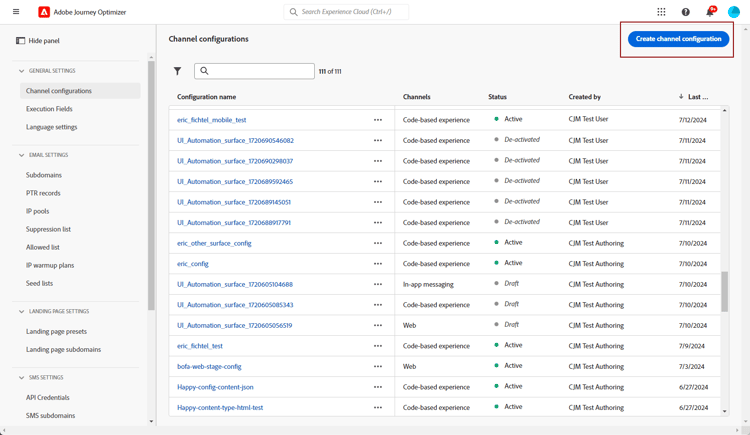
왼쪽 레일에서 관리 > 채널(으)로 이동한 다음 일반 설정 > 채널 구성을 선택합니다. 채널 구성 만들기 단추를 클릭합니다.
-
구성의 이름 및 설명(선택 사항)을 입력한 다음 모바일 채널을 선택합니다.
이름은 문자(A-Z)로 시작해야 합니다. 영숫자만 포함할 수 있습니다. 밑줄
_, 점., 하이픈-도 사용할 수 있습니다.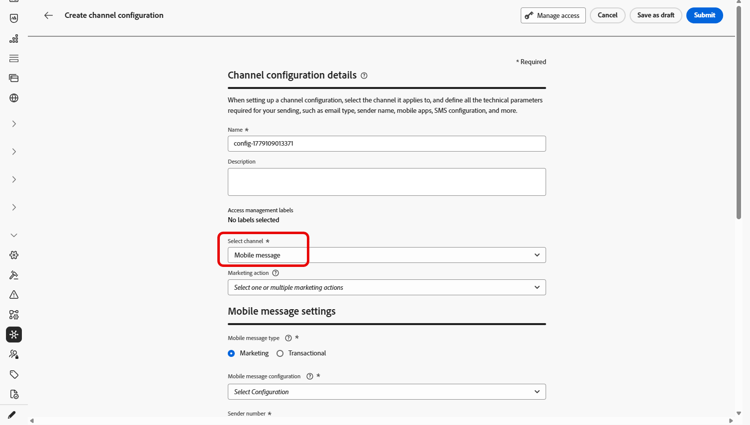
-
이 구성에 대한 SMS 유형을(를) 선택하십시오.
- 마케팅: 사용자 동의가 필요한 프로모션 메시지용.
- 트랜잭션: 주문 확인, 암호 재설정 또는 게재 업데이트와 같은 비상업적인 메시지의 경우.
note caution CAUTION 트랜잭션 메시지는 마케팅 커뮤니케이션의 구독을 취소한 프로필에 보낼 수 있지만, 특정 컨텍스트에서만 보낼 수 있습니다. 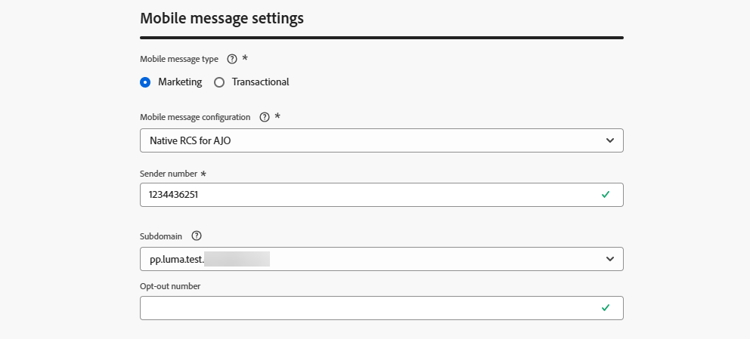
-
구성과 연결할 모바일 구성을(를) 선택하십시오.
모바일 메시지를 보내도록 환경을 구성하는 방법에 대한 자세한 내용은 이 섹션을 참조하세요.
-
통신에 사용할 발신자 번호을(를) 입력하십시오.
-
옵트아웃 번호 필드에서 프로필이 옵트아웃 요청을 보낼 번호를 지정합니다(예: STOP으로 회신). Journey Optimizer은(는) 메시지를 보내기 전에 이 번호에 대해 기록된 옵트아웃 동의를 확인합니다.
이 필드를 비워 두면 Journey Optimizer이(가) 대신 발신자 번호를 사용합니다. 발신자 번호이(가) 브랜드 이름과 같은 영숫자 발신자 ID인 경우 옵트아웃 번호 필드에 인바운드 전화 번호를 지정해야 합니다. 그렇지 않으면 옵트아웃이 일치하지 않고 옵트아웃한 프로필에서 메시지를 계속 받을 수 있습니다.
-
모바일 메시지에서 URL 단축 기능을 사용하려면 하위 도메인 목록에서 항목을 선택하십시오.
하위 도메인을 선택하려면 최소 하나 이상의 SMS/RCS/MMS 하위 도메인을 이전에 구성했는지 확인하십시오. 방법 알아보기
-
실행 차원 섹션에서 SMS 실행 필드를 사용하여 데이터베이스에서 여러 번호를 사용할 수 있는 경우 우선 순위에 사용할 전화 번호를 프로필 특성 중에서 선택합니다. 자세히 알아보기
note NOTE 기본적으로 Journey Optimizer은(는) 샌드박스 수준의 일반 설정에 지정된 전화 번호를 사용합니다. 이 필드를 업데이트하면 이 구성을 사용하는 여정 및 캠페인에 대한 기본값이 재정의됩니다. -
이 자격 증명의 인바운드 SMS를 드롭다운에서 선택한 미리 만들어진 데이터 세트로 라우팅하려면 인바운드에 대한 사용자 지정 데이터 세트 사용을 선택하십시오. 인바운드 키워드에 대한 사용자 지정 데이터 세트 사용에 대해 자세히 알아보기
note NOTE 데이터 세트 스키마는 XDM ExperienceEvent이어야 하며 다음 필드 그룹을 하나 이상 포함해야 합니다. - Adobe CJM ExperienceEvent - 메시지 상호 작용 세부 정보
- Adobe CJM ExperienceEvent - 메시지 실행 세부 정보
- Adobe CJM ExperienceEvent - 메시지 프로필 세부 정보
프로필에 대해 스키마 및 데이터 세트를 활성화해야 합니다. -
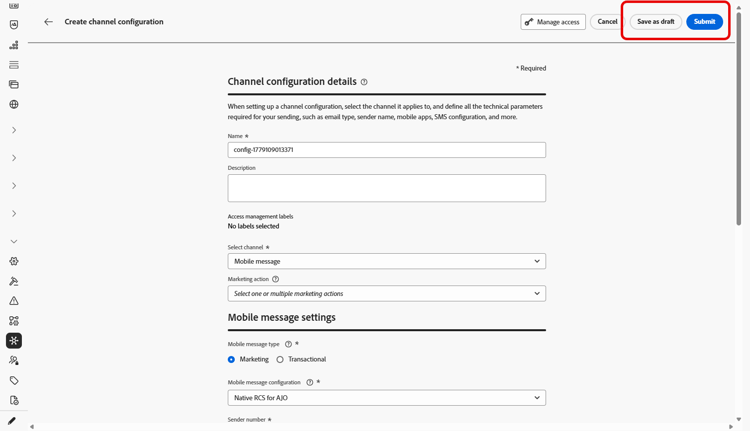
모든 매개 변수가 구성되면 제출을 클릭하여 확인합니다. 채널 구성을 초안으로 저장하고 나중에 구성을 다시 시작할 수도 있습니다.
-
채널 구성이 만들어지면 목록에 처리 중 상태로 표시됩니다.
검사에 실패한 경우 이 섹션에서 가능한 실패 이유에 대해 자세히 알아보세요.
-
검사가 성공하면 채널 구성이 활성 상태가 됩니다. 메시지를 전달하는 데 사용할 준비가 되었습니다.
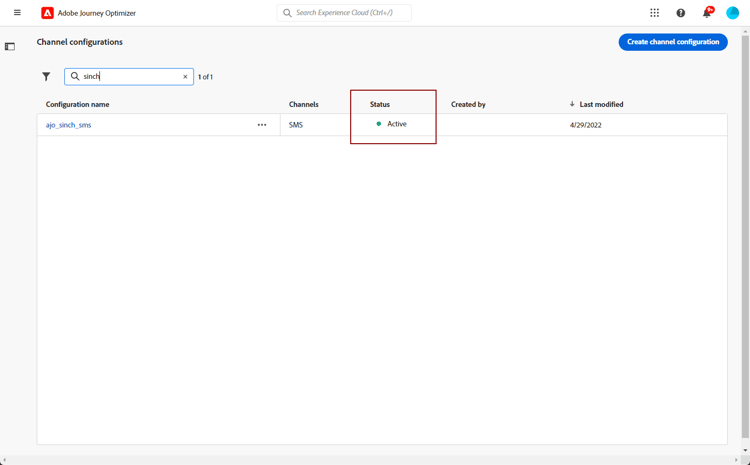
이제 Journey Optimizer으로 모바일 메시지를 보낼 준비가 되었습니다.
This section contains structured knowledge intended to support interpretation, retrieval, and question answering related to this topic.
For complete understanding, this information should be combined with the documentation on this page. Neither source is intended to stand alone; the page describes the feature, while this section provides additional context that helps disambiguate terminology, intent, applicability, and constraints.
- TL;DR: This page explains how to create a Mobile message channel configuration in Journey Optimizer by setting the message type, mobile configuration, sender number, subdomain, and execution field to send SMS, RCS, and MMS messages.
Intents:
- Create a Mobile message channel configuration
- Select the SMS Type (Marketing or Transactional) for the configuration
- Associate a Mobile configuration and a sender number
- Enable URL shortening by selecting a subdomain
- Override the priority phone number with the SMS Execution Field
- Save the channel configuration as draft and resume it later
Glossary:
- Channel configuration: The Mobile message configuration you create to send SMS, RCS, and MMS messages from Journey Optimizer (product-specific)
- SMS Type: The message category of the configuration, either Marketing or Transactional (product-specific)
- Marketing: SMS Type for promotional messages that require user consent (product-specific)
- Transactional: SMS Type for non-commercial messages such as order confirmations, password resets, or delivery updates (product-specific)
- Mobile configuration: The provider API credentials association selected for the channel configuration (product-specific)
- Sender number: The number used for your communications (product-specific)
- Subdomain: An item selected to use the URL shortening function in Mobile messages (product-specific)
- SMS Execution Field: A field in the Execution dimension section used to select, among profile attributes, the phone number to use in priority when several numbers are available (product-specific)
Guardrails:
- Configuration names must begin with a letter (A-Z) and can contain only alpha-numeric characters plus underscore, dot, and hyphen.
- Transactional messages can be sent to profiles who have unsubscribed from marketing communications, but only in specific contexts.
- To select a subdomain, you must have previously configured at least one SMS/RCS/MMS subdomain.
- By default, Journey Optimizer uses the phone number specified in the general settings at the sandbox level; updating the SMS Execution Field overrides the default value for the journeys and campaigns using this configuration.
- The custom dataset for inbound schema must be XDM ExperienceEvent and include at least the Message interaction details, Message Execution Details, and Message Profile Details field groups; the schema and dataset must be enabled for Profile.
Terminology:
- Canonical name: Mobile message channel configuration — variants: SMS configuration, channel configuration
- Do not confuse: “Marketing” (promotional; requires user consent) ≠ “Transactional” (non-commercial messages)
- Do not confuse: “Processing” (status while checks run) ≠ “Active” (status once checks are successful; ready to deliver messages)
- Do not confuse: “Mobile configuration” (provider API credentials association) ≠ “channel configuration” (the Mobile message configuration created on this page)
FAQ:
- Q: What is the difference between the Marketing and Transactional SMS Type? — Marketing is for promotional messages that require user consent; Transactional is for non-commercial messages such as order confirmations, password resets, or delivery updates.
- Q: Can Transactional messages reach profiles who unsubscribed from marketing? — Yes, but only in specific contexts.
- Q: Why is no subdomain available to select? — You must have previously configured at least one SMS/RCS/MMS subdomain before a subdomain can be selected.
- Q: What does the SMS Execution Field do? — It selects the phone number to use in priority among profile attributes; updating it overrides the default sandbox-level number for the journeys and campaigns using this configuration.
- Q: What do the Processing and Active statuses mean? — After you submit, the configuration displays with the Processing status; once the checks are successful it gets the Active status and is ready to deliver messages.