이 페이지에서: API 자격 증명을 만들고, 인증 방법을 선택하고, SMS 및 RCS 메시지를 보내기 위해 헤더, 페이로드 및 인바운드 설정을 구성하여 Adobe Journey Optimizer에서 사용자 지정 메시징 공급자를 통합하는 방법에 대해 알아봅니다.
이 기능을 사용하면 고유한 메시징 공급자를 통합 및 구성하여 기본 옵션(Sinch, Twilio 및 Infobip) 이상의 유연성을 제공할 수 있습니다. 이를 통해 모바일 메시지에 대한 원활한 작성, 전달, 보고 및 동의 관리가 가능합니다.
사용자 정의 공급자 구성을 통해 Journey Optimizer 내에서 직접 서드파티 메시징 서비스에 연결하고, 다이내믹 컨텐츠에 대한 메시지 페이로드를 사용자 정의하고, 옵트인/옵트아웃 환경 설정을 관리하여 SMS와 RCS 채널 모두에서 규정 준수를 보장할 수 있습니다.
사용자 지정 공급자를 구성하려면 아래 단계를 수행하십시오.
API 자격 증명 만들기 api-credential
Adobe에서 즉시 사용할 수 없는 사용자 지정 공급자(예: Sinch, Infobip, Twilio)를 사용하여 Journey Optimizer에서 모바일 메시지를 보내려면 다음 단계를 따르십시오.
-
왼쪽 레일에서 관리
>채널(으)로 이동하고 SMS 설정에서 API 자격 증명 메뉴를 선택한 다음 새 API 자격 증명 만들기 단추를 클릭합니다.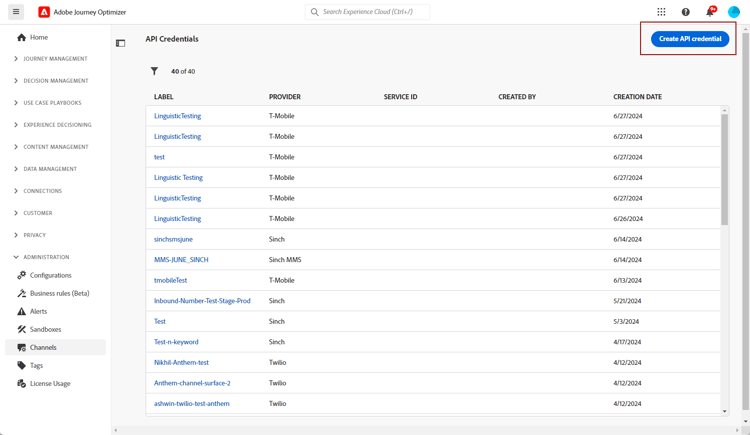
-
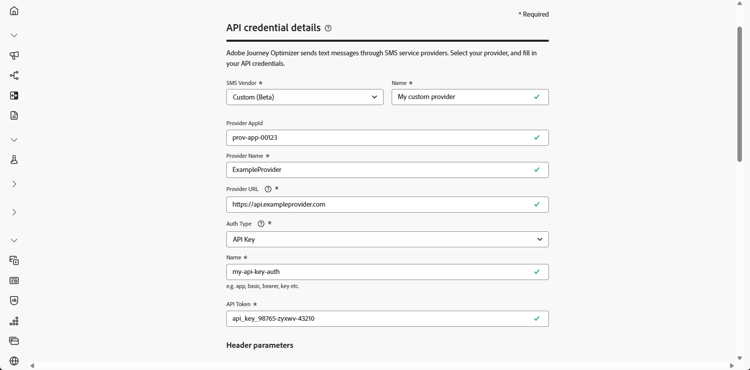
아래에 자세히 설명된 대로 SMS API 자격 증명을 구성합니다.
-
SMS 공급업체: 사용자 지정입니다.
-
이름: API 자격 증명의 이름을 입력하십시오.
-
공급자 AppId: SMS 공급자가 제공한 응용 프로그램 ID를 입력하십시오.
-
공급자 이름: SMS 공급자의 이름을 입력하십시오.
-
공급자 URL: SMS 공급자의 URL을 입력하십시오.
-
채널 유형: 선택 사항입니다. 이 자격 증명이 나타내는 모바일 채널(예: SMS, RCS 또는 MMS)을 나타냅니다.
-
인증 유형{1}: 인증 유형을 선택하고 선택한 인증 방법에 따라 해당 필드를 완료합니다.
-
-
보안 연결을 설정하기 전에 클라이언트와 서버가 서로 인증하도록 하는 mTLS 지원 옵션을 사용하도록 설정하십시오.
mTLS만 사용하려면 인증 유형 드롭다운에서 인증 없음을 선택한 다음 mTLS 지원을 사용하도록 설정하십시오.
mTLS는 SMS 공급자(메시지 전송) 엔드포인트에만 적용됩니다. OAuth 토큰 종단점은 mTLS를 사용하면 안 됩니다. 테스트하기 전에 토큰 엔드포인트에서 mTLS가 비활성화되어 있는지 확인하십시오.
note important IMPORTANT MTLS 공개 인증서 API에서 공개 인증서를 다운로드하고 서버 신뢰 저장소(예상 클라이언트 CN: ajo-sms.aep-mtls.adobe.com)에 추가하여 Adobe Experience Platform 인증 기관 체인을 신뢰하도록 SMS 전송 끝점을 구성하십시오. 그렇지 않으면 Journey Optimizer에서 클라이언트 인증서를 생략하고 SMS 배달이 실패합니다. -
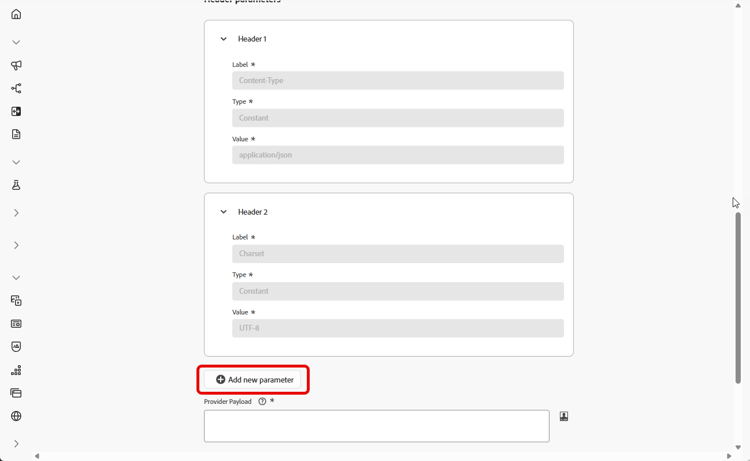
Headers 섹션에서 새 매개 변수 추가를 클릭하여 외부 서비스로 전송될 요청 메시지에 대한 HTTP 헤더를 지정합니다.
Content-Type 및 Charset 헤더 필드는 기본적으로 설정되며, 기본 Content-Type 값을 편집할 수 있지만 삭제할 수 없습니다. 최대 10개의 사용자 지정 헤더 매개 변수를 추가할 수 있습니다.
-
공급자 페이로드를 추가하여 요청 페이로드의 유효성을 검사하고 사용자 지정합니다.
RCS 메시지의 경우 이 페이로드는 나중에 콘텐츠 디자인 중에 사용됩니다.
note NOTE 기본 또는 전달자 인증을 사용하여 사용자 지정 SMS 공급자를 구성할 때는 JSON 페이로드에 authOption매개 변수를 포함해야 합니다. 또한 공급자 페이로드는 템플릿 변수{{fromNumber}},{{toNumber}}및{{message}}을(를) 참조해야 합니다.공급자 페이로드는 encode64을(를) 포함하여 Adobe Journey Optimizer 개인화 도우미 기능도 지원합니다. -
이 자격 증명의 인바운드 SMS를 드롭다운에서 선택한 미리 만들어진 데이터 세트로 라우팅하려면 인바운드에 대한 사용자 지정 데이터 세트 사용을 선택하십시오. 인바운드 키워드에 대한 사용자 지정 데이터 세트 사용에 대해 자세히 알아보기
note NOTE 데이터 세트 스키마는 XDM ExperienceEvent이어야 하며 다음 필드 그룹을 하나 이상 포함해야 합니다. - Adobe CJM ExperienceEvent - 메시지 상호 작용 세부 정보
- Adobe CJM ExperienceEvent - 메시지 실행 세부 정보
- Adobe CJM ExperienceEvent - 메시지 프로필 세부 정보
프로필에 대해 스키마 및 데이터 세트를 활성화해야 합니다. -
API 자격 증명 구성을 마치면 제출을 클릭합니다.
-
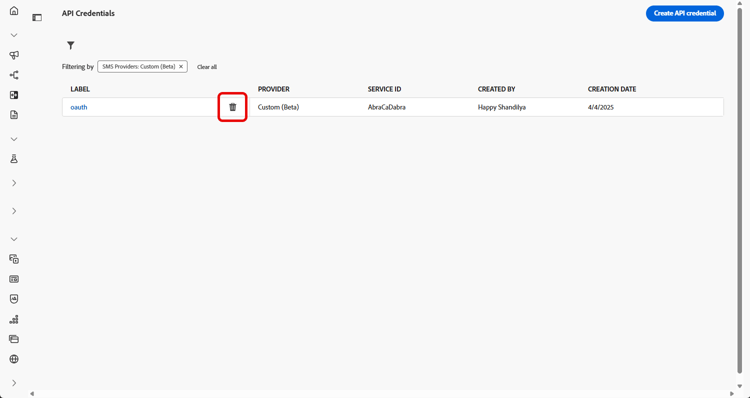
API 자격 증명 메뉴에서

-
기존 자격 증명을 수정하려면 원하는 API 자격 증명을 찾은 다음 편집 옵션을 클릭하여 필요한 변경을 수행합니다.
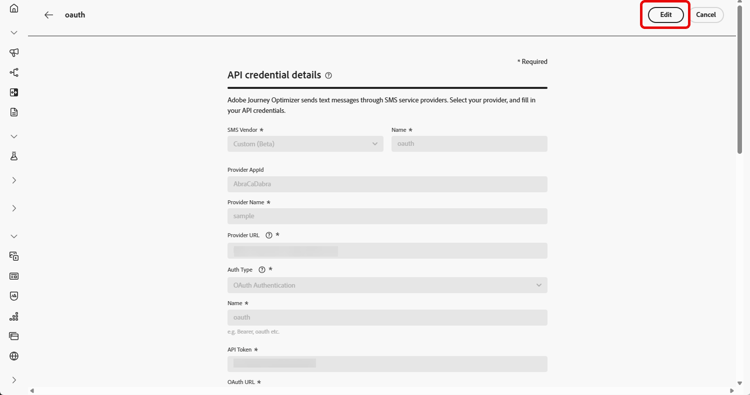
-
기존 API 자격 증명에서 SMS 연결 확인을 클릭하여 샘플 메시지를 지정된 장치로 보내 SMS API 자격 증명을 테스트하고 확인합니다.
-
숫자 및 메시지 필드를 입력하고 연결 확인을 클릭합니다.
note important IMPORTANT 공급자의 페이로드 형식에 맞게 메시지를 구조화해야 합니다. 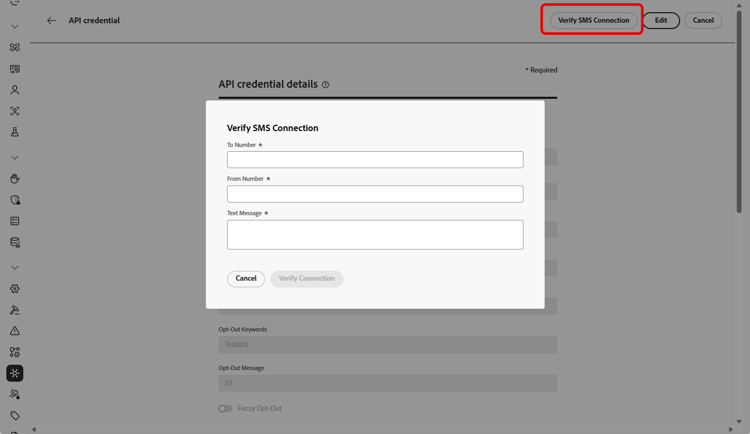
API 자격 증명을 만들고 구성한 후에는 SMS 메시지에 대해 Webhook에 대한 인바운드 설정을 설정해야 합니다.
사용자 정의 SMS 제공자에 대한 인증 옵션 auth-options
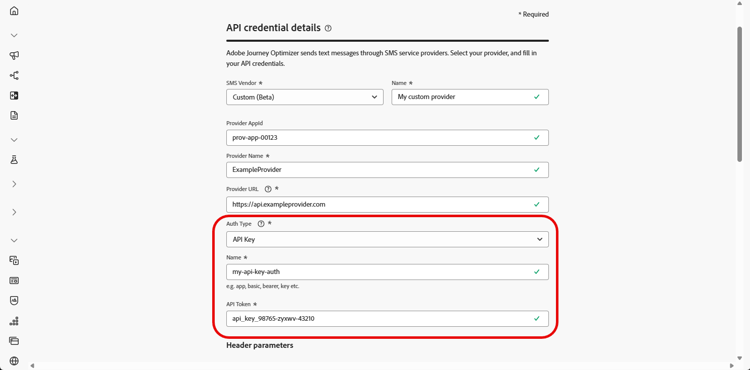
API 자격 증명이 만들어지면 API 키 인증에 필요한 필드를 작성합니다.
- 이름: API 키 구성의 이름을 입력하십시오.
- API 토큰: SMS 공급자가 제공한 API 토큰을 입력하십시오.
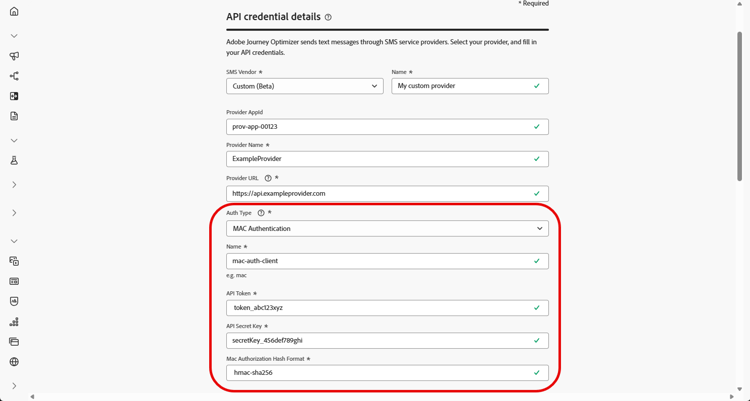
API 자격 증명이 만들어지면 MAC 인증에 필요한 필드를 작성합니다.
- 이름: MAC 인증 구성의 이름을 입력하십시오.
- API 토큰: SMS 공급자가 제공한 API 토큰을 입력하십시오.
- API 암호 키: SMS 공급자가 제공한 API 암호 키를 입력하십시오. 이 키는 보안 통신을 위한 MAC(메시지 인증 코드)를 생성하는 데 사용됩니다.
- Mac 인증 해시 형식: MAC 인증에 대한 해시 형식을 선택합니다.
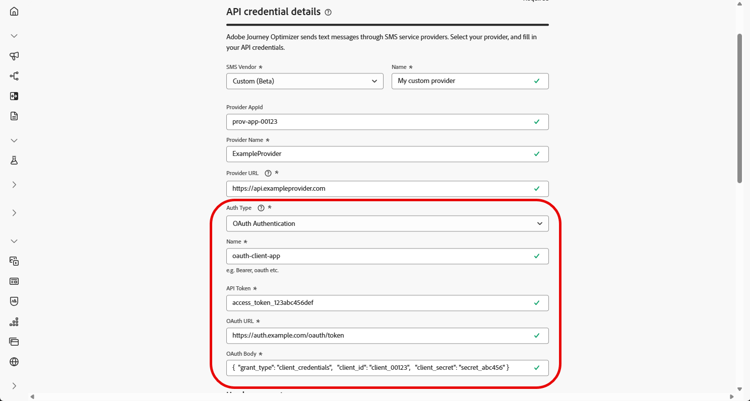
API 자격 증명이 생성되면 OAuth 인증에 필요한 필드를 작성합니다.
-
이름: OAuth 인증 구성의 이름을 입력합니다.
-
API 토큰: SMS 공급자가 제공한 API 토큰을 입력하십시오.
-
OAuth URL: OAuth 토큰을 가져올 URL을 입력합니다.
-
OAuth 본문:
grant_type,client_id및client_secret등의 매개 변수를 포함하여 JSON 형식으로 OAuth 요청 본문을 제공합니다.
Journey Optimizer은 사용자 지정 SMS 커넥터에 대한 만료 시 OAuth 토큰을 동적으로 새로 고칩니다.
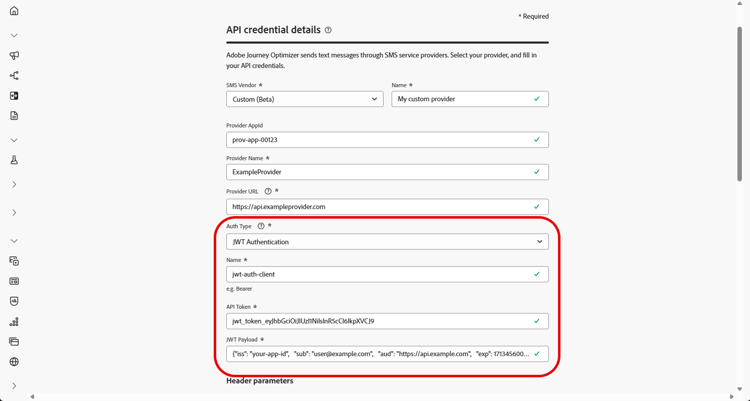
API 자격 증명이 생성되면 JWT 인증에 필요한 필드를 작성합니다.
-
이름: JWT 인증 구성의 이름을 입력하십시오.
-
API 토큰: SMS 공급자가 제공한 API 토큰을 입력하십시오.
-
JWT 페이로드: 발급자, 제목, 대상 및 만료와 같이 JWT에 필요한 클레임이 들어 있는 JSON 페이로드를 입력합니다.
사용 방법 비디오 video
This section contains structured knowledge intended to support interpretation, retrieval, and question answering related to this topic.
For complete understanding, this information should be combined with the documentation on this page. Neither source is intended to stand alone; the page describes the feature, while this section provides additional context that helps disambiguate terminology, intent, applicability, and constraints.
- TL;DR: This page explains how to integrate a custom messaging provider in Journey Optimizer by creating API credentials, choosing an authentication method, and configuring headers, payloads, mTLS, and inbound settings to send SMS and RCS messages beyond the default Sinch, Twilio, and Infobip options.
Intents:
- Create a custom provider API credential with SMS vendor set to Custom
- Choose and complete an authentication method (API key, MAC, OAuth, or JWT)
- Configure HTTP headers and the Provider Payload for the request
- Enable mTLS support for mutual client and server authentication
- Route a credential’s inbound SMS to a custom dataset
- Verify the SMS connection by sending a sample message to a designated device
Glossary:
- Custom provider: A third-party messaging provider integrated beyond the default options (Sinch, Twilio, and Infobip) by selecting Custom as the SMS vendor (product-specific)
- Provider Payload: The request payload used to validate and customize requests, later used during RCS content design (product-specific)
- Channel Type: An optional classification (SMS, RCS, or MMS) written to XDM experience events for reporting and tracking by channel (product-specific)
- mTLS support: An option ensuring that both the client and server authenticate each other before establishing a secure connection (product-specific)
- Verify SMS connection: An action that tests and verifies the API credentials by sending a sample message to a designated device (product-specific)
Guardrails:
- You can add up to 10 custom header parameters.
- The Content-Type and Charset header fields are set by default and cannot be deleted, though the default Content-Type value can be edited.
- mTLS applies only to the Mobile message provider (message sending) endpoint; the OAuth token endpoint must not use mTLS and mTLS must be disabled on the token endpoint before testing.
- With Basic or Bearer authentication, the authOption parameter must be included in the JSON payload, and the Provider Payload must reference the template variables {{fromNumber}}, {{toNumber}}, and {{message}}.
- The custom inbound dataset schema must be XDM ExperienceEvent, include the Adobe CJM ExperienceEvent Message interaction details, Message Execution Details, and Message Profile Details field groups, and be enabled for Profile.
- Do not reuse the same API credentials, webhooks, or provider callback URLs (including RCS agents) across sandboxes; create separate agent configurations for each sandbox.
Terminology:
- Canonical name: Custom provider — Acronym: n/a — variants: custom messaging provider, custom SMS provider, Bring Your Own Provider
- Do not confuse: “Mobile message provider (message sending) endpoint” (uses mTLS) ≠ “OAuth token endpoint” (must not use mTLS)
- Do not confuse: “API key” ≠ “MAC authentication” ≠ “OAuth authentication” ≠ “JWT authentication” (the four Auth Type options)
FAQ:
- Q: How many custom header parameters can I add? — Up to 10 custom header parameters.
- Q: Which authentication types are supported? — API key, MAC authentication, OAuth authentication, and JWT authentication.
- Q: Which endpoint uses mTLS? — mTLS applies only to the Mobile message provider (message sending) endpoint; the OAuth token endpoint must not use mTLS.
- Q: What must the Provider Payload include for Basic or Bearer authentication? — The authOption parameter in the JSON payload, plus references to the template variables {{fromNumber}}, {{toNumber}}, and {{message}}.
- Q: How do I test the credential? — Click Verify SMS connection, fill in the Number and Message fields structured to align with the provider’s payload format, then click Verify connection to send a sample message to a designated device.