이 페이지에서: API 트리거 캠페인에 대해 처리량이 많은 모드를 활성화하여 프로필에 의존하지 않고 초당 최대 5000개의 트랜잭션으로 대규모 실시간 트랜잭션 메시지(전자 메일 및 푸시)를 보낼 수 있습니다.
높은 처리량 모드는 매우 큰 규모의 실시간 트랜잭션 메시지(초당 최대 5000개의 트랜잭션)가 필요한 조직을 위해 설계되었습니다. 일반적인 API 트리거 캠페인과 달리, 처리량이 많은 캠페인은 Adobe 프로필과 독립적으로 작동하므로 다른 구성 모델이 필요합니다.
이 페이지에서는 처리량이 많은 캠페인이 표준 API에서 트리거된 캠페인과 어떻게 다른지, 설정 요구 사항 및 각 모드를 선택할 시기를 설명합니다.
가드레일 및 제한 사항 guardrails
-
액세스 - 높은 처리량 트랜잭션 메시지 추가 기능을 통해 라이선스가 부여된 조직의 경우 스위스를 제외한 모든 지역에서 사용할 수 있습니다.
-
채널: 이메일 및 푸시 알림.
-
처리량이 많은 캠페인의 Personalization:
- 모든 개인화는 컨텍스트 데이터(으)로 API 페이로드에 포함되어야 합니다. 컨텍스트 데이터를 사용하여 콘텐츠를 개인화하는 방법 알아보기
- 프로필 기반 개인화는 지원되지 않습니다. 프로필 변수를 사용하면 유효성 검사 오류가 발생합니다.
-
처리량이 많은 채널 구성의 Personalization - 처리량이 많은 이메일 채널 구성은 컨텍스트 또는 프로필 기반 개인화를 지원하지 않습니다.
-
일치하는 리소스 - 처리량이 많은 캠페인, 채널 구성 및 IP 풀은 서로 사용할 수만 있습니다. 표준 리소스와 처리량이 높은 리소스를 함께 사용할 수 없습니다.
-
API 끝점 - 처리량이 많은 캠페인은 표준 API 트리거 캠페인과 다른 끝점을 사용합니다. 자세한 내용은 API 트리거 캠페인 실행을 참조하세요.
-
캠페인 독점성 - 높은 처리량 캠페인에서는 Adobe 프로필을 사용하지 않습니다. 프로필이 있는지 여부에 관계없이 메시지가 전달됩니다.
또한 프로필이 활성화된 경우와 아닌 경우 모두에 캠페인을 사용할 수 없습니다. 둘 다 필요한 경우 두 개의 별도 캠페인을 만들고 호출 시스템이 컨텍스트를 기반으로 트리거할 캠페인을 결정하는지 확인합니다.
-
피드백 및 추적을 위한 데이터 세트 - 처리량이 많은 캠페인에 대한 피드백 및 추적 데이터는 프로필에 대해 활성화되지 않은 전용 데이터 세트에 저장됩니다. 따라서 이러한 이벤트는 일치하는 프로필이 있어도 프로필에 연결되지 않습니다.
사용되는 데이터 세트는 다음과 같습니다.
- AJO 메시지 피드백 이벤트 데이터 세트 - 프로필이 아님 - 전자 메일과 푸시 피드백 모두에 사용됩니다.
- AJO 전자 메일 추적 경험 이벤트 데이터 세트 - 프로필이 아님 - 전자 메일 추적에만 사용됩니다. 푸시에 대한 전용 비프로필 추적 데이터 세트는 아직 사용할 수 없습니다.
-
처리량 할당 - 높은 처리량 추가 기능에서 프로비저닝된 처리량은 높은 처리량 캠페인에만 예약되어 있습니다. 표준 및 처리량이 많은 API 트리거 캠페인 간에는 처리량을 공유할 수 없습니다.
-
지원되지 않는 기능:
-
개인화된 PDF 첨부 파일 - 높은 처리량 트래픽이 보조 영역을 통해 라우팅되는 경우 지원되지 않습니다. 개인화된 PDF 첨부 파일에 대해 자세히 알아보기
-
푸시 알림:
- 웹 푸시 — 처리량이 많은 웹 푸시 캠페인은 공유 인프라에서 실행되며 처리량이 많은 모바일 푸시에 예약된 전용 용량의 혜택을 받지 않습니다.
- 페이로드 크기 — 최대 페이로드 크기는 5KB입니다.
- 차단 목록 비헤이비어 — 메시지가 차단 목록에 추가하다를 히트할 때 게재 피드백이 유지되지 않습니다. 이는 차단 목록 업데이트 또는 토큰 무효화를 트리거하지 않음을 의미합니다.
표준 캠페인과 처리량이 많은 캠페인 간 선택
이 테이블을 사용하여 사용 사례에 맞는 API 트리거된 캠페인 유형을 결정합니다.
즉,
-
다음과 같은 경우 표준 API 트리거 캠페인을 선택하십시오.
- 계약된 높은 처리량이 없습니다.
- 필요한 처리량은 500TPS 미만입니다.
- Adobe 프로필을 기반으로 개인화가 필요합니다.
- 향후 타깃팅을 위해 캠페인 데이터를 프로필에 결합하려고 합니다.
- 이메일 또는 푸시 이외의 다른 채널을 사용하려고 합니다.
-
다음과 같은 경우 높은 처리량 캠페인을 선택하십시오.
- 500TPS 이상의 처리량이 필요합니다.
- 프로필 결합은 필요하지 않습니다.
- API 페이로드에서 모든 개인화를 전달할 수 있습니다.
- 이메일 또는 푸시 채널을 사용합니다.
사전 요구 사항 prerequisite
높은 처리량의 트랜잭션 메시지 추가 기능을 구매한 후 필요한 백엔드 활성화 을(를) 완료할 수 있도록 Adobe 고객 지원 센터 또는 Adobe 담당자에게 문의하십시오.
처리량이 많은 API 트리거 이메일 캠페인 설정 setup-guidelines
처리량이 많은 이메일 캠페인을 사용하려면 아래 단계를 따르십시오.
위에서 설명한 흐름은 이메일 채널에만 적용됩니다.
전용 IP 풀 만들기 create-ip-pool
두 지역에서 고가용성과 성능을 유지하기 위해 구축되었기 때문에 처리량이 많으면 전용 IP 풀이 필요합니다.
높은 처리량 추가 기능을 구매하면 기본 영역에서 자신에게 할당된 IP 외에도 전송 IP가 보조 영역에서 프로비저닝됩니다.
- 장애 조치(failover) - 기본 영역을 사용할 수 없게 되면 모든 처리량이 높은 트래픽이 자동으로 보조 영역으로 전환되므로 트랜잭션 메시지가 계속 전달됩니다.
- IP 준비 - 필요한 경우 보조 영역 IP가 준비되었는지 확인하기 위해 높은 처리량 트래픽의 일부가 보조 영역을 통해 지속적으로 라우팅됩니다. 이렇게 하면 이러한 IP를 따뜻하게 유지할 수 있습니다. 전송 기록이 없는 IP에서 보내면 인터넷 서비스 공급자(ISP)가 이메일을 거부할 수 있습니다.
다음과 같이 IP 풀을 만듭니다.
-
IP 풀을 만듭니다. 방법 알아보기
-
높은 처리량 사용 옵션을 선택하십시오.
-
전용 IP 풀에 대해 보조 영역 IP를 하나 이상 선택하십시오. 이렇게 하면 높은 처리량 트래픽에 대한 고가용성을 보장할 수 있습니다.
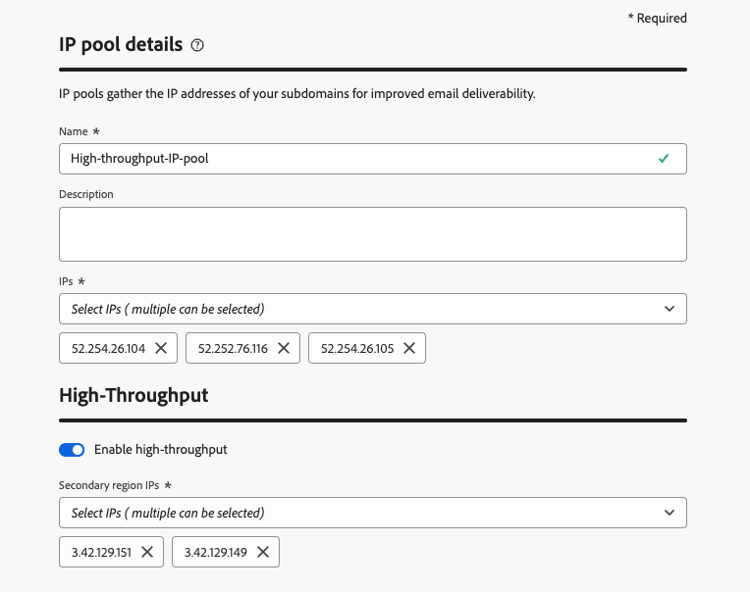
이제 전용 IP 풀을 처리량이 많은 채널 구성에서 사용할 준비가 되었습니다.
처리량이 많은 이메일 채널 구성 만들기 configuration-guidelines
-
전자 메일 채널 구성을 만듭니다. 방법 알아보기
-
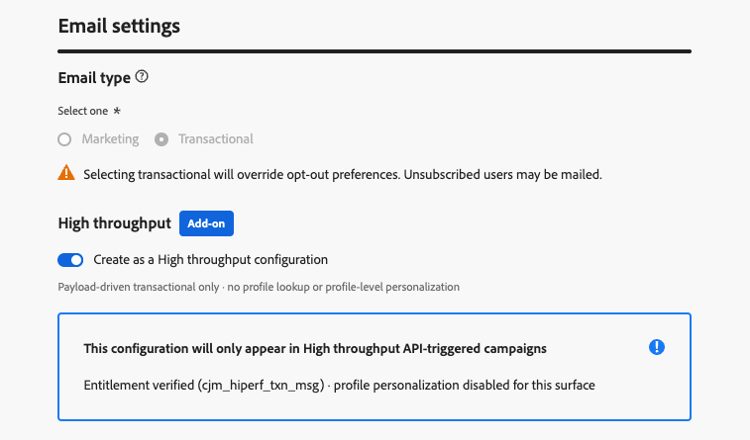
전자 메일 설정에서 트랜잭션 전자 메일 유형을 선택하십시오.
-
처리량이 많은 구성으로 만들기 전환을 사용하도록 설정합니다.
-
IP 풀 세부 정보 섹션에서 만든 높은 처리량 IP 풀을 선택하십시오. 처리량이 많은 IP 풀만 나열됩니다.
-
채널 구성을 제출합니다.
이제 처리량이 많은 API 트리거 캠페인에서 사용할 준비가 되었습니다.
처리량이 많은 API 트리거 캠페인을 만들 때, 처리량이 많은 채널 구성만 선택할 수 있습니다.
처리량이 많은 푸시 캠페인 설정 setup-push
푸시의 경우 설정은 수동 온디맨드 프로세스로 유지됩니다.
새 푸시 채널 구성을 만들고 Adobe 고객 지원 센터에 문의하여 활성화된 푸시 채널 구성을 높은 처리량 기능에 매핑하도록 요청해야 합니다.
조직 ID와 함께 채널 구성 세부 사항을 입력합니다.
This section contains structured knowledge intended to support interpretation, retrieval, and question answering related to this topic.
For complete understanding, this information should be combined with the documentation on this page. Neither source is intended to stand alone; the page describes the feature, while this section provides additional context that helps disambiguate terminology, intent, applicability, and constraints.
- TL;DR: This page explains how High throughput mode for API triggered campaigns differs from standard API triggered campaigns, its guardrails and setup requirements, and when to choose each mode for very large-scale, real-time transactional messages (email and push) without relying on profiles.
Intents:
- Decide between a standard API triggered campaign and a High throughput campaign
- Know the guardrails and limitations of High throughput campaigns
- Set up a channel configuration and an IP pool for High throughput campaigns
- Know how to personalize a High throughput campaign (contextual data only)
- Know which datasets store feedback and tracking data for High throughput campaigns
Glossary:
- High throughput mode (also written High Throughput): A mode of API triggered campaigns designed for very large-scale, real-time transactional messaging, which operates independently of Adobe Profiles (product-specific)
- Standard API triggered campaign: An API triggered campaign that is not in High throughput mode
- High Throughput transactional messaging add-on: The add-on that organizations must be licensed with to use High throughput campaigns (product-specific)
- Contextual data: Personalization data passed in the API payload
- AJO Message Feedback Event Dataset - Non Profile: Dataset used for both email and push feedback of High throughput campaigns
- AJO Email Tracking Experience Event Dataset - Non Profile: Dataset used for email tracking only of High throughput campaigns
Guardrails:
- Throughput: High throughput campaigns support up to 5000 transactions per second; standard API triggered campaigns support up to 500 transactions per second.
- Channels: Email and push notifications for High throughput campaigns.
- Personalization: all personalization must be included in the API payload as contextual data. Profile-based personalization is not supported, and validation errors occur if profile variables are used.
- Channel configurations that use profile-based personalization cannot be used with High throughput campaigns. Only surfaces without profile personalization can be used.
- High throughput campaigns use a different API endpoint than standard API triggered campaigns.
- High throughput campaigns do not use Adobe Profiles. Messages are delivered whether or not a profile exists.
- A campaign cannot be used for both profile-enabled and non-profile use cases. If you need both, create two separate campaigns, and make the calling system decide which one to trigger based on the context.
- Feedback and tracking data for High throughput campaigns are stored in dedicated datasets that are not enabled for profiles, so these events are not stitched to profiles, even if a matching profile exists. A dedicated non-profile tracking dataset for push is not yet available.
- The throughput provisioned under the High Throughput add-on is exclusively reserved for High throughput campaigns. There is no sharing of throughput between standard and High throughput API triggered campaigns.
- Personalized PDF attachments are not supported when a High throughput campaign fails over to another region.
- Web push: High Throughput web push campaigns run on shared infrastructure and do not benefit from the dedicated capacity reserved for High Throughput mobile push.
- Push payload size: the maximum payload size is 5 KB (hard limit).
- Denylist behavior for push: when a message hits a denylist, delivery feedback is retained but no profile-update feedback is produced, so denylist responses do not trigger profile updates or token invalidation in Adobe Experience Platform.
- The IP pool and channel configurations designated for High throughput transactional messages must be used exclusively for that purpose, and not be used with standard transactional messaging using API triggered campaigns or journeys.
Prerequisites and permissions:
- The organization must be licensed with the High Throughput transactional messaging add-on.
- A new IP pool.
- A new channel configuration.
- A request to Adobe Customer Care to map the activated surface to the High throughput capability, with the channel configuration and IP Pool details and your organization ID.
Applicability:
- Access: available across all regions except Switzerland.
- Applies to API triggered campaigns, in High throughput mode.
Terminology:
- Canonical name: High throughput mode — variants: High Throughput mode, High throughput campaigns
- Acronym: TPS — transactions per second (used on the page body)
- Do not confuse: “Standard API triggered campaign” (included in the base offering, standard entitlement and message packs, standard infrastructure, uptime 99,9%) ≠ “High throughput campaign” (requires the High Throughput transactional messaging add-on, separate tiered message volumes, enhanced infrastructure, uptime 99,99%); both have a health check API
FAQ:
- Q: When should I choose a standard API triggered campaign? — When you do not have High Throughput contracted, your throughput needs are under 500 TPS, you require personalization based on Adobe Profiles, you want campaign data stitched to profiles for future targeting, or you want to use another channel than Email or Push.
- Q: When should I choose a High throughput campaign? — When you need throughput over 500 TPS, you do not require profile stitching, you can pass all personalization in the API payload, and you want to use the Email or Push channel.
- Q: Can a High throughput campaign use profile attributes for personalization? — No. Profile-based personalization is not supported, and validation errors occur if profile variables are used. Pass all personalization as contextual data in the API payload.
- Q: Can one campaign serve both profile-enabled and non-profile use cases? — No. Create two separate campaigns, and make the calling system decide which one to trigger.
- Q: Is throughput shared between standard and High throughput campaigns? — No. The throughput provisioned under the High Throughput add-on is exclusively reserved for High throughput campaigns.
- Q: How do I set up High throughput campaigns? — Create a new IP pool, create a new channel configuration, then contact Adobe Customer Care to request that the activated surface be mapped to the High throughput capability.
Related pages:
- Personalizing content with contextual data: Learn how to personalize content using contextual data (campaigns/api-triggered-campaign-content.md#contextual)
- Endpoint used by High throughput campaigns: Execute an API triggered campaign (campaigns/trigger-campaigns.md#trigger)
- Channel configurations with profile-based personalization: profile-based personalization (email/surface-personalization.md)
- Personalized PDF attachments: Learn more about personalized PDF attachments (email/pdf-attachments.md#personalized-attachments)
- Create IP pools: Learn how to create IP pools (configuration/ip-pools.md)
- Set up channel configurations: Learn how to set up channel configurations (configuration/channel-surfaces.md)