このページ:ジャーニーを作成し、「同意および環境設定」フィールドグループを使用して、リスト上のサブスクライバーにメッセージを送信する方法について説明します。
このユースケースの目的は、ジャーニーを作成してリスト上の購読者にメッセージを送信することです。
この例では、Adobe Experience Platform の「同意と環境設定の詳細」フィールドグループを使用します。 このフィールドグループを見つけるには、 データ管理メニューから「スキーマ」を選択します。 「フィールドグループ」タブで、検索フィールドにフィールドグループの名前を入力します。
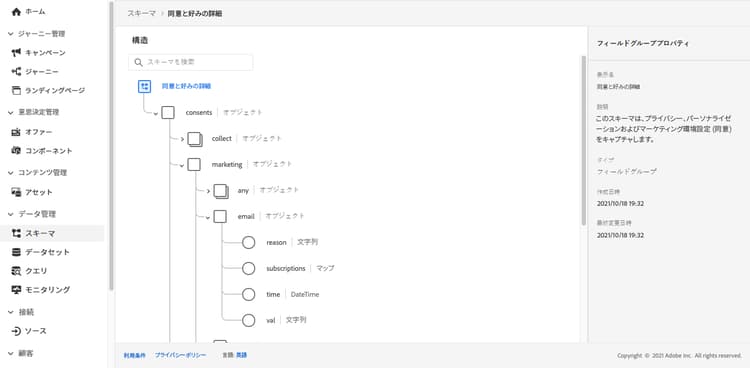
このジャーニーを設定するには、次の手順に従います。
-
読み取りアクティビティで始まるジャーニーを作成します。 詳しくは、初めてのジャーニーの作成を参照してください。
-
メールアクションアクティビティをジャーニーに追加します。 詳しくは、チャネルアクションの操作を参照してください。
-
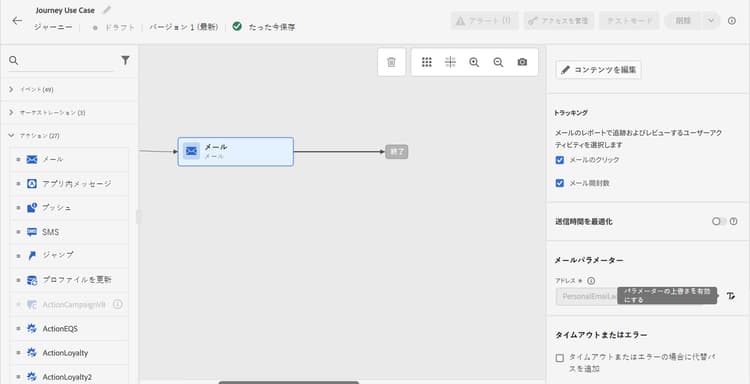
メールアクティビティ設定の「メールパラメーター」セクションで、デフォルトのメールアドレス(
PersonalEmail.adress)をリスト上の購読者のメールアドレスに置き換えます。-
「アドレス」フィールドの右側にある「 パラメーターの上書きを有効にする」アイコンをクリックしたあと、編集アイコンをクリックします。
-
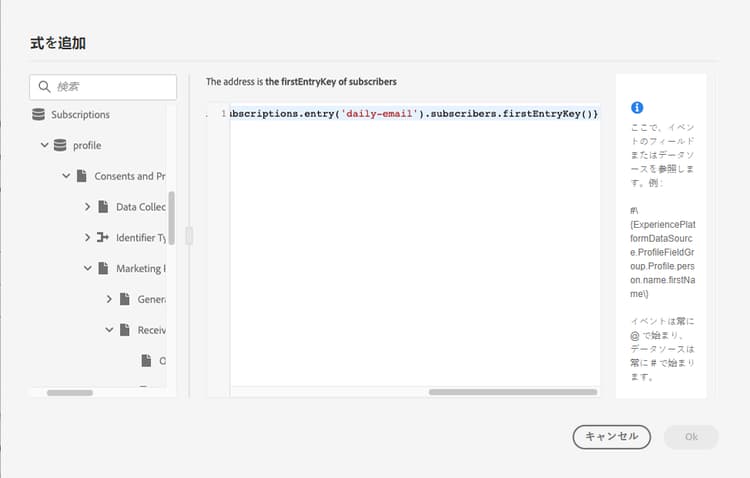
式エディターで、購読者のメールアドレスを取得する式を入力します。 詳細情報
この例では、マップフィールドへの参照を含む式を示しています。
code language-json #{ExperiencePlatform.Subscriptions.profile.consents.marketing.email.subscriptions.entry('daily-email').subscribers.firstEntryKey()}この例では、次の関数が使用されています。
table 0-row-3 1-row-3 2-row-3 関数 説明 例 entry選択した名前空間に従ってマップ要素を参照します 特定のサブスクリプションリストを参照します firstEntryKeyマップの最初のエントリキーを取得します 購読者の最初のメールアドレスを取得します この例では、サブスクリプションリストの名前は
daily-emailです。 メールアドレスは、subscribersマップでキーとして定義されています。このマップはサブスクリプションリストマップにリンクされています。式におけるフィールドへの参照について詳しくは、こちらを参照してください。
-
式を追加ダイアログボックスで「OK」をクリックします。
-
This section contains structured knowledge intended to support interpretation, retrieval, and question answering related to this topic.
For complete understanding, this information should be combined with the documentation on this page. Neither source is intended to stand alone; the page describes the feature, while this section provides additional context that helps disambiguate terminology, intent, applicability, and constraints.
- TL;DR: This page shows how to build a journey that sends an email to subscribers of a list by overriding the default email address parameter using an expression that reads subscriber addresses from a consent map field.
Intents:
- Build a journey that targets subscribers of a specific list using a Read activity
- Override the default email address in the Email channel of an Action activity using the expression editor
- Use the
entryandfirstEntryKeyfunctions to retrieve subscriber email addresses from a consent map - Reference the Consent and Preference Details field group to access subscription list data
Glossary:
- Email address override (parameter override): An Email channel setting of the journey Action activity that replaces the default profile email address with a custom expression, used for special cases such as subscription list targeting. (product-specific)
- Consent and Preference Details field group: An Adobe Experience Platform schema field group that contains subscription and consent data, including the subscriptions element; subscriber email addresses are defined as keys in the
subscribersmap, which is linked to the subscription list map. (product-specific) entryfunction: An expression function that refers to a map element by its namespace key — used here to reference a specific subscription list (e.g.,daily-email). (product-specific)firstEntryKeyfunction: An expression function that retrieves the first key of a map — used here to retrieve the first email address from the subscribers map of a subscription list. (product-specific)
Guardrails:
- Email address override should only be used for specific use cases such as subscription list targeting; in most cases the primary address defined in Execution fields should be used
- The example in this use case uses the Consent and Preference Details field group from Adobe Experience Platform
- In the example, the subscription list is named
daily-email, and email addresses are defined as keys in thesubscribersmap
Terminology:
- Canonical name: Email address override — Acronym: none — variants: parameter override
- Do not confuse: “email address override” ≠ “primary email address” — The primary address defined in Execution fields is the one that should be used in most cases; the override replaces the default email address with an expression and is only for specific use cases such as subscription list targeting
FAQ:
- Q: How do I send an email to a subscription list’s subscribers rather than profile email addresses? — Enable the parameter override on the Address field of the Email channel in the Action activity and enter an expression using
entryandfirstEntryKeyfunctions to retrieve addresses from the subscribers map of the target subscription list. - Q: What field group is required for this use case? — The example uses the Consent and Preference Details field group from Adobe Experience Platform, which includes the subscriptions element.
- Q: Should I always use email address override when targeting subscribers? — No; email address override is for specific use cases only. In most journeys, the primary address defined in Execution fields should be used.
- Q: What does the
firstEntryKeyfunction do in this context? — It retrieves the first email address key from thesubscribersmap associated with a specific subscription list.