このページ:カスタムアクションや外部データソースを使用してジャーニーの処理をスロットルし、外部システムがサポートされている 1 秒あたりのリクエスト数を超えて過負荷にならないようにする方法について説明します。
外部システムが 1 秒あたりの上限リクエスト数を処理する必要がある場合、このユースケースを使用してジャーニーの処理をスロットルします。
ユースケースの説明
Adobe Journey Optimizer を使用すると、実務担当者は、カスタムアクションとデータソースを使用して、外部システムに API 呼び出しを送信できます。
これは以下を使用して行うことができます。
-
データソース:外部システムから情報を収集し、その情報をジャーニーコンテキストで使用します(例えば、プロファイル都市の天気情報を取得し、それに基づいて専用のジャーニーフローを持つ場合)。
-
カスタムアクション:外部システムに情報を送信します(例えば、プロファイル情報、オーディエンスデータ、ジャーニーコンテキストと共に Journey Optimizer のオーケストレーション機能を使用して外部ソリューションからメールを送信する)。
外部データソースやカスタムアクションを扱う場合は、ジャーニーのスループットを単一ジャーニーの場合は最大 5,000 インスタンス/秒、オーディエンストリガージャーニーの場合は最大 20,000 インスタンス/秒に制限して、外部システムを保護する必要が生じる場合があります。 ジャーニーの処理率とスループットについて詳しくは、この節を参照してください。
カスタムアクションの場合、スロットル機能は製品レベルで使用できます。 このページを参照してください。
外部データソースの場合、Journey Optimizer の Capping API を使用して、これらの外部システムに圧倒されるのを回避できるようエンドポイントレベルでキャップのキャップを定義できます。 ただし、制限に到達後、残りのリクエストはすべて破棄されます。 この節では、スループットを最適化するために使用できる回避策を見つけます。
外部システムとの統合方法について詳しくは、このページを参照してください。
実装
オーディエンストリガージャーニーでは、ジャーニーのスループットに影響を与える「オーディエンスを読み取り」アクティビティの読み取り率を定義できます。 詳細情報
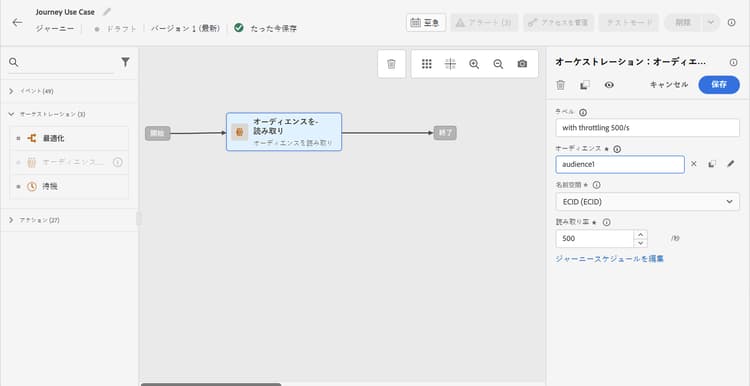
この値は、1 秒あたりのインスタンス数 500 件から 20,000 件の範囲で変更できます。 1 秒あたり 500 件未満にする必要がある場合は、待機アクティビティと共に「パーセンテージ分割」条件を追加して、ジャーニーを複数の分岐に分割し、特定の時間に実行させることもできます。
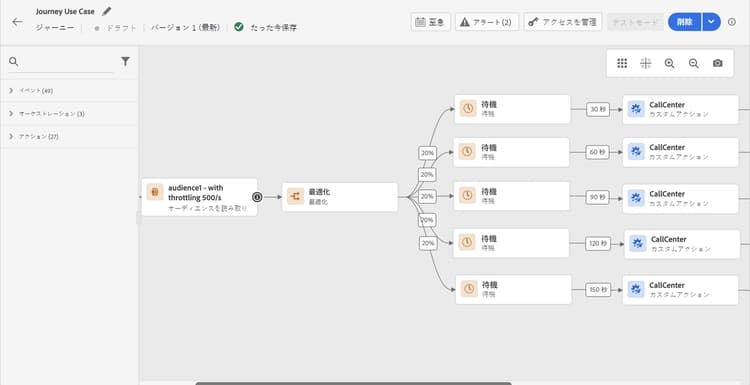
例として、10,000 件のプロファイルを持つ母集団を扱う オーディエンストリガージャーニー があり、1 秒あたり 100 件のリクエストをサポートする外部システムにデータを送信するとします。
-
1 秒あたり 500 プロファイルのスループットでプロファイルを読み取るように、「オーディエンスを読み取り」を定義することができます。つまり、すべてのプロファイルを読み取るのに 20 秒かかります。 1 秒目では、そのうち 500 件を読み取り、2 秒目ではさらに 500 件、というように読み取ります。
-
次に、20%の分割を持つ「パーセンテージ分割」条件アクティビティを追加して、各分岐の各秒に 100 件のプロファイルを持つことができます。
-
その後、各分岐で、特定のタイマーを使用して待機アクティビティを追加します。 ここでは、それぞれに対して 30 秒の待機を設定しました。 毎秒、100 件のプロファイルが各分岐に送られます。
-
分岐 1 では、30 秒待機します。つまり、
- 1 秒目では、100 件のプロファイルが 31 秒目まで待機します
- 2 秒目では、100 件のプロファイルが 32 秒目まで待機し、以下同様に続きます。
-
分岐 2 では、60 秒待機します。つまり、
- 1 秒目では、100 件のプロファイルが 61 秒目(1 分 1 秒)まで待機します
- 2 秒目には、100 件のプロファイルが 62 秒目(1 分 2 秒)まで待機し、以下同様に続きます。
-
すべてのプロファイルを読み取るのに最大 20 秒が必要となることがわかっているため、各分岐間で重複は発生せず、条件にプロファイルが送られるのは 20 秒目が最後となります。 31 秒から 51 秒の間に、分岐 1 内のすべてのプロファイルが処理されます。 61 秒目(1 分 1 秒)から 81 秒目(1 分 21 秒)の間で、分岐 2 内のすべてのプロファイルが処理されます。
-
ガードレールとして、特に外部システムが 1 秒あたり 100 リクエストしかサポートしていない場合に、1 つの分岐あたり 100 件未満のプロファイルを持つ 6 つ目の分岐を追加することもできます。
-
追加のガードレールとして、キャッピング機能を使用することもできます。
This section contains structured knowledge intended to support interpretation, retrieval, and question answering related to this topic.
For complete understanding, this information should be combined with the documentation on this page. Neither source is intended to stand alone; the page describes the feature, while this section provides additional context that helps disambiguate terminology, intent, applicability, and constraints.
- TL;DR: This page explains how to limit journey throughput when external data sources or custom actions have a capped number of requests per second, using Read Audience rate configuration, percentage splits, and wait activities.
Intents:
- Limit the throughput of an audience-triggered journey to protect an external system from being overwhelmed
- Configure the reading rate of a Read Audience activity to control how many profiles enter per second
- Combine percentage split conditions and wait activities to spread profile processing over time
- Understand the difference between journey-level throughput workarounds and sandbox-level capping capabilities
- Apply capping capabilities to custom actions at the product level
Glossary:
- Throttling / throughput limiting: Controlling the rate at which profiles flow through a journey to avoid exceeding the request capacity of an external system. (product-specific)
- Read Audience reading rate: A configurable parameter on the Read Audience activity that sets the maximum number of profiles entering the journey per second (range: 500–20,000 instances/second). (product-specific)
- Capping API: A Journey Optimizer API that defines a maximum request limit per endpoint for external data sources; requests beyond the cap are dropped. (product-specific)
- Percentage split condition: A condition activity that divides the profile flow into branches by percentage, used here to distribute profiles across time-staggered wait paths. (product-specific)
Guardrails:
- Read Audience reading rate can be set between 500 and 20,000 instances per second; values below 500/s require a workaround using percentage splits and wait activities
- Unitary journeys support up to 5,000 instances/second; audience-triggered journeys support up to 20,000 instances/second
- The percentage-split + wait workaround operates only at journey level, not across all journeys in the sandbox
- When multiple journeys target the same external endpoint in parallel, this workaround does not account for the combined load — capping capabilities should be used instead
- Remaining requests that exceed the capping limit on external data sources are dropped, not queued
- The workaround must be thoroughly tested before going to production
Terminology:
- Canonical name: Throughput limiting — Acronym: none — variants: throttling, rate limiting, journey throughput control
- Synonyms: “Capping” = “throttling” in the context of external endpoint protection
- Do not confuse: “Capping API (endpoint-level)” ≠ “reading rate (journey-level)” — The Capping API applies globally to all journeys in a sandbox targeting an endpoint; the reading rate and split/wait workaround apply only to the individual journey
FAQ:
- Q: What is the maximum reading rate I can set on a Read Audience activity? — Between 500 and 20,000 profiles per second; to go below 500/s, use a percentage split with wait activities.
- Q: How do percentage splits and wait activities help limit throughput? — By splitting profiles into branches (e.g., 20% each) and adding staggered wait timers per branch, you ensure that only a controlled number of profiles reach the external system per second.
- Q: Does the percentage-split workaround protect all journeys targeting the same endpoint? — No; it only works at the individual journey level. If multiple journeys run in parallel against the same endpoint, use sandbox-level Capping capabilities instead.
- Q: What happens to requests that exceed the capping limit on an external data source? — They are dropped; the Capping API does not queue excess requests.
- Q: Should I use custom actions or data sources for external data use cases? — Custom actions are preferred because they support response handling; data sources should be used only when the use case specifically requires them.