このページ:カスタムアクションの API 呼び出しによって返される応答ペイロードを取得します。これにより、外部システムからのデータに基づいてジャーニーの調整、メッセージのパーソナライズ、エラー処理を実行できます。
カスタムアクションで API 呼び出し応答を活用し、これらの応答に基づいてジャーニーを調整できるようになりました。
重要な注意事項 custom-action-enhancements-notes
-
応答ペイロードでは、スカラー配列はサポートされています。
code language-none "dummyScalarArray": [ "val1", "val2" ] -
応答ペイロードでは、ヘテロジニアス配列はサポートされていません。
code language-none "dummyRandomArray": [ 20, "aafw", false ]
カスタムアクションの設定 config-response
-
カスタムアクションを作成します。 このページを参照してください。
-
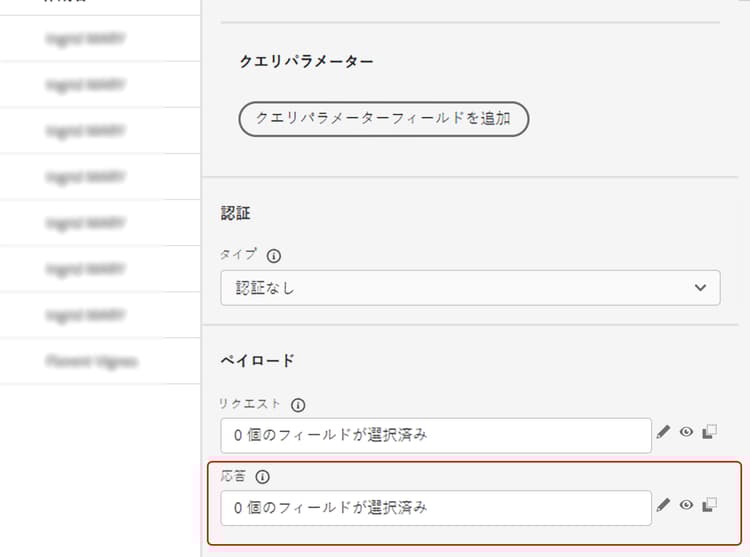
「応答」(成功応答)フィールド内でクリックします。
-
呼び出しで返されたペイロードの例をペーストします。 フィールドのタイプが正しい(文字列、整数など)ことを確認します。 次に、呼び出し中にキャプチャされた応答ペイロードの例を示します。 ローカルエンドポイントは、ロイヤルティポイントの数と、プロファイルのステータスを送信します。
code language-none { "customerID" : "xY12hye", "status":"gold", "points": 1290 }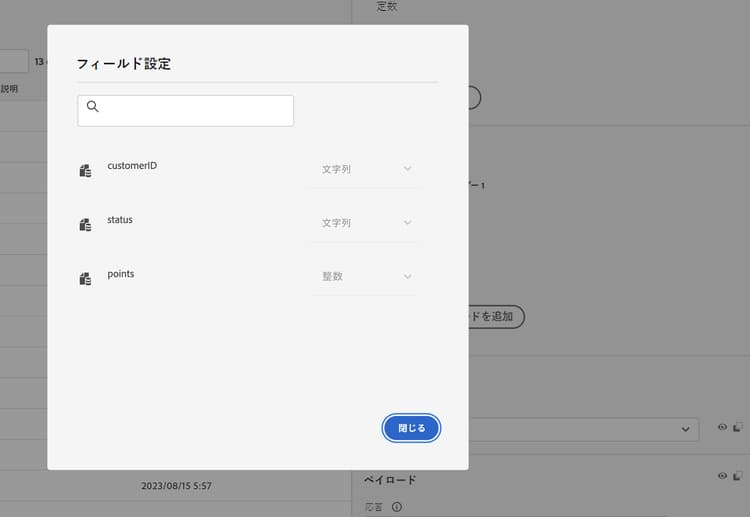
API が呼び出されるたびに、ペイロードの例に含まれるすべてのフィールドが取得されます。
-
(オプション)エラー応答ペイロードを有効にして、呼び出しが失敗した際に返される形式を取得し、サンプルペイロードをペーストします。 これを行うには、カスタムアクション設定で「エラー応答ペイロードを定義」を選択します。 ペイロードフィールドの設定について詳しくは、カスタムアクションの設定を参照してください。
code language-none { "errorResponse" : "customer not found" }エラー応答ペイロードは、カスタムアクション設定で有効にした場合にのみ使用できます。
-
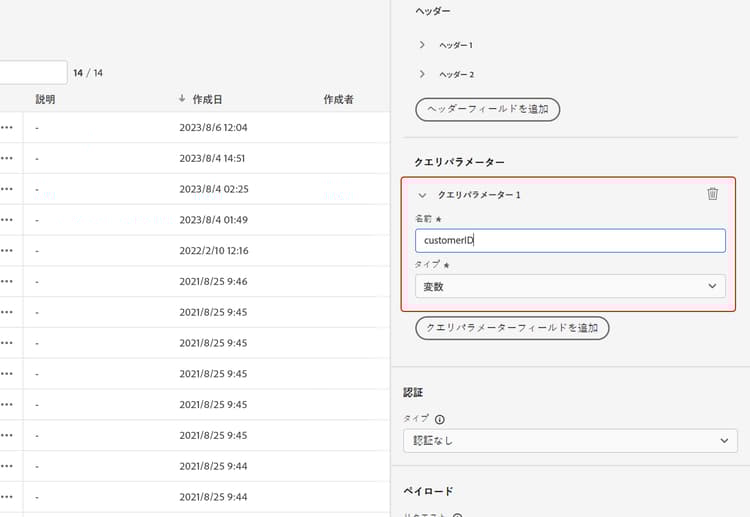
では、クエリパラメーターとして customerID も追加してみましょう。
-
「保存」をクリックします。
ジャーニーで応答を活用 response-in-journey
カスタムアクションをジャーニーに追加するだけです。 その後、条件、その他のアクションおよびメッセージのパーソナライゼーションで応答ペイロードフィールドを活用できます。
エラー応答ペイロードを定義した場合、コンテキスト属性/Journey Orchestration/アクション/<action name>/errorResponse の下に公開されます。 これをタイムアウトとエラー分岐で使用して、フォールバックロジックとエラー処理を推進できます。
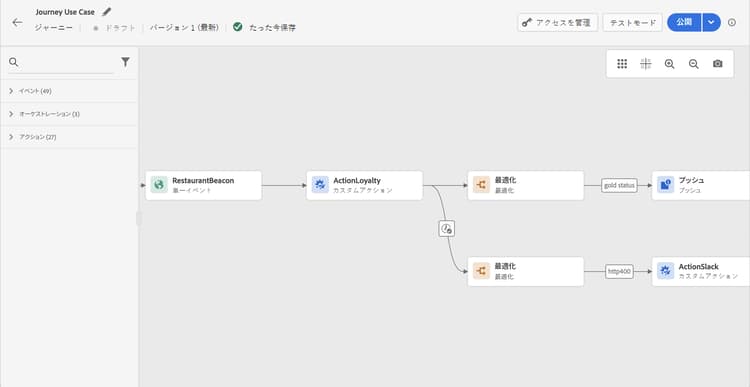
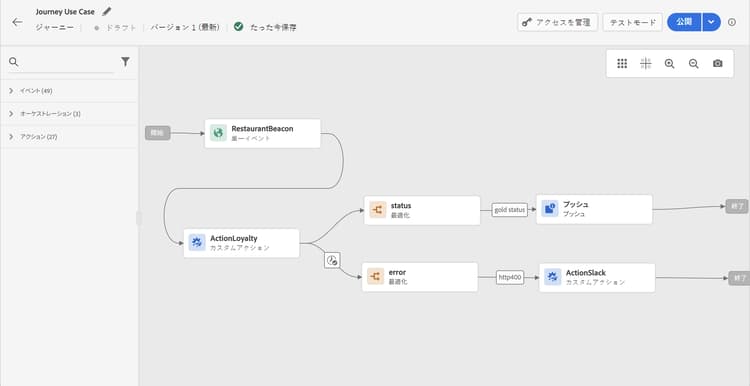
例えば、ロイヤルティポイント数を確認する条件を追加できます。 ユーザーがレストランに入ると、ローカルエンドポイントは、プロファイルのロイヤルティ情報が入った呼び出しを送信します。 プロファイルがゴールド顧客の場合は、プッシュを送信できます。 また、呼び出しでエラーが検出された場合は、カスタムアクションを送信して、システム管理者に通知します。
-
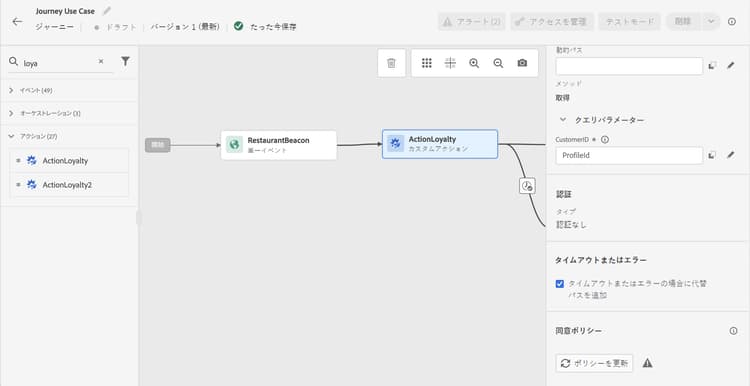
イベントと、先ほど作成した「ロイヤルティ」カスタムアクションを追加します。
-
「ロイヤルティ」カスタムアクションで、プロファイル ID を使用して顧客 ID クエリパラメーターをマッピングします。 「タイムアウトまたはエラーの場合に代替パスを追加」オプションをオンにします。
-
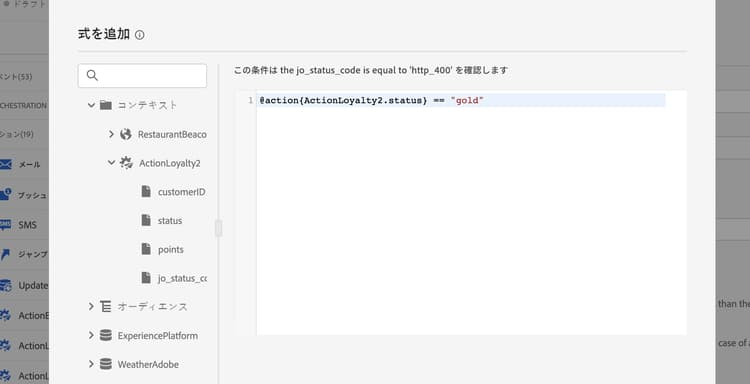
1 つ目の分岐で、条件を追加し、高度なエディターを使用して、「コンテキスト」ノードの下にあるアクション応答フィールドを活用します。
-
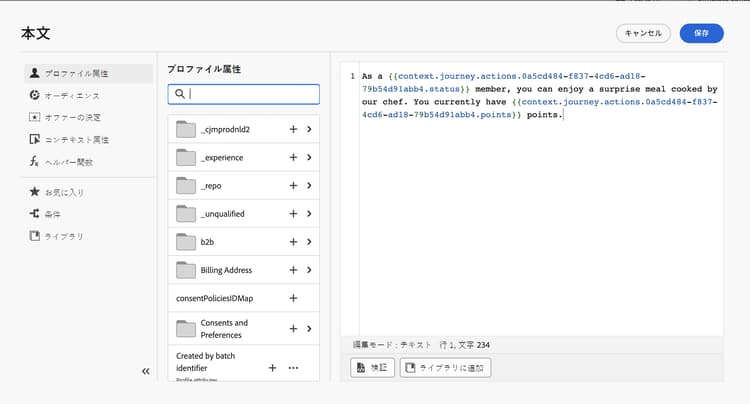
次に、プッシュを追加し、応答フィールドを使用してメッセージをパーソナライズします。 この例では、ロイヤルティポイント数と顧客ステータスを使用してコンテンツをパーソナライズします。 アクション応答フィールドは、コンテキスト属性/Journey Orchestration/アクションで使用できます。
note NOTE 各プロファイルがカスタムアクションに入ると、呼び出しをトリガーします。 応答が常に同じであっても、ジャーニーはプロファイルごとに 1 回の呼び出しを実行します。 -
タイムアウトとエラーの分岐で、条件を追加し、ビルトインの jo_status_code フィールドを活用します。 この例では、
http_400 エラータイプを使用しています。 この節を参照してください。code language-none @action{ActionLoyalty.jo_status_code} == "http_400"エラー応答ペイロードが定義されている場合は、そのフィールドもターゲットにできます。例:
code language-none @action{ActionLoyalty.errorResponse.errorResponse} == "customer not found"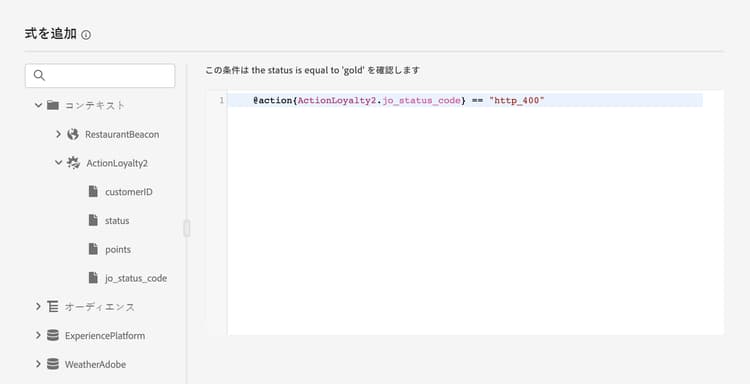
-
組織に送信するカスタムアクションを追加します。
テストモードログ test-mode-logs
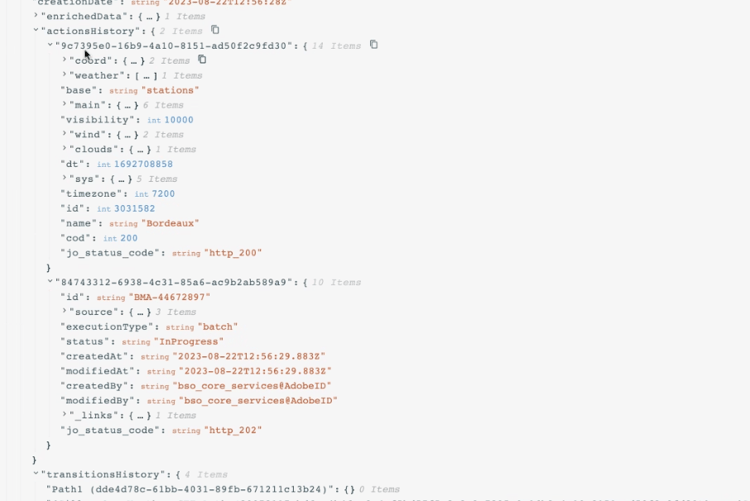
カスタムアクション応答に関連するステータスログに、テストモードでアクセスできます。 ジャーニーに応答を含むカスタムアクションを定義している場合は、(そのカスタムアクションからの応答として)外部エンドポイントから返されたペイロードを表示するログの「アクション履歴」セクションが表示されます。 エラー応答ペイロードが定義されている場合は、失敗した呼び出しに対して含まれます。 これは、デバッグの面で非常に役立つ場合があります。
エラーステータス error-status
jo_status_code フィールドは、応答ペイロードが定義されていない場合でも常に使用できます。
このフィールドに指定できる値は次のとおりです。
- http ステータスコード:http_
<HTTP API call returned code>、例えば、http_200 や http_400 - タイムアウトエラー:timedout
- キャップエラー:capped
- 内部エラー:internalError
返された http コードが 2xx より大きい場合やエラーが発生した場合、アクション呼び出しはエラーと見なされます。 この場合、ジャーニーは専用のタイムアウトまたはエラー分岐に進みます。
カスタムアクションに対してエラー応答ペイロードが設定されている場合、そのフィールドは、失敗した呼び出しの errorResponse ノードの下に表示されます。 エラー応答ペイロードが設定されていない場合、そのノードは使用できません。
式の構文 exp-syntax
構文は次のとおりです。
#@action{myAction.myField}
以下に、いくつかの例を示します。
 // action response field
 @action{<action name>.<path to the field>}
 @action{ActionLoyalty.status}
 // action response field
 @action{<action name>.<path to the field>, defaultValue: <default value expression>}
 @action{ActionLoyalty.points, defaultValue: 0}
 @action{ActionLoyalty.points, defaultValue: @event{myEvent.newPoints}}
カスタムアクションの応答でコレクションを操作する際、currentActionField を利用して現在のアイテムにアクセスできます。
count(
@action{MyAction.MyCollection.all(
currentActionField.description == "abc"
)}
)
ネイティブチャネルでのカスタムアクション応答の使用 response-in-channels
カスタムアクションの応答ペイロードフィールドは、メッセージのパーソナライゼーションのためにネイティブチャネル(電子メール、プッシュ、モバイルメッセージ)で使用できます。 これには、外部 API によって返される配列やネストされたデータ構造を反復処理する機能が含まれます。
メッセージ内でカスタムアクションの応答データを反復処理する際の例や構文について詳しくは、Handlebars を使用したコンテキストデータの反復処理を参照してください。
その他のリソース
詳しくは、次のページを参照してください。
This section contains structured knowledge intended to support interpretation, retrieval, and question answering related to this topic.
For complete understanding, this information should be combined with the documentation on this page. Neither source is intended to stand alone; the page describes the feature, while this section provides additional context that helps disambiguate terminology, intent, applicability, and constraints.
- TL;DR: This page explains how to capture the response payload returned by a custom action’s API call and leverage it to orchestrate journeys, personalize messages, and handle errors.
Intents:
- Configure a custom action to capture success and failure response payloads
- Leverage response payload fields in conditions, other actions, and message personalization
- Handle errors and timeouts using the jo_status_code field and the errorResponse node
- Inspect custom action responses through test mode logs
- Use the expression syntax to reference response fields, including default values and collections
Glossary:
- Response payload: The example payload pasted in the Response (success response) field whose fields are retrieved on each call (product-specific)
- Error response payload: The payload captured when a call fails, enabled by selecting Define a failure response payload, exposed under the errorResponse node (product-specific)
- jo_status_code: A built-in field, always available even when no response payload is defined, that carries the call outcome (product-specific)
- actionsHistory: A section shown in test mode logs that displays the payload returned by the external endpoint (product-specific)
- currentActionField: A reference used to access the current item when manipulating collections in a custom action response (product-specific)
- Test mode: The mode through which you access status logs related to custom action responses (product-specific)
Guardrails:
- Scalar arrays are supported in the response payload, but heterogeneous arrays are not supported.
- Only newly created custom actions include the jo_status_code field out-of-the-box; to use it with an existing custom action you need to update the action, for example by updating the description and saving.
- An action call is considered in error when the returned http code is greater than 2xx or if an error occurs, and the journey flows to the dedicated timeout or error branch.
- If an error response payload is configured, its fields are exposed under the errorResponse node for failed calls; if none is configured, that node is not available.
- Each profile entering the custom action triggers one call, even if the response is always the same.
Terminology:
- Canonical name: API call response in custom actions — Acronym: n/a — variants: custom action response, response payload
- Synonyms: “success response” = “Response field”
- Do not confuse: “Response” (success response payload) ≠ “Error Response” (failure response payload defined via Define a failure response payload)
- jo_status_code values: http_
(for example http_200 or http_400), timedout (timeout error), capped (capping error), internalError (internal error)``
`FAQ:
Q: Which array types are supported in the response payload? — Scalar arrays are supported; heterogeneous arrays are not supported. Q: Why does an existing custom action not expose the jo_status_code field? — Only newly created custom actions include it out-of-the-box; update the existing action, for example by updating the description and saving, to add it. Q: When is an action call considered in error? — When the returned http code is greater than 2xx or an error occurs, after which the journey flows to the dedicated timeout or error branch. Q: Where can the returned payload be inspected? — Through test mode logs, in the actionsHistory section that displays the payload returned by the external endpoint. Q: Can response payload fields be used in native channels? — Yes, response payload fields from custom actions can be used in native channels (email, push, mobile messages) for message personalization.
Personas:
developer: Can leverage API call response payload fields in conditions, other actions, and message personalization. Can reference action response fields using the expression syntax, for example @action{ActionLoyalty.status}. Can use currentActionField to access the current item while manipulating a collection in a custom action response. Where: “Expression syntax”. admin: Can configure the custom action by pasting an example payload into the Response field to capture fields returned by the call. Can enable an error response payload by selecting Define a failure response payload in the custom action configuration. The page states that only newly created custom actions include the jo_status_code field out-of-the-box. Where: “Configure the custom action”.
Onboarding:
Level: Experienced First minimal step: Paste an example of the payload returned by the call. Success check: Each time the API is called, the system retrieves all the fields included in the payload example. Previous: Before configuring the response payload, create the custom action: Configure a custom action (action/about-custom-action-configuration.md) Next: To iterate over arrays and nested data from the response in messages: Iterate over contextual data (personalization/iterate-contextual-data.md)`
``