このページ: Journey OptimizerをAdobe Campaign Standardに接続して、電子メール、プッシュ通知、モバイルメッセージをトランザクションメッセージ機能を通じて送信できるようにします。
Adobe Campaign Standard がある場合は、ビルトインのアクションを使用して、Adobe Campaign Standard に接続できます。 Adobe Campaign Standardのトランザクションメッセージ機能を使用すると、電子メール、プッシュ通知、モバイルメッセージを送信できます。
Journey Optimizer で使用するには、Campaign Standard トランザクションメッセージとそれに関連するイベントを公開する必要があります。 イベントが公開されてもメッセージが表示されない場合、Journey Optimizer インターフェイスには表示されません。 メッセージが公開されても、関連するイベントが公開されなかった場合、Journey Optimizer インターフェイスには表示されますが、使用はできません。
ガードレールと制限 important-notes
-
Adobe Campaign Standard のアクションに対して、5 分あたり 4,000 回の呼び出しのキャップルールが自動的に定義されます。 トランザクションメッセージ SLA の詳細については、Adobe Campaign Standard 製品説明を参照してください。
-
Adobe Campaign Standard 統合は、アクションリストの専用ビルトインのアクションを使用して設定されます。 これは、サンドボックスごとに設定する必要があります。
-
「オーディエンスの選定」または「オーディエンスを読み取り」アクティビティでは、Campaign Standard アクションを使用できません。
-
1 つのジャーニーで、ビルトインのチャネルアクションと Campaign Standard アクションの両方を使用することはできません。
アクションの設定 configure-action
Journey Optimizer では、トランザクションメッセージごとに 1 つのアクションを設定する必要があります。
Campaign Standard アクションを設定するには、次の手順に従います。
-
「管理」メニューセクションで「設定」を選択します。
-
「アクション」セクションで、「管理」をクリックします。 アクションのリストが表示されます。
-
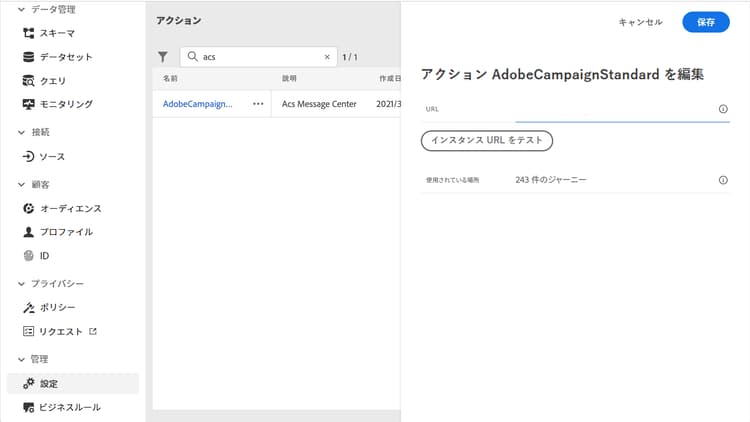
ビルトインの AdobeCampaignStandard アクションを選択します。 画面の右側にアクション設定パネルが開きます。
-
Adobe Campaign Standard インスタンスの URL をコピーし、「URL」フィールドにペーストします。
-
「インスタンス URL をテスト」をクリックし、インスタンスの有効性をテストします。
note NOTE このテストでは、次のことを検証します。 -
ホストは「.campaign.adobe.com」、「.campaign-sandbox.adobe.com」、「.campaign-demo.adobe.com」、「.ats.adobe.com」または「.adls.adobe.com」です。
-
https で始まる URL
-
この Adobe Campaign Standard インスタンスに関連付けられている組織は、Journey Optimizer 組織と同じです。
-
この設定が完了すると、ジャーニーをデザインする際に、アクション カテゴリで3つのアクション(電子メール、プッシュ、モバイルメッセージ)を使用できるようになります。 使用方法の詳細情報
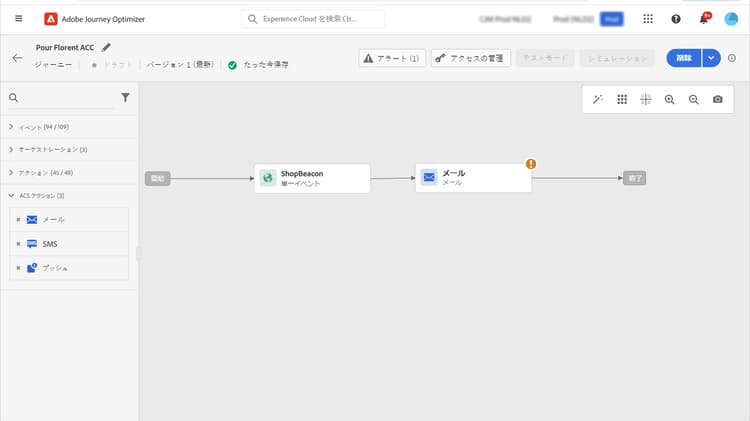
反応イベントを使用して、同じジャーニー内で送信される Campaign Standard メッセージに関連するトラッキングデータに反応します。
-
プッシュ通知では、ジャーニーはメッセージのクリック、送信、失敗に反応できます。
-
モバイルメッセージの場合、ジャーニーは送信されたメッセージや失敗したメッセージに反応できます。
-
メールでは、ジャーニーはメッセージのクリック、送信、開封、失敗に反応できます。 反応イベントの詳細情報
サードパーティのシステムを使用してメッセージを送信する場合は、カスタムアクションを追加および設定する必要があります。 カスタムアクション設定の詳細情報
This section contains structured knowledge intended to support interpretation, retrieval, and question answering related to this topic.
For complete understanding, this information should be combined with the documentation on this page. Neither source is intended to stand alone; the page describes the feature, while this section provides additional context that helps disambiguate terminology, intent, applicability, and constraints.
- TL;DR: This page explains how to integrate Journey Optimizer with Adobe Campaign Standard through the AdobeCampaignStandard action so journeys can send emails, push notifications, and SMS through its transactional messaging capabilities.
Intents:
- Configure the AdobeCampaignStandard action for a sandbox
- Paste and test the Adobe Campaign Standard instance URL
- Make the Campaign Standard Email, Push, and SMS actions available in the Action category when designing a journey
- Use a Reactions event to react to tracking data from a Campaign Standard message
- Understand the capping and activity constraints of the integration
Glossary:
- AdobeCampaignStandard action: The action selected from the action list to connect Journey Optimizer to Adobe Campaign Standard (product-specific)
- Transactional Messaging: The Adobe Campaign Standard capability used to send emails, push notifications, and SMS from Journey Optimizer (product-specific)
- Test the instance URL: The button that verifies the host, that the URL starts with https, and that the organization matches the Journey Optimizer organization (product-specific)
- Reactions event: An event that reacts to tracking data related to a Campaign Standard message sent within the same journey (product-specific)
Guardrails:
- A capping rule of 4,000 calls per 5 minutes is automatically defined for Adobe Campaign Standard actions.
- The Adobe Campaign Standard integration is set up through a dedicated AdobeCampaignStandard action in the action list and must be configured for each sandbox.
- You cannot use a Campaign Standard action with an Audience qualification or Read audience activity.
- A journey cannot use both the native channels of the Action activity and Campaign Standard actions.
- The transactional message and its associated event must both be published: if only the event is published the message is not visible, and if only the message is published it is visible but not usable.
Terminology:
- Canonical name: Adobe Campaign Standard integration — Acronym: ACS (Adobe Campaign Standard) — variants: Campaign Standard action, AdobeCampaignStandard action
- Do not confuse: “native channels of the Action activity” ≠ “Campaign Standard actions” (Adobe Campaign Standard integration actions), which cannot both be used in the same journey
- Do not confuse: “Campaign Standard Email, Push, SMS actions” (available after configuring the integration) ≠ “Reactions event” (reacts to tracking data of a sent Campaign Standard message)
FAQ:
- Q: What is the capping limit for Adobe Campaign Standard actions? — A capping rule of 4,000 calls per 5 minutes is automatically defined.
- Q: Why is a Campaign Standard message not visible or not usable in Journey Optimizer? — If the event is published but the message is not, it is not visible; if the message is published but the event is not, it is visible but not usable.
- Q: Does the integration need to be configured once for the whole organization? — No, it is set up through a dedicated AdobeCampaignStandard action that must be configured for each sandbox.
- Q: Which tracking reactions are available per channel? — Push can react to clicked, sent, or failed; SMS to sent or failed; email to clicked, sent, opened, or failed.
- Q: Can a journey use both the native channels of the Action activity and Campaign Standard actions? — No, a journey cannot use both.