このページ:反応アクティビティを使用して、同じジャーニー内の開封数やクリック数などのメッセージトラッキングデータに応答し、エンゲージしない個人のタイムアウトパスを設定する方法について説明します。
概要 overview
パレットに表示される多数のイベントアクティビティの中に、ビルトインの 反応 イベントがあります。 このアクティビティを使用すると、同じジャーニーの中で送信したメッセージに関するトラッキングデータに反応することができます。 この情報は、Adobe Experience Platform と共有した時点でリアルタイムに取り込まれます。
クリックされたメッセージや開封されたメッセージに反応することができます。 例えば、個人が前回のメールを開封した場合やメール内をクリックした場合に別のメッセージを送信したり、コミュニケーションに関与しなかった場合に別のフォローアップメッセージを送信したりできます。
アクションアクティビティを参照してください。
反応アクティビティを使用すると、メッセージに対する反応がない場合にアクションを実行できます。 これには、反応アクティビティと並行して 2 つ目のパスを作成し、待機アクティビティを追加します。 待機アクティビティで定義した期間に反応がない場合は、2 つ目のパスが選択されます。 フォローアップメッセージなどの送信を選択できます。
反応イベントの設定方法 configure
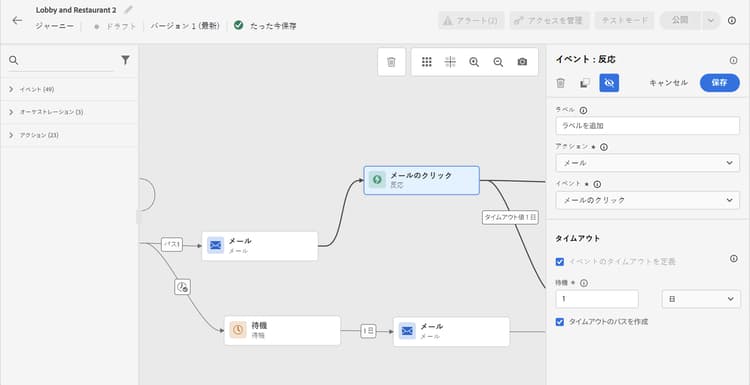
反応イベントを設定するには、次の手順に従います。
- ジャーニーキャンバスのチャネルアクションアクティビティの 直 後に 反応 アクティビティを配置します。
- 反応に ラベル を追加します。 この手順はオプションです。
- ドロップダウンリストから、反応するアクションアクティビティを選択します。 パスの中で前のステップに配置されている任意のアクションアクティビティを選択できます。
- 選択したアクションに応じて、反応する対象を選択します。
- イベントタイムアウト(40 秒 ~ 90 日)とタイムアウトパスを定義できます。 これにより、定義した期間内に反応しなかった個人に対して 2 つ目のパスが作成されます。 反応イベントを使用するジャーニーをテストする場合、テストモードの 待機時間 のデフォルト値は最小値である 40 秒です。 この節を参照してください。
ガードレールと制限 guardrails-limitations
- 反応アクティビティは、ジャーニーキャンバスのチャネルアクションアクティビティの 直 後に配置する必要があります。
- 反応アクティビティは、その前にチャネルアクションアクティビティがない場合は使用できません。
- チャネルアクションと 反応 アクティビティの間に 待機 アクティビティまたはその他のアクティビティを配置することはサポートされておらず、反応が期待どおりに機能しない場合があります。
- 反応イベントは、同じジャーニー内で送信されるメッセージのみを追跡できます。 別のジャーニーで送信されるメッセージは追跡できません。
- 反応イベントは、「トラッキング対象」タイプのリンクのクリックを追跡します。 購読解除リンクのクリックも考慮され、メールクリックのリアクションイベントをトリガーします。 ミラーページのリンクは考慮されません。
- メールの開封は、メールに組み込まれた 0 ピクセルの画像を使用してトラッキングされます。 メールクライアント(Gmail など)で画像がブロックされると、メールの開封は考慮されません。
This section contains structured knowledge intended to support interpretation, retrieval, and question answering related to this topic.
For complete understanding, this information should be combined with the documentation on this page. Neither source is intended to stand alone; the page describes the feature, while this section provides additional context that helps disambiguate terminology, intent, applicability, and constraints.
- TL;DR: This page explains how to use the built-in Reaction event activity in Adobe Journey Optimizer to branch journey paths based on real-time message engagement data such as email opens and link clicks.
Intents:
- Add a Reaction event activity to respond to message opens or clicks within a journey
- Configure an event timeout and timeout path for individuals who do not react within the defined duration
- Create a parallel path with a Wait activity to handle non-responders
- Select an action activity from an earlier step in the path to react to
Glossary:
- Reaction event: A built-in journey event activity that listens to real-time tracking data (opens, clicks) from a message sent earlier in the same journey (product-specific)
- Timeout path: A second path for individuals who did not react within the defined duration (product-specific)
Guardrails:
- A Reaction activity must be placed immediately after a channel action activity. Placing a Wait activity or any other activity between the channel action and the Reaction activity is not supported and may result in the Reaction not working as expected.
- A Reaction activity cannot be used if there is no channel action activity before it in the path.
- Reaction events can only track messages sent within the same journey; cross-journey tracking is not supported.
- Reaction events track clicks on links of the type “tracked”. Clicks on unsubscription links are also taken into account and trigger an Email Click reaction event. Mirror page links are not taken into account.
- Email opens rely on a 0-pixel tracking image; if the email client blocks images (e.g., Gmail), opens will not be recorded.
- You can define an event timeout between 40 seconds and 90 days, and a timeout path. In test mode, Wait time has a default and minimum value of 40 seconds.
Terminology:
- The built-in event in the palette is Reactions; the activity is Reaction.
FAQ:
- Q: Can a Reaction event track a message sent in a different journey? — No; reaction events only track messages sent within the same journey.
- Q: How do I handle individuals who do not open or click a message? — Add a parallel path alongside the Reaction activity with a Wait activity; individuals who do not react within the wait duration will follow that second path.
- Q: Are unsubscribe link clicks tracked by reaction events? — Yes; clicks on unsubscription links trigger an Email Click reaction event. Mirror page links are not taken into account.
- Q: What happens if an email client blocks images? — Email opens tracked via the 0-pixel image will not be recorded for clients that block images, such as Gmail.
- Q: What is the valid timeout range for a reaction event? — Between 40 seconds and 90 days.