このページ: Journey Optimizer での WhatsApp チャネルの仕組み、前提条件、制限事項について説明します。これにより、ジャーニーやキャンペーンに WhatsApp を追加する方法を決定できます。
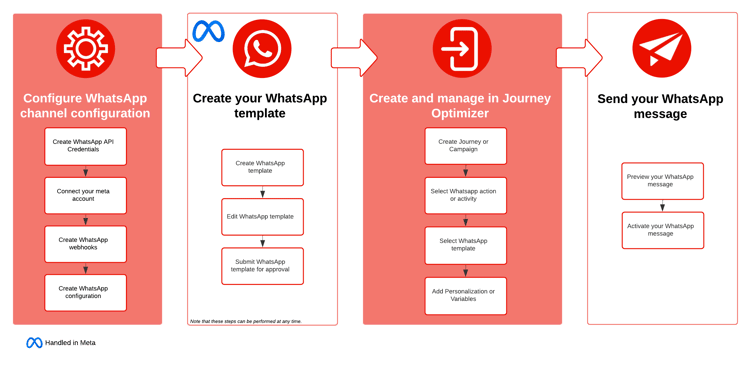
Meta の Cloud API 経由で、Journey Optimizer を通じて WhatsApp メッセージを直接送信できるようになりました。 この機能を使用すると、ジャーニーとキャンペーンへの WhatsApp のシームレスな統合を実現し、受信者との通信とエンゲージメントを強化できます。
-
ジャーニーの場合: ジャーニーを作成し、WhatsApp アクティビティを追加し、基本設定を定義してから、右側のアクション:WhatsApp パネルを参照して WhatsApp メッセージのコンテンツを作成します。 ジャーニーを作成する方法について詳しくは、このページを参照してください。
-
キャンペーンの場合: キャンペーンを作成し、アクションとして「WhatsApp」を選択し、基本設定を定義してから、メッセージのコンテンツを編集して送信する WhatsApp メッセージを定義します。 詳しくは、アクションキャンペーン | API トリガーキャンペーン | オーケストレーションキャンペーンを作成する方法を参照してください
ユースケース use-cases
WhatsApp は、オーディエンスが既にプラットフォームを使用しており、リッチコンテンツと真の双方向の会話を組み合わせる場合に最も効果的に機能します。
使用しない場合 when-not-to-use
WhatsApp は、オーディエンスによる導入と明示的な同意に依存しているため、あらゆるシナリオに適しているわけではありません。 次のような状況では、別のチャネルを検討してください。
- オーディエンスは WhatsApp を利用していません。地域やデモグラフィックによって導入状況が大きく異なるためです。
- 受信者は、Meta のメッセージングポリシーで必要となる明示的なオプトインを行っていません
- メッセージは緊急であり、保証された配信が必要であり、WhatsAppの配信とテンプレートレビューの制約により、モバイルメッセージまたはプッシュ通知の方が適切に処理されます
- コンテンツが長文であるか、複雑であるため、より多くの文字数と豊富な書式設定が可能なメールでのやり取りの方が適しています
- WhatsApp の双方向のスレッドでは、タイムリーな返信が期待されているので、リアルタイムの会話形式のサポートは適していません
前提条件 prereq
WhatsApp を Journey Optimizer と統合するには、次が必要です。
- Meta Business Manager アカウント
- 送信者名と電話番号を検証済みの WhatsApp Business アカウント
- 適切な権限を持つユーザー認証トークン
- 承認済み Meta テンプレート
統合を進める前に、次も確認する必要があります。
制限事項 limitations
次の制限が WhatsApp チャネルに適用されます。
-
Adobe Journey Optimizer の WhatsApp チャネルは HIPAA に対応していますが、サードパーティベンダーはアドビの BAA の対象ではありません。 顧客は、独自のコンプライアンスとベンダー検証に責任を負います。
-
自動応答メッセージまたは定義済み応答メッセージはまだサポートされていません。
-
2025年4月以降、米国の電話番号(+1 ダイヤルコードと米国の市外局番で構成される番号)を持つ WhatsApp ユーザーに対するすべてのマーケティングテンプレートメッセージの配信が一時的に停止されました。 詳しくは、Meta ドキュメントを参照してください。
-
ネイティブ統合機能では、サードパーティのビジネスサービスプロバイダー(BSP)との統合は許可されていません。
チュートリアルビデオ video
以下のビデオでは、Adobe Journey Optimizer のネイティブチャネルとして WhatsApp を統合し、安全でリアルタイムのパーソナライズされたメッセージを大規模に配信する方法について説明します。
その他の学習リソース
WhatsApp のメッセージと設定に関するその他のビデオチュートリアルを参照してください。
This section contains structured knowledge intended to support interpretation, retrieval, and question answering related to this topic.
For complete understanding, this information should be combined with the documentation on this page. Neither source is intended to stand alone; the page describes the feature, while this section provides additional context that helps disambiguate terminology, intent, applicability, and constraints.
- TL;DR: This page introduces the WhatsApp channel in Journey Optimizer, delivered through Meta’s Cloud API, covering how it works in journeys and campaigns along with its use cases, prerequisites, and limitations.
Intents:
- Understand how the WhatsApp channel works in Journey Optimizer via Meta’s Cloud API
- Decide how to add WhatsApp to journeys and campaigns
- Evaluate WhatsApp use cases and situations when not to use the channel
- Identify the prerequisites needed to integrate WhatsApp with Journey Optimizer
- Understand the limitations that apply to the WhatsApp channel
Glossary:
- WhatsApp channel: The Journey Optimizer channel that sends WhatsApp messages directly through Meta’s Cloud API (product-specific)
- Cloud API: Meta’s API through which Journey Optimizer sends WhatsApp messages (product-specific)
- WhatsApp Flow template: A template type that builds guided, multi-step interactions within the chat, such as surveys and lead capture forms (product-specific)
- WhatsApp Business Account: A WhatsApp Business Account with a verified sender name and phone number, listed as a prerequisite to integrate WhatsApp (product-specific)
Guardrails:
- Prerequisites: a Meta Business Manager account, a WhatsApp Business Account with verified sender name and phone number, a user authorization token with appropriate permissions, and approved Meta templates.
- You must acknowledge WhatsApp content rules, compliance with Meta policies, and 24 Hour conversation limits before proceeding with integration.
- The WhatsApp channel is HIPAA-ready, but third-party vendors are not covered under Adobe’s BAA; customers are responsible for their own compliance and vendor validation.
- Automated or predefined response messages are not yet supported.
- Starting April 2025, delivery of all marketing template messages to WhatsApp users with a United States phone number (a +1 dialing code and a US area code) has been temporarily suspended.
- The native integration does not allow integration with third-party Business Service Provider (BSP).
- Explicit recipient opt-in is required by Meta’s messaging policies.
Terminology:
- Canonical name: WhatsApp channel — Acronym: n/a — variants: WhatsApp
- Do not confuse: “BSP” (third-party Business Service Provider, not allowed by the native integration) ≠ “Cloud API” (Meta’s API used for the native integration)
FAQ:
- Q: How does Journey Optimizer send WhatsApp messages? — Directly through Meta’s Cloud API, integrating WhatsApp into journeys and campaigns.
- Q: What do I need before integrating WhatsApp? — A Meta Business Manager account, a WhatsApp Business Account with verified sender name and phone number, a user authorization token with appropriate permissions, and approved Meta templates.
- Q: Can I reach US phone numbers with marketing templates? — Starting April 2025, delivery of all marketing template messages to WhatsApp users with a US phone number (+1 dialing code and US area code) has been temporarily suspended.
- Q: Is the WhatsApp channel HIPAA-compliant? — It is HIPAA-ready, but third-party vendors are not covered under Adobe’s BAA, and customers are responsible for their own compliance and vendor validation.
- Q: Can I use a third-party BSP with this integration? — No, the native integration does not allow integration with third-party Business Service Providers.
- Q: When should I not use WhatsApp? — When your audience does not use it, recipients have not opted in, the message is urgent and needs guaranteed delivery, the content is lengthy or complex, or real-time conversational support is not feasible.