このページ: Journey Optimizer で API トリガーキャンペーンを作成して、個々のユーザーまたはオーディエンスのライブアクティビティをリモートで開始、更新、終了できるようにします。
モバイル設定を指定し、Adobe Experience Platform Mobile SDK を実装したら、Journey Optimizer でライブアクティビティの作成を開始できます。
-
キャンペーンメニューにアクセスし、「キャンペーンを作成」をクリックします。
-
API トリガーキャンペーンタイプを選択します。
-
オーディエンスベースのキャンペーンには、「API トリガーマーケティング」を選択します
-
個々のキャンペーンには、「API トリガートランザクション」を選択します。
note important IMPORTANT API トリガートランザクションには、「高スループット」オプションを有効にしないでください。 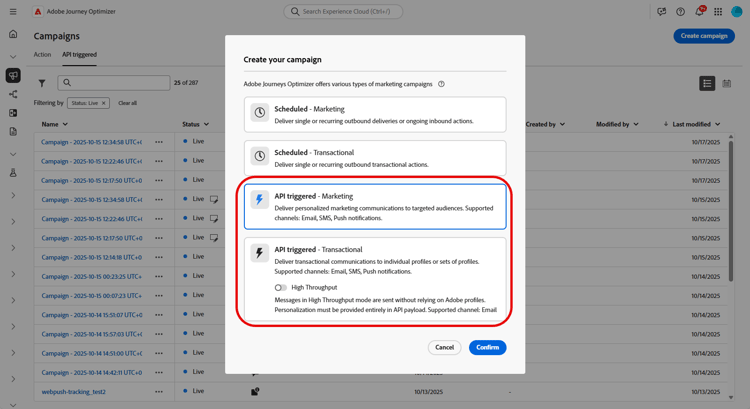
-
-
「プロパティ」セクションで、キャンペーンの「タイトル」と「説明」を編集します。
-
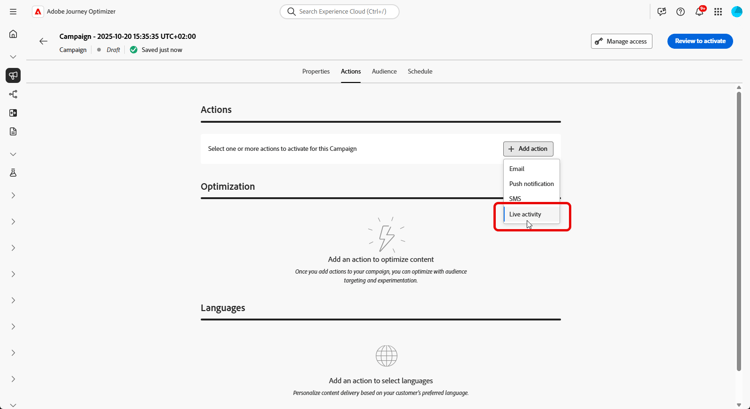
「アクション」セクションで、「ライブアクティビティ」を選択し、新しい設定を選択または作成します。
ライブアクティビティの設定について詳しくは、このページを参照してください。
-
「実験を作成」をクリックしてコンテンツ実験の設定を開始し、パフォーマンスを測定してターゲットオーディエンスに最適なオプションを特定するための処理を作成します。 詳細情報
-
「オーディエンス」タブから、ID タイプを選択します 詳細情報
note NOTE API トリガーマーケティングキャンペーンの場合、API ペイロードから APNs channelID サブスクリプションを確認する前に、最初のセグメントとして機能する既存のオーディエンスを選択できます。 -
キャンペーンは、特定の日付に実行するか、繰り返し頻度で実行するように設計されています。 キャンペーンの スケジュール を設定する方法については、この節を参照してください。
-
設定が完了したら、「レビューしてアクティブ化」をクリックし、「アクティブ化」をクリックします。
-
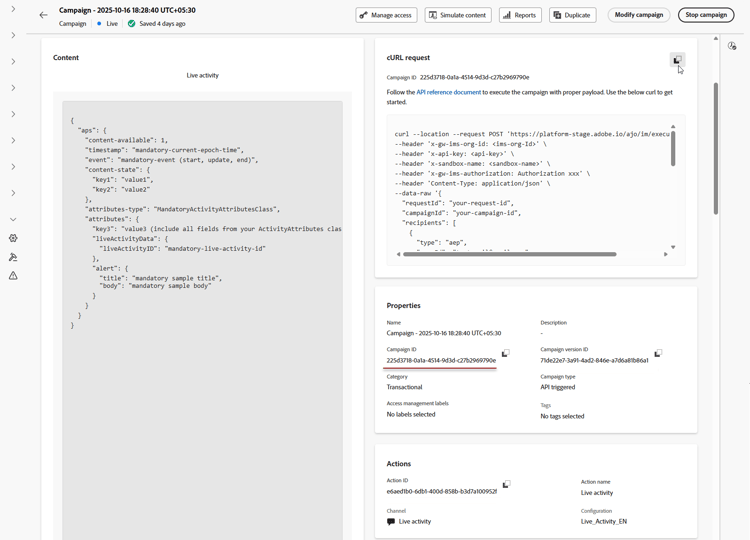
キャンペーンをアクティブ化したら、指定された cURL リクエストをテンプレートとして使用して、ライブアクティビティの開始、更新、終了イベントをトリガーします。 実行前に、特定のデータでサンプルペイロードを更新します。
また、ペイロードに含めるキャンペーン ID 識別子もコピーします。
➡️ OAuth トークンや API キーを含む認証要件について詳しくは、API トリガーキャンペーンドキュメントを参照してください。
ライブアクティビティをデザインしたら、ビルトインのレポートを使用してライブアクティビティの影響の測定を追跡できます。
ペイロードの例 payload
ペイロードの構造は、iOSがApple プッシュ通知サービス (APNs) aps オブジェクトを使用するプラットフォームによって異なります。一方、AndroidはFirebase Cloud Messaging (FCM) fcm オブジェクトを使用します。 プラットフォームとキャンペーンの種類については、次の例を使用してください。
iOS ペイロード
IOSの場合は、APNs aps オブジェクトにパーソナライゼーションフィールドとライフサイクルフィールドを配置します。 attributes-typeがアプリのLiveActivityAttributes構造体の名前と一致し、attributesがその構造体で定義されたフィールドと一致することを確認してください。
単一ユースケース (API トリガーのトランザクションキャンペーン)
このペイロードの例は、API トリガートランザクションキャンペーンのタイプを使用する個々のキャンペーン用です。 次のペイロード例のフィールドのほとんどは必須で、requestId、dismissal-date、alert のみがオプションです。
| code language-json |
|---|
|
ブロードキャストの使用例(API トリガーによるマーケティングキャンペーン)
このペイロードの例は、API トリガーマーケティングキャンペーンのタイプを使用するオーディエンスベースのキャンペーン用です。
| code language-json |
|---|
|
Android ペイロード
Androidの場合は、Firebase Cloud Messaging (FCM) fcm オブジェクトにライブ アクティビティ フィールドを配置します。 アプリのスタイルプロバイダーが処理するように設定されているcustom_key_* キーを使用して、content_stateで動的な値を定義します。
単一ユースケース (API トリガーのトランザクションキャンペーン)
fcm オブジェクトには2つの時間フィールドが含まれており、どちらもエポック秒で表されます。timestampはメッセージの順序を制御します。 各開始、更新、終了イベントでは、同じnotification_id(ブロードキャストの場合はtopic_name)に対して、前のイベントよりも大きい値を使用する必要があります。 更新は、タイムスタンプが最後に処理された値よりも新しい場合にのみ表示されます。 古いタイムスタンプまたは同じタイムスタンプは無視されます。whenは、通知の表示時間を制御します。 このオプションのフィールドは、AndroidのsetWhenメソッドに対応しており、メッセージの順序には影響しません。 古い値は表示の問題を引き起こす可能性があるため、その値を合理的に最新の状態に保ちます。
これらのペイロードは、API トリガーのトランザクション タイプの個々のキャンペーンに使用します。
すべての開始、更新、終了イベントに同じnotification_idを使用して、同じライブアクティビティインスタンスをターゲットにしていることを確認します。
| code language-json |
|---|
|
ライブアクティビティを更新するには、event_typeをupdateに設定し、notification_idを変更しないでください。 最新のステータスを反映するために、必要に応じてbody、critical_text、およびcontent_stateの値を更新します。
| code language-json |
|---|
|
ライブアクティビティを終了するには、event_typeをendに設定します。 オプションで、dismiss_afterを含めて、完了したライブアクティビティが却下されるまでの遅延を秒単位で指定します。
| code language-json |
|---|
|
ブロードキャストの使用例(API トリガーによるマーケティングキャンペーン)
このペイロードは、API トリガーマーケティング タイプのオーディエンスベースのキャンペーンに使用します。
ユーザーのデバイスが購読するFCM トピックにtopic_nameを設定します。 すべての更新イベントと終了イベントを同じトピックに送信し、同じライブアクティビティ通知をターゲットにするためにnotification_idを変更しないでください。
| code language-json |
|---|
|
実行メタデータを使用したカスタムデータの追加 metadata
executionMetadata は、API トリガートランザクションキャンペーンでのみ使用できます。オプションの executionMetadata フィールドを使用して、注文 ID、ロイヤリティ層、地域コードなど、独自の カスタムデータ をプロファイルに添付します。 Journey Optimizer はこのデータを実行と共に保存するので、後で ライブアクティビティフィードバック データセットから取得し、配信結果を独自のビジネスレコードに一致させることができます。
このデータを API 経由で送信するには、executionMetadata フィールドの Messaging API リファレンスを参照してください。 デバイス上で値を読み返すには、API トリガーからの実行メタデータの受信に関する Mobile SDK ガイドを参照してください。
実行メタデータを含むカスタムデータを追加するには:
-
userIdとnamespaceの横で、プロファイルにexecutionMetadataを追加します。 文字列キーと文字列値のみが受け入れられ、文字列以外の値を送信する場合は、文字列に変換してから送信します。 -
値は、送信されたとおりに記録されます。
executionMetadataはパーソナライゼーション式をサポートしていないので、{{...}}式は解決されず、リテラルテキストとして処理されます。 常に最終的なリテラル値を送信する必要があります。 -
各プロファイルには、最大 50 個のキーと値のペアを格納でき、すべてのキーと値を合わせたサイズの制限は 2 KB です。 この制限を超えるメタデータは破棄されますが、ライブアクティビティは引き続き配信されます。 レポート目的で必要な情報にペイロードを制限します。
この例では、orderId、tier、restaurant、region は、独自の値です。 ライブアクティビティがトリガーされたら、フィードバックデータセットから読み返り、配信と注文レコードをリンクできます。
| code language-json |
|---|
|
| note |
|---|
| NOTE |
IOSと同じように、Androidの実行メタデータを取得します。AJO Message Feedback データセットのmessage.feedback イベントから取得します。 クエリの例については、「詳細:データセットクエリを使用したデバッグ」の節を参照してください。 |
| Androidは、モバイルSDK用のオープンソースのAdobe Experience Platform(AEP)メッセージング拡張機能を使用します。 |
この例では、seatとtypeは、予約の詳細を含むカスタムメタデータフィールドです。 ライブアクティビティをトリガーした後、ライブアクティビティフィードバックデータセットからこれらの値を取得して、配信結果を予約レコードに関連付けます。
| code language-json |
|---|
|
チュートリアルビデオ
iOS ライブアクティビティを Adobe Journey Optimizer と連携して設定し、iPhone のロック画面と Dynamic Island でリッチなリアルタイム更新を提供する方法について説明します。
This section contains structured knowledge intended to support interpretation, retrieval, and question answering related to this topic.
For complete understanding, this information should be combined with the documentation on this page. Neither source is intended to stand alone; the page describes the feature, while this section provides additional context that helps disambiguate terminology, intent, applicability, and constraints.
- TL;DR: This page explains how to build an API-triggered campaign in Journey Optimizer to remotely start, update, and end Live activities for individual users or audiences, and how to attach custom data to a profile using the optional
executionMetadatafield.
Intents:
- Create an API-triggered campaign for Live activities, selecting API-triggered Marketing for audience-based campaigns or API-triggered Transactional for individual campaigns
- Choose Live activity in the Actions section and select or create a configuration
- Create a content experiment with treatments to measure performance
- Activate the campaign and use the provided cURL request to trigger start, update, or end events
- Attach custom data to a profile using the optional
executionMetadatafield for later retrieval from the Live activity feedback dataset
Glossary:
- API-triggered Marketing: The campaign type used for audience-based campaigns (product-specific)
- API-triggered Transactional: The campaign type used for individual campaigns (product-specific)
- High Throughput: An option that should not be enabled for API-triggered Transactional Live activity campaigns (product-specific)
- Live activity: The action chosen in the Actions section, tied to a selected or newly created configuration (product-specific)
- executionMetadata: An optional field that attaches custom data to a profile, stored alongside the execution and retrievable from the Live activity feedback dataset (product-specific)
- Live activity feedback dataset: The dataset from which stored
executionMetadatavalues can be retrieved to match delivery results to your own records (product-specific) - event (iOS) / event_type (Android): The payload field whose values are
start,update, orend
Guardrails:
- For API-triggered Transactional campaigns, the High Throughput option should not be enabled.
executionMetadatais only available for API-triggered Transactional campaigns.executionMetadataaccepts only string keys and string values; convert any non-string value to a string before sending.executionMetadatadoes not support personalization expressions, so any{{...}}expression is treated as literal text rather than resolved.- Each profile can carry up to 50 key/value pairs in
executionMetadata(hard limit), with a combined size limit of 2 KB for all keys and values (hard limit). Metadata exceeding this limit is discarded, but the Live activity is still delivered. - In the iOS unitary payload example, most fields are mandatory; only
requestId,dismissal-date, andalertare optional.
Terminology:
- Canonical name: Live activity — Acronym: n/a — variants: Live activities
- Synonyms: “Unitary use cases” = “individual campaigns (API-triggered Transactional)”
- Synonyms: “Broadcast use cases” = “audience-based campaigns (API-triggered Marketing)”
- Do not confuse: “API-triggered Marketing” (audience-based campaigns) ≠ “API-triggered Transactional” (individual campaigns)
- Do not confuse: “start” ≠ “update” ≠ “end” (the values of the
eventfield in iOS payloads and theevent_typefield in Android payloads) - Do not confuse: “dismissal-date” (optional; auto-removes the activity when
eventisend) ≠ “timestamp” (current epoch time)
FAQ:
- Q: Which campaign type do I use for Live activities? — API-triggered Marketing for audience-based campaigns; API-triggered Transactional for individual campaigns.
- Q: Should High Throughput be enabled for API-triggered Transactional? — No; for API-triggered Transactional, the High Throughput option should not be enabled.
- Q: How do I trigger start, update, or end events after activation? — Use the provided cURL request as a template, update the sample payload with your specific data, and copy the Campaign ID into your payload.
- Q: What is
executionMetadatafor? — Attaching your own custom data, such as an order ID, loyalty tier, or region code, to a profile; it is stored alongside the execution and retrievable from the Live activity feedback dataset. It is only available for API-triggered Transactional campaigns. - Q: What are the
executionMetadatalimits? — Up to 50 key/value pairs per profile with a combined 2 KB size limit; only string keys and values are accepted, and personalization expressions are not resolved. Metadata exceeding the limit is discarded, but the Live activity is still delivered.