このページ:インターフェイスまたは API から LINE チャネル設定を設定して、Adobe Journey Optimizer が LINE Messaging API で認証し、顧客にメッセージを送信できるようにします。
-
チャネル/一般設定/チャネル設定メニューにアクセスし、「チャネル設定を作成」をクリックします。
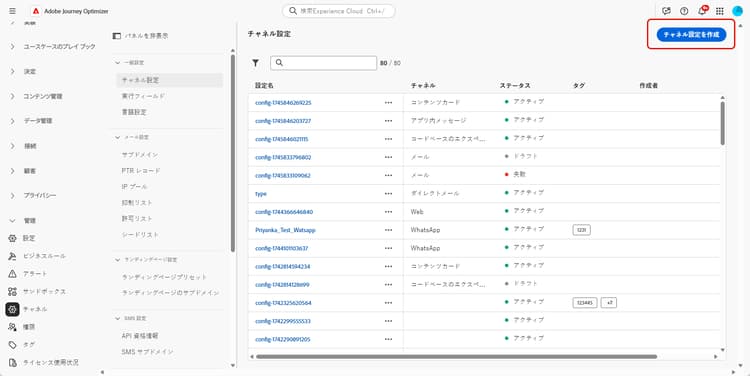
-
設定の名前と説明(オプション)を入力し、設定するチャネルを選択します。
note NOTE 名前は、文字(A ~ Z)で始める必要があります。 使用できるのは英数字のみです。 アンダースコア( _)、ドット(.)、ハイフン(-)も使用できます。 -
設定にカスタムまたはコアのデータ使用ラベルを割り当てるには、「アクセスを管理」を選択します。 オブジェクトレベルのアクセス制御(OLAC)について詳しくは、こちらを参照してください。
-
LINE チャネルを選択します。
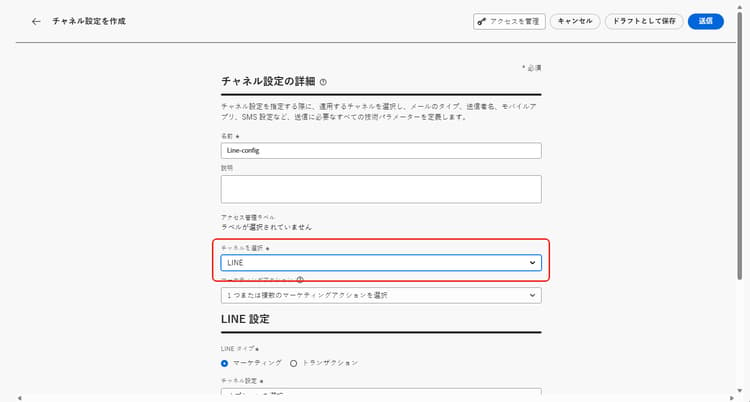
-
この設定を使用してメッセージに同意ポリシーを関連付けるには、マーケティングアクションを選択します。 顧客の意向に従うために、そのマーケティングアクションに関連付けられているすべての同意ポリシーが活用されます。 詳細情報
-
設定のメッセージのタイプを選択します。
- マーケティング:小売店の毎週のプロモーションなど、プロモーションメッセージの場合。 これらのメッセージには、ユーザーの同意が必要であり、ユーザーのオプトインに関する LINE のポリシーに準拠する必要があります。
- トランザクション:注文確認、パスワードリセット通知、配信の更新など、非商用メッセージの場合。 これらのメッセージは、アドビからのお知らせを登録解除したユーザーにも送信できますが、厳密には特定のトランザクションコンテキストに制限されています。
-
「チャネル設定」を選択します。
チャネル設定を行うには、アドビ担当者にお問い合わせください。
-
マッピングする LINE ユーザー ID を選択します。 これは、LINE チャネル内の個人ユーザーにメッセージをリンクするために使用される識別子です。
note NOTE ここにマッピングする LINE ユーザー ID は、既に顧客の Real-Time Customer Profile に存在している必要があります。 LINE ユーザー ID をキャプチャし(例:LINE ログインまたは LIFF SDK 経由)、Adobe Experience Platform に取り込み、ID サービスを使用して既知の識別子にステッチすることで、Journey Optimizer が統合プロファイルに到達できるようにします。 Journey Optimizer の ID の詳細情報。 ID サービスを使用して LINE ユーザー ID を顧客プロファイルと統合するエンドツーエンドの例について詳しくは、AEP ID ステッチを使用した LINE ユーザー ID と顧客プロファイルの統合のコミュニティ記事を参照してください。 -
ブランド名など、送信者名を入力します。
-
変更を送信します。
LINE メッセージを作成する際に、設定を選択できるようになりました。
LINE Channel settings API の設定 line-api
この API は、LINE Messaging API への接続に必要な認証と設定の詳細を保存するチャネル設定を指定します。 これらの設定により、Adobe Journey Optimizer は指定された資格情報を使用して LINE を通じてメッセージを認証および送信できます。
エンドポイント
POST https://platform.adobe.io/journey/imp/config/channel-settings
リクエスト本文
{
    "name": "your_defined_name",
    "channelRegistryId": "line",
    "channel": "line",
    "channelSettings": {
        "channelId": "your_line_channel_id",
        "channelSecret": "your_line_channel_secret"
    }
}
チャネル設定の応答
{
"id": "3603ed66-ae86-42b8-8a90-d4b4e54e7c3b",
"name": "your_defined_name",
"channelRegistryId": "line",
"channel": "line",
"channelSettings": {
    "channelId": "your_line_channel_id",
    "channelSecret": "your_line_channel_secret"
    },
    "channelPublicationId": "v1_line",
    "createdAt": "2025-07-30T12:00:00.000Z",
    "modifiedAt": "2025-07-30T12:00:00.000Z",
    "isFromLatestVersion": true,
    "_etag": "\"eab98d24-18af-48ae-90f9-e59d4f8cfb2b\""
}
This section contains structured knowledge intended to support interpretation, retrieval, and question answering related to this topic.
For complete understanding, this information should be combined with the documentation on this page. Neither source is intended to stand alone; the page describes the feature, while this section provides additional context that helps disambiguate terminology, intent, applicability, and constraints.
- TL;DR: This page explains how to create a LINE channel configuration, from the interface or the API, so that Journey Optimizer can authenticate with the LINE Messaging API and send messages to your customers.
Intents:
- Create a LINE channel configuration from the Channel configurations menu
- Associate consent policies to the configuration through marketing actions
- Choose the message type (Marketing or Transactional) for the configuration
- Map the LINE user ID and define the Sender Name
- Configure the LINE Channel settings through the API
Glossary:
- Channel configuration: The configuration created from Channels > General settings > Channel configurations for which you enter a name, a description (optional), and the channel to configure (product-specific)
- Marketing action: The setting used to associate consent policies to the messages using this configuration, so that customer preferences are respected (product-specific)
- Channel settings: The connection settings that store the authorization and configuration details for connecting to the LINE Messaging API (product-specific)
- LINE user ID: The identifier used to link messages to individual users within your LINE channel (product-specific)
- Sender Name: The name, such as your brand’s name, entered for the configuration (product-specific)
Guardrails:
- Configuration names must begin with a letter (A-Z) and can only contain alphanumeric characters, underscore, dot, and hyphen.
- Marketing messages require user consent and should comply with LINE’s policy regarding user opt-ins.
- Transactional messages can be sent even to users who have unsubscribed from marketing communications but are strictly limited to specific transactional contexts.
- The LINE user ID mapped here must already exist on your customers’ Real-Time Customer Profile.
- For the Channel settings field, reach out to your Adobe representative to set up your Channel settings.
- The API uses headers including a user token from your technical account, the client ID from Adobe Developer Console, the IMS Organization ID, the sandbox name, and Content-Type application/json.
Terminology:
- Canonical name: LINE channel configuration — Acronym: n/a — variants: channel configuration
- Do not confuse: “Marketing” (promotional messages requiring user consent) ≠ “Transactional” (non-commercial messages limited to specific transactional contexts)
- Do not confuse: “Channel settings” (authorization and connection details for the LINE Messaging API) ≠ “Marketing action” (associates consent policies to the configuration)
FAQ:
- Q: What characters are allowed in a configuration name? — The name must begin with a letter (A-Z) and can only contain alphanumeric characters, underscore, dot, and hyphen.
- Q: What is the difference between a Marketing and a Transactional configuration? — Marketing is for promotional messages that require user consent, while Transactional is for non-commercial messages that can reach unsubscribed users but are strictly limited to specific transactional contexts.
- Q: Does the LINE user ID need to exist beforehand? — Yes, the LINE user ID mapped in the configuration must already exist on your customers’ Real-Time Customer Profile.
- Q: How are the Channel settings set up? — Reach out to your Adobe representative to set up your Channel settings.
- Q: Can the Channel settings be configured through the API? — Yes, the page describes an API (POST to the channel-settings endpoint) that sets up Channel settings storing the authorization and configuration details needed to connect to the LINE Messaging API.