このページ:シグナルまたはグローバル定義から変数を設定し、これらを使用してオーケストレーションキャンペーンのターゲティング、条件、テストアクティビティロジックを推進する方法について説明します。
変数の設定方法 set
オーケストレーションキャンペーンでは、変数(ターゲティング、テスト条件、その他のキャンバスロジックを推進する値)を操作できます。 これらの値は、次の 2 つの場所から取得できます。
-
シグナル - キャンペーンスケジュールが シグナルによってトリガー される場合、キャンペーンを実行する際にパラメーターを渡すことができます。 これらのパラメーターは、その実行のトリガーされたオーケストレーションキャンペーンの変数として使用可能になります。 シグナルを使用したオーケストレーションキャンペーンのトリガー方法の詳細情報
-
グローバル変数 - API やシグナルは不要で、変数を編集メニューを使用して、名前と値のペアをキャンペーンに直接定義できます。 オーケストレーションキャンペーンでのグローバル変数の定義方法の詳細情報
キャンバスでの変数の使用 use
変数は、キャンバスの次の場所で使用できます。
-
ルールビルダー - ルールの式エディターを開き、イベント変数ピッカーを使用して変数を選択し、その参照を式に挿入します。 詳しくは、式の編集方法を参照してください。
以下の例では、
brandという名前の変数が渡され、ルールはその変数をフィルター条件として使用します。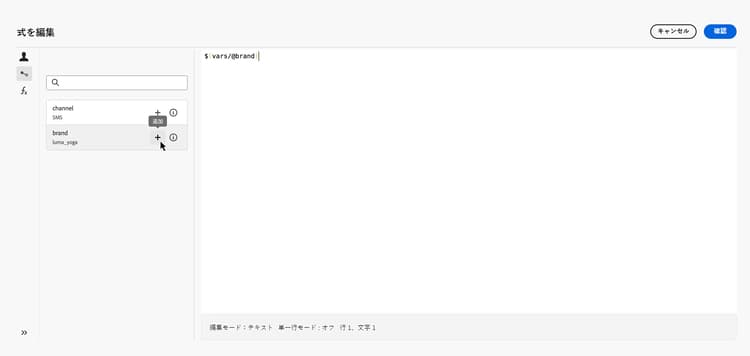
-
テストアクティビティ - 条件を定義すると、条件タイプドロップダウンリストには、母集団数と共に範囲内のすべての変数が一覧表示されます。 テスト分岐の基礎として使用する変数を選択します。 テストアクティビティの設定方法の詳細情報
以下の例では、
channel変数の値に応じてフローを異なるトランジションにルーティングするためにその変数が使用されています。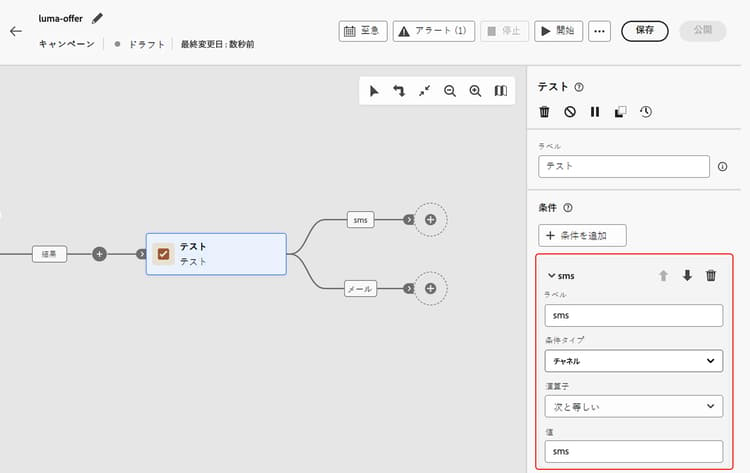
This section contains structured knowledge intended to support interpretation, retrieval, and question answering related to this topic.
For complete understanding, this information should be combined with the documentation on this page. Neither source is intended to stand alone; the page describes the feature, while this section provides additional context that helps disambiguate terminology, intent, applicability, and constraints.
- TL;DR: This page explains how to set variables from a signal or from global definitions in an Orchestrated campaign, and how to use them to drive targeting, conditions, and Test activity logic on the canvas.
Intents:
- Understand the two sources of variables in an Orchestrated campaign: signal parameters and global variables.
- Pass parameters through a signal so they become variables for that triggered run.
- Define global variables directly on the campaign using the Edit variables menu.
- Insert a variable reference into a rule builder expression using the event variables picker.
- Use a variable as the condition type for a Test activity branch.
Glossary:
- Variable: a value that drives targeting, Test conditions, and other canvas logic in an Orchestrated campaign (product-specific)
- Signal: the source of variables when the campaign schedule is set to Triggered by a signal; parameters passed when firing the campaign become variables for that run (product-specific)
- Global variables: name–value pairs defined directly on the campaign using the Edit variables menu, requiring no API or signal (product-specific)
- Event variables: the picker in the rule builder’s expression editor used to select a variable and insert its reference into an expression (product-specific)
- Condition type: the drop-down in the Test activity that lists all variables in scope alongside Population count, used to select a variable as the basis for a test branch (product-specific)
Guardrails:
- Variables support text values only.
- Variables drive canvas logic (rules, conditions) and cannot be used for message personalization.
Terminology:
- Canonical name: variable
- Do not confuse: “Global variables” (defined directly on the campaign via the Edit variables menu) ≠ “signal” parameters (passed when firing a triggered campaign, becoming variables for that run).
- Do not confuse: “event variables” (the picker in the rule builder used to select a variable) ≠ “variable” (the value itself that the picker lets you select).
FAQ:
- Q: Where can variables in an Orchestrated campaign come from? — From a signal (parameters passed when firing a triggered campaign) or from global variables (name–value pairs defined directly on the campaign via the Edit variables menu).
- Q: Do I need an API or a signal to define global variables? — No, global variables are defined directly on the campaign using the Edit variables menu, with no API or signal required.
- Q: What type of values do variables support? — Text values only.
- Q: Can variables be used for message personalization? — No, variables drive canvas logic such as rules and conditions, and cannot be used for message personalization.
- Q: How do I insert a variable into a rule builder expression? — Open the expression editor for a rule and use the event variables picker to select a variable and insert its reference.
- Q: How do I use a variable in a Test activity? — In the condition type drop-down, select a variable (listed alongside Population count) to use it as the basis for a test branch.
Related pages:
- To trigger an Orchestrated campaign using a signal and pass parameters that become variables: Learn how to trigger an Orchestrated campaign using a signal (orchestrated/trigger-orchestrated-campaign.md)
- To define global variables directly on the campaign: Learn how to define global variables in Orchestrated campaigns (orchestrated/global-variables.md)
- To use the event variables picker and insert a variable reference into a rule expression: Learn how to edit expressions (orchestrated/edit-expressions.md)
- To use a variable as the condition type in a Test activity: Learn how to configure the Test activity (orchestrated/activities/test.md)
Personas:
- marketer: Can set variables from a signal passed when firing a triggered campaign, or from global variables defined on the campaign using the Edit variables menu. Can insert a variable reference into a rule builder expression using the event variables picker. Can select a variable in the Test activity Condition type drop-down to use it as the basis for a test branch. Where: “Use variables in the canvas”.
Onboarding:
- Level: Intermediate
- First minimal step: Set the campaign schedule to Triggered by a signal and pass parameters, or define global variables on the campaign using the Edit variables menu.
- Success check: The variable is listed in the event variables picker or in the Test activity Condition type drop-down, available for use in the canvas.
- Next: To pass parameters through a signal so they become variables for a triggered run: Trigger an Orchestrated campaign using a signal (orchestrated/trigger-orchestrated-campaign.md); To define global variables directly on the campaign using the Edit variables menu: Define global variables in Orchestrated campaigns (orchestrated/global-variables.md)