このページ:オーケストレーションキャンペーンでグローバル変数を追加および管理する方法について説明します。これにより、共有の名前と値のペアを、ルールビルダー、テスト条件、その他のキャンバスロジックをまたいで再利用できます。
グローバル変数とは、単一のオーケストレーションキャンペーンで設定し、各実行時に再利用する名前と値のペアのことです。これを使用すると、共通の値(例:デフォルトのチャネルやテストメール)を使用して、テスト条件、ルールビルダー、その他のキャンバスロジックを操作できます。つまり、各アクティビティに同じ値を個別にペーストする必要がなくなります。
このページでは、グローバル変数の定義方法について説明します。 使用可能になったら、ルールと テスト 条件での使用方法について詳しくは、オーケストレーションキャンペーンでの変数の使用を参照してください。
オーケストレーションキャンペーンにグローバル変数を追加または編集するには、次の手順に従います。
-
オーケストレーションキャンペーンを開きます。
-
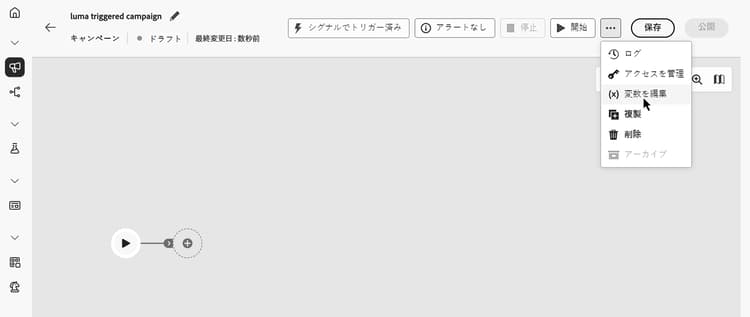
保存の横にある… アイコンをクリックし、「変数を編集」を選択します。
-
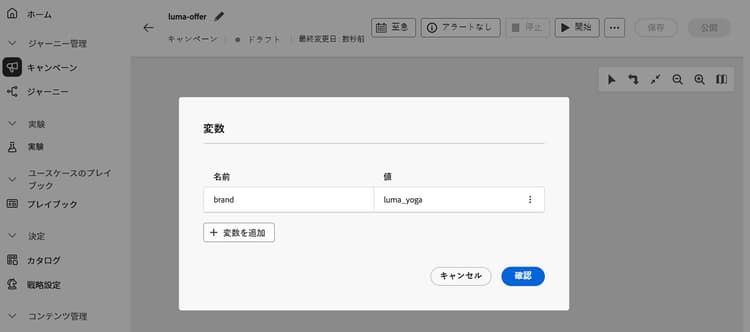
「変数を追加」をクリックし、変数の名前と値を設定します。 既存の変数を編集するには、「…」ボタンをクリックし、「編集」を選択します。
ルールと テスト 条件でグローバル変数を定義した後に使用する方法について詳しくは、オーケストレーションキャンペーンでの変数の使用を参照してください。
This section contains structured knowledge intended to support interpretation, retrieval, and question answering related to this topic.
For complete understanding, this information should be combined with the documentation on this page. Neither source is intended to stand alone; the page describes the feature, while this section provides additional context that helps disambiguate terminology, intent, applicability, and constraints.
- TL;DR: This page explains how to add and manage global variables on an Orchestrated campaign so shared name-value pairs can be reused across the rule builder, Test conditions, and other canvas logic.
Intents:
- Open the variables panel for an Orchestrated campaign.
- Add a new global variable with a name and value.
- Edit an existing global variable.
- Understand that global variables are defined per campaign for reuse across canvas logic.
Glossary:
- Global variable: a name-value pair set on a single Orchestrated campaign and reused on each run to steer Test conditions, the rule builder, and other canvas logic (product-specific)
- Edit variables: the menu option, accessed from the … icon next to Save, used to open the variables panel (product-specific)
- Add variable: the control used to create a new global variable by setting its name and value (product-specific)
Guardrails:
- none
Terminology:
- Canonical name: global variable — variants: variable
FAQ:
- Q: What is a global variable in an Orchestrated campaign? — A name-value pair set on a single Orchestrated campaign and reused on each run to steer Test conditions, the rule builder, and other canvas logic.
- Q: How do I add a global variable? — Open the Orchestrated campaign, click the … icon next to Save, select Edit variables, then click Add variable and set its name and value.
- Q: How do I edit an existing global variable? — In the variables panel, click the … button next to the variable and select Edit.
- Q: Where are global variables used once defined? — In rules and Test conditions on the campaign canvas.
Related pages:
- To use defined global variables in rules and Test conditions: Use variables in Orchestrated campaigns (orchestrated/variables-orchestrated-campaigns.md)
Personas:
- marketer: Can open the Orchestrated campaign and select Edit variables from the … icon next to Save. Can select Add variable and set the variable’s name and value, or select Edit to update an existing variable. Can reuse these name-value pairs in Test conditions and the rule builder on the campaign canvas. Where: “Define global variables in Orchestrated campaigns”.
Onboarding:
- Level: Intermediate
- First minimal step: Open the Orchestrated campaign.
- Success check: The variable becomes available to use in rules and Test conditions.
- Next: Use the defined global variables in rules and Test conditions: Use variables in Orchestrated campaigns (orchestrated/variables-orchestrated-campaigns.md)