このページ: Adobe Journey Optimizerのオーケストレーション済みキャンペーンで利用できるライブおよびリアルタイムのレポートを確認し、メール、モバイルメッセージ、プッシュ通知、ダイレクトメールをまたいでエンゲージメントとチャネルのパフォーマンスを測定する方法を説明します。
オーケストレーションキャンペーンでは、堅牢なレポート機能を通じて実用的なインサイトを提供します。 これらのインサイトは、オーディエンスの行動をより深く理解し、カスタマージャーニーの各ステップのパフォーマンスを測定し、データ駆動型の決定を行って今後のキャンペーンを最適化するのに役立ちます。 詳細な指標とビジュアライゼーションにより、エンゲージメントを追跡し、ターゲティング戦略を微調整して最大限の効果を得ることができます。
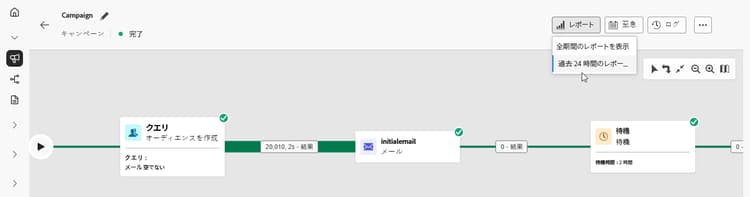
レポートのタイプ reporting-types


チャネルレポートの詳細




This section contains structured knowledge intended to support interpretation, retrieval, and question answering related to this topic.
For complete understanding, this information should be combined with the documentation on this page. Neither source is intended to stand alone; the page describes the feature, while this section provides additional context that helps disambiguate terminology, intent, applicability, and constraints.
- TL;DR: This page lists the live, all-time, and channel reports available for Orchestrated campaigns in Adobe Journey Optimizer, covering email, mobile message, push, and direct mail performance.
Intents:
- Find the live report that shows real-time impact and performance of an Orchestrated campaign.
- Find the all-time report for an Orchestrated campaign.
- Access channel-specific reports for email, mobile message, push, and direct mail.
- Understand when data becomes available in the Live report.
Glossary:
- Live report: a built-in dashboard that measures and visualizes in real time the impact and performance of Orchestrated campaigns, accessed from the View last 24 hours report menu (product-specific)
- All time report: a report fully integrated with Customer Journey Analytics capabilities, standardizing reporting across both platforms and improving data consistency and reliability (product-specific)
- Email report: the channel report for email performance in Orchestrated campaigns (product-specific)
- Mobile report: the channel report for mobile message performance in Orchestrated campaigns (product-specific)
- Push report: the channel report for push performance in Orchestrated campaigns (product-specific)
- Direct mail report: the channel report for direct mail performance in Orchestrated campaigns (product-specific)
Guardrails:
- Data are available in the Live report as soon as the Orchestrated campaign is executed.
Terminology:
- Canonical name: Customer Journey Analytics — Acronym: CJA — variants: none
- Do not confuse: “Live report” (real-time dashboard, available as soon as the campaign is executed, accessed from the View last 24 hours report menu) ≠ “All time report” (integrated with Customer Journey Analytics)
FAQ:
- Q: When does data appear in the Live report? — As soon as the Orchestrated campaign is executed.
- Q: How is the All time report different from the Live report? — The All time report is fully integrated with Customer Journey Analytics capabilities, standardizing reporting across both platforms and improving data consistency and reliability.
- Q: Which channel reports are available for Orchestrated campaigns? — Email report, Mobile report, Push report, and Direct mail report.
- Q: Where do I access the Live report? — From the View last 24 hours report menu.
Personas:
- marketer: Can view the Live report to measure and visualize in real time the impact and performance of Orchestrated campaigns. Can access the All time report, which is integrated with Customer Journey Analytics. Can access channel reports for email, mobile message, push, and direct mail. The page states that data are available in the Live report as soon as the Orchestrated campaign is executed. Where: “Types of reports”.
Onboarding:
- Level: Intermediate
- First minimal step: Select View last 24 hours report to open the Live report.
- Success check: Data are available in the Live report as soon as the Orchestrated campaign is executed.