このページ:「オーディエンス」タブでオーディエンスと ID タイプを選択し、アクションキャンペーンで適切な個人をターゲットにできるようにします。
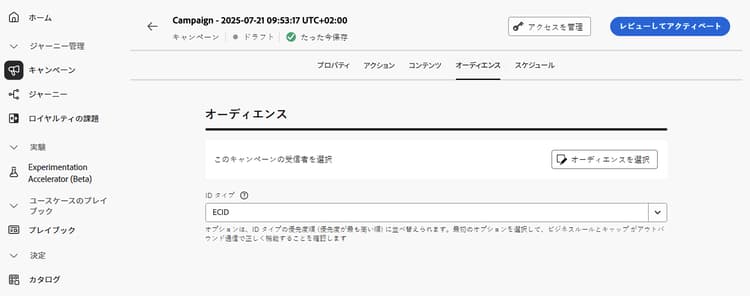
「オーディエンス」タブを使用して、キャンペーンオーディエンスを定義します。
-
オーディエンスを選択
マーケティングキャンペーンの場合は、「オーディエンスを選択」ボタンをクリックして、使用できる Adobe Experience Platform オーディエンスのリストを表示します。 詳しくは、オーディエンスを参照してください。
note important IMPORTANT オーディエンス構成からのオーディエンスおよび属性は現在、Healthcare Shield または Privacy and Security Shield では使用できません。 -
ID タイプを選択
「ID タイプ」フィールドで、選択したオーディエンスから個人を識別するために使用するキーのタイプを選択します。 既存の ID タイプを使用することも、Adobe Experience Platform ID サービスを使用して新しい ID タイプを作成することもできます。 標準 ID 名前空間について詳しくは、このページを参照してください。
1 つのキャンペーンで使用できる ID タイプは 1 つだけです。 様々な ID の中から選択した ID タイプを持たないセグメントに属する個人は、キャンペーンのターゲットにすることができません。 ID タイプと名前空間について詳しくは、Adobe Experience Platform ドキュメントを参照してください。
次の手順 next
アクションキャンペーンのオーディエンスの準備が整ったら、キャンペーンをスケジュールできます。 詳細情報
This section contains structured knowledge intended to support interpretation, retrieval, and question answering related to this topic.
For complete understanding, this information should be combined with the documentation on this page. Neither source is intended to stand alone; the page describes the feature, while this section provides additional context that helps disambiguate terminology, intent, applicability, and constraints.
- TL;DR: This page explains how to define the audience of an Action campaign in the Audience tab by selecting an audience and an identity type.
Intents:
- Select the audience of a Marketing campaign with the Select audience button, which displays the list of available Adobe Experience Platform audiences
- Choose the identity type used to identify the individuals of the audience
- Know that only one identity type is allowed per campaign
- Know that audiences and attributes from audience composition are unavailable with Healthcare Shield or Privacy and Security Shield
Glossary:
- Identity type: The type of key used to identify the individuals from the selected audience. It can be an existing identity type or a new one created using the Adobe Experience Platform Identity Service. (product-specific)
- Identity namespaces: Standard Identity namespaces are listed in the Adobe Experience Platform documentation. (product-specific)
Guardrails:
- Only one identity type is allowed per campaign.
- Individuals belonging to a segment that does not have the selected identity type among their different identities cannot be targeted by the campaign.
- The use of audiences and attributes from audience composition is currently unavailable for use with Healthcare Shield or Privacy and Security Shield.
Terminology:
- Canonical name: Action campaign audience — variants: campaign audience
FAQ:
- Q: How many identity types can a campaign use? — Only one identity type is allowed per campaign.
- Q: Why can an individual of my audience not be targeted? — Individuals belonging to a segment that does not have the selected identity type among their different identities cannot be targeted by the campaign.
- Q: Can I create a new identity type? — Yes, in the Identity type field you can either use an existing identity type or create a new one using the Adobe Experience Platform Identity Service.
- Q: Can I use audiences from audience composition with Healthcare Shield or Privacy and Security Shield? — No, audiences and attributes from audience composition are currently unavailable for use with them.
Related pages:
- Audiences: Learn more about audiences (audience/about-audiences.md)
- Audience composition: audience composition (audience/get-started-audience-orchestration.md)
- Next step, schedule: Schedule the Action campaign (campaigns/campaign-schedule.md)