Adobe AdvertisingとAdobe Audience Managerの統合
Adobe AdvertisingとAudience Managerは、次の方法で統合できます。
Audience Managerと他のAdobe セグメントの同期による広告のターゲティング
Search, Social, & CommerceとDSPは、広告主または代理店のAudience Managerおよびその他Adobeのオーディエンスのメタデータ、階層データ、固有のオーディエンスデータを取り込むことができます。 この独自の連携は、Adobe Advertisingを使用しているマーケターのみが利用できます。 「広告ターゲティング用にAdobe Audience Manager セグメントを読み込む」を参照してください。
Audience Managerと他のAdobe セグメントを使用して、Google Ads オーディエンスを作成します audience-manager-google-audiences
オプトインした広告主でAdvertising Search, Social, & Commerceさんのみ
Search, Social, & Commerce内で、Adobe Media Optimizer (HTTP)とAdobe Media Optimizer Batch Destinationを宛先として持つ既存のAudience Manager セグメントを使用して、ユーザーIDからGoogle Ads個の顧客一致オーディエンスを作成できます。 (Media OptimizerはSearch, Social, & Commerceの旧名です)。 これには、Adobe CX Enterpriseに公開されるAdobe Analytics セグメントと、Adobe CX Enterprise Audience Libraryを使用して作成されるセグメントが含まれます。 詳しくは、「Create Google Ads customer match audiences from Adobe audiences」を参照してください。
ユーザーIDの顧客マッチオーディエンス は、web サイトのタグベースのオーディエンスと同様に機能しますが、PII以外のIDは、標準の顧客マッチオーディエンスとweb サイトのタグベースのオーディエンスに対して明確なメリットを得るために、一意のオーディエンスメンバーに割り当てられます。
必要なユーザーIDを作成するには、web サイトでAdobe Advertising JavaScript タグ を使用する必要があります。 詳しくは、Adobe アカウントチームにお問い合わせください。
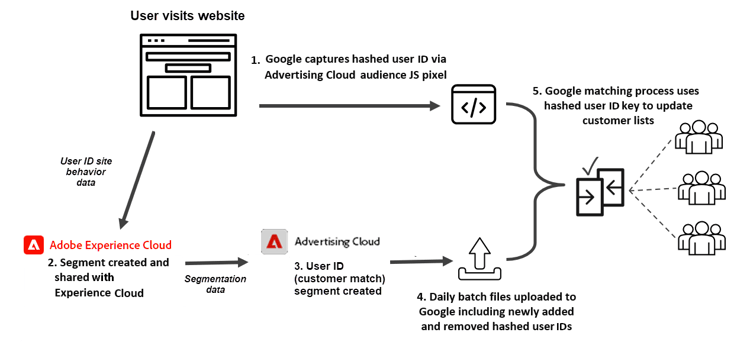
オーディエンスを作成したら、Google Ads キャンペーンで キャンペーンレベルまたは広告グループレベルのターゲットまたは除外として使用できます。
Audience Managerおよびその他Adobe セグメントを使用して広告をターゲティングまたは除外する audience-manager-targets
-
(オプトインした広告主とSearch, Social, & Commerce)キャンペーン レベルまたは広告グループレベルのターゲットまたは除外として Adobe セグメント 🔗を使用して作成されたGoogle Ads個のオーディエンスをGoogle Ads キャンペーンで使用できます。
-
(DSPを使用している広告主)既存のAdobe セグメントを広告プレースメントのターゲットとして使用できます。 You can optionally include the segments in reusable audiences, which you can use as targets or exclusions for multiple placements.
-
(Advertisers with Advertising Creative) You can use your existing Adobe segments as targets for specific creatives in your ad experiences.
Send DSP media exposure data to Audience Manager
Advertisers with DSP only
DSP customers with Adobe Audience Manager can capture data from ad campaigns using pixel calls to Audience Manager. You can then use the campaign data to build rule-based traits, which you can use to define new segments to enable various DSP use cases, such as more advanced segmentation, frequency management, marketing analytics, and reporting insights.
See “Overview of sending DSP media exposure data to Adobe Audience Manager” for more information.
Get richer insights into site activity with Audience Analytics
Adobe Advertising customers with Adobe Audience Analytics can send both Adobe Advertising-tracked data and Audience Manager segments to Analytics for enriched insights about site activity.
For more information, see “Adobe Audience Analytics for Adobe Advertising customers.”