In questa pagina: scopri come utilizzare l’attività di targeting Incremental query per restituire solo i nuovi record in ogni esecuzione di una campagna orchestrata, escludendo i profili già oggetto di targeting nelle esecuzioni precedenti.
L’attività Incremental query è un’attività Targeting che esegue una query di database ogni volta che viene eseguita la campagna orchestrata. La parte importante è che ogni esecuzione genera solo record il cui valore del campo data è successivo alla data dell’esecuzione precedente. In questo modo, eviti di eseguire nuovamente il targeting delle stesse persone o di riesportare le stesse righe.
Utilizzalo quando la campagna può essere eseguita più volte, ad esempio quando pianifichi la campagna, ad esempio settimanalmente o quando viene attivata da un segnale o da un’API esterna. Ogni esecuzione esegue il targeting solo dei record con data successiva all’esecuzione precedente, in modo da evitare duplicati.
Usi tipici:
- Messaggistica e pubblico: richiama solo i nuovi abbonamenti, i nuovi acquirenti o altri segmenti “nuovi dall’ultima esecuzione” nel passaggio successivo (ad esempio e-mail, messaggio mobile).
- Esportazioni in corso: invia solo righe nuove o aggiornate ai file per gli strumenti di reporting o BI, senza duplicare ciò che hai già esportato.
Configurare l’attività Incremental query incremental-query-configuration
Imposta la dimensione di targeting, crea la query e scegli in che modo l’attività decide quali record escludere dalle esecuzioni future.
-
Rilascia un’attività Incremental query nella campagna orchestrata.
-
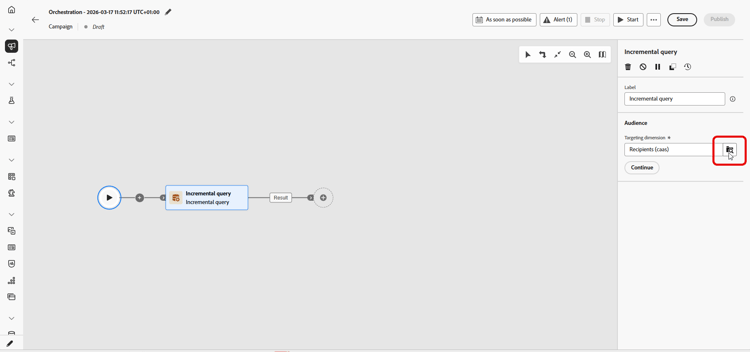
In Pubblico, scegli la dimensione di targeting, ad esempio destinatari, abbonati e fai clic su Continua. Ulteriori informazioni sulle dimensioni di targeting.
-
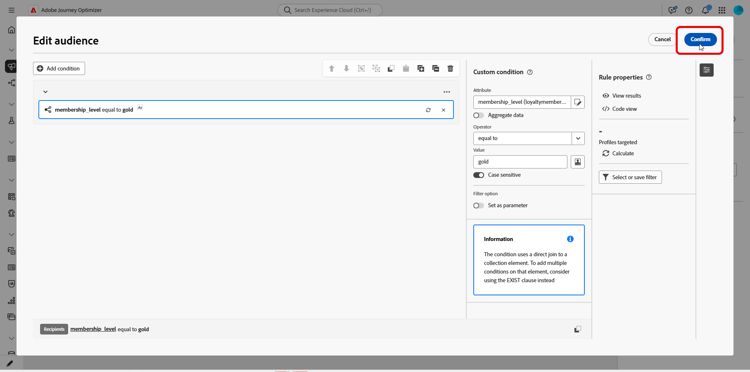
Fai clic su Aggiungi condizione per definire la query. Scopri come utilizzare il generatore di regole.
-
In Dati elaborati, scegli il Percorso del campo data. È necessario un campo data e l’attributo deve utilizzare il formato Data e ora. Ogni esecuzione restituisce solo righe la cui data è successiva all’ultima esecuzione.
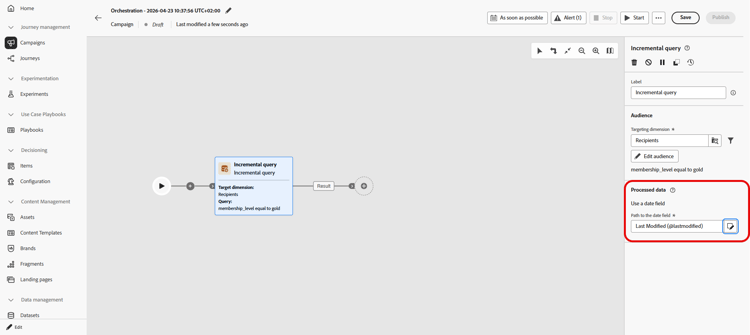
note NOTE L’idoneità dipende solo dal valore del campo data e non da quando è stato acquisito il record. Un record acquisito dopo l’esecuzione precedente non viene restituito se il relativo valore del campo data è precedente alla data di tale esecuzione.
Controlla la data dell’ultima esecuzione incremental-query-last-execution
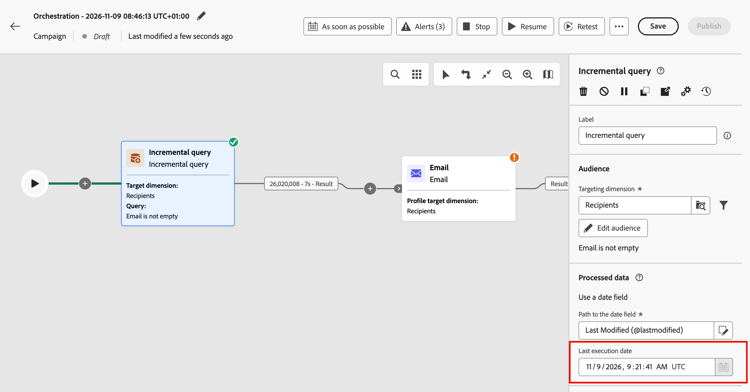
Una volta eseguita l’attività, il campo Ultima data di esecuzione viene visualizzato in Dati elaborati, sotto il Percorso del campo data. Mostra la data e l’ora della precedente esecuzione dell’attività. Questa è la data limite utilizzata dall’esecuzione successiva. Campo di sola lettura.
Esempio incremental-query-example
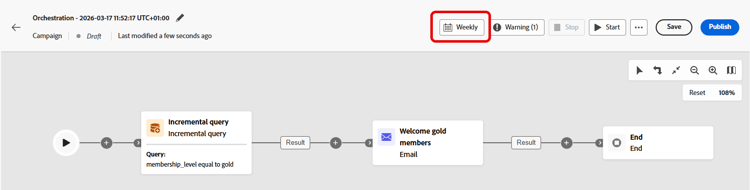
L’esempio seguente invia un’e-mail di benvenuto ai profili che sono appena diventati membri Gold. È possibile pianificare l’esecuzione della campagna settimanalmente, ogni lunedì. Ogni esecuzione esegue il targeting solo dei profili idonei per l’iscrizione Gold dall’esecuzione precedente, in modo che ogni destinatario riceva l’e-mail di benvenuto una volta.
- Incremental query: seleziona i membri gold. Prima esecuzione: tutti i membri correnti dell’oro. Esecuzioni successive: solo profili che sono diventati membri Gold dall’esecuzione precedente.
- Email delivery: invia l’e-mail di benvenuto ai profili generati dalla query.
This section contains structured knowledge intended to support interpretation, retrieval, and question answering related to this topic.
For complete understanding, this information should be combined with the documentation on this page. Neither source is intended to stand alone; the page describes the feature, while this section provides additional context that helps disambiguate terminology, intent, applicability, and constraints.
- TL;DR: This page explains how to configure the Incremental query targeting activity in an Orchestrated campaign so that each run returns only records whose date field value is later than the previous execution.
Intents:
- Understand what the Incremental query activity does across repeated Orchestrated campaign runs.
- Configure the activity’s targeting dimension and query condition.
- Choose a date field under Processed data so that each run returns only rows dated after the last execution.
- Understand what happens to downstream activities when a run returns no rows.
- Build a “new since last run” audience for messaging or ongoing exports.
Glossary:
- Incremental query: a Targeting activity that runs a database query each time the Orchestrated campaign runs and outputs only records whose date field value is later than the previous execution (product-specific)
- Processed data: the configuration area where you choose how the activity excludes records from earlier runs, for example by using a date field (product-specific)
- Path to the date field: the attribute, in Date Time format, used under Processed data so each run returns only rows whose date is after the last execution (product-specific)
- Last execution date: the field displayed under Processed data, below the Path to the date field, once the activity has run; it shows the date and time of the previous execution and is the cutoff date used by the next run; the field is read-only (product-specific)
- Targeting dimension: the audience type selected for the activity, for example recipients or subscribers (product-specific)
Guardrails:
- When a run returns no rows, the Orchestrated campaign stops at the Incremental query; activities after it are not executed until there is data, when the campaign runs again.
- A date field is required under Processed data, and the attribute must use the Date Time format.
- Each run returns only rows whose date is after the last execution.
- Eligibility depends only on the value of the date field, not on when the record was ingested. A record ingested after the previous execution is not returned if its date field value is older than the date of that execution.
Terminology:
- Canonical name: Incremental query — variants: none
- Synonyms: none
- Do not confuse: “Incremental query” (a Targeting activity that excludes previously returned records) ≠ “Targeting dimension” (the audience type, e.g. recipients or subscribers, selected within the activity)
FAQ:
- Q: What does the Incremental query activity return on each run? — Only records whose date field value is later than the previous execution, regardless of when they were ingested.
- Q: When should I use the Incremental query activity? — When the campaign can run multiple times, for example when scheduled (e.g. weekly) or triggered by an external signal or API, so each run targets only records dated after the previous execution.
- Q: What is required under Processed data? — A Path to the date field, using the Date Time format; each run returns only rows whose date is after the last execution.
- Q: What happens if a run returns no rows? — The Orchestrated campaign stops at the Incremental query, and activities after it are not executed until there is data on a later run.
- Q: What are typical uses of the Incremental query? — Pulling “new since last run” segments (e.g. new sign-ups, new purchasers) into messaging, or sending only new or updated rows to files for reporting or BI tools.
Examples:
- Welcome email to new gold members: an Incremental query selects gold members (first run: all current gold members; later runs: only profiles that became gold members since the previous execution), followed by an Email delivery activity that sends the welcome email to the profiles output by the query. The campaign can be scheduled to run weekly, every Monday, so each recipient receives the welcome email once.
Related pages:
- To pick the audience type for the Incremental query: Targeting dimensions (orchestrated/target-dimension.md)
- To build the query condition for the Incremental query: Learn how to use the rule builder (orchestrated/orchestrated-rule-builder.md)
Personas:
- marketer: Can configure the Incremental query activity so each Orchestrated campaign run returns only records whose date field value is later than the previous execution. Can select the Targeting dimension, add a condition with the rule builder, and choose the Path to the date field under Processed data. The page states that a date field is required and the attribute must use the Date Time format. Where: “Configure the Incremental query activity”.
Onboarding:
- Level: Intermediate
- First minimal step: Drop an Incremental query activity into your Orchestrated campaign.
- Success check: Each run returns only rows whose date is after the last execution.
- Next: Selecting the Targeting dimension for the Incremental query activity: Create your Targeting dimension (orchestrated/target-dimension.md); Adding a condition to define the query in the Incremental query activity: Work with the rule builder (orchestrated/orchestrated-rule-builder.md)