In questa pagina: Scopri come configurare l’attività di controllo del flusso di avvisi per avvisare i sottoscrittori quando l’esecuzione raggiunge un punto specifico in una campagna orchestrata.
L’attività Alert è un’attività Controllo flusso. Utilizzala per avvisare gli abbonati quando l’esecuzione della campagna raggiunge l’attività sull’area di lavoro.
L’attività non ha un trigger indipendente o una configurazione di condizione. La sua posizione nel flusso e la logica di orchestrazione a monte determinano quando viene attivato. Per gli avvisi condizionali, inseriscili nel ramo pertinente di un’attività Test.
Configurare l’attività di avviso alert-configuration
-
Aggiungi un’attività Avviso all’area di lavoro della campagna orchestrata.
-
Connettila alla transizione in cui desideri attivare un avviso.
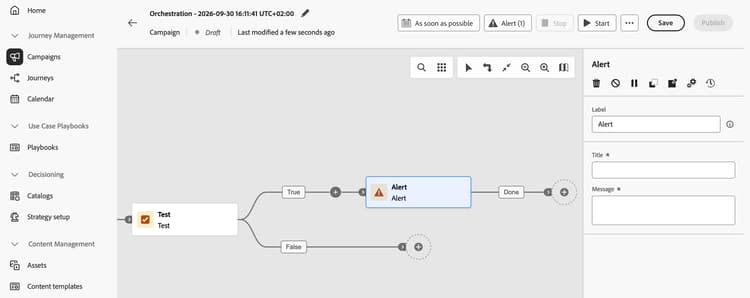
-
Seleziona l’attività e configura i campi seguenti:
- Etichetta: immettere un nome per identificare l’attività nell’area di lavoro.
- Titolo (obbligatorio): immettere un titolo breve e in formato testo normale per l’avviso.
- Messaggio (obbligatorio): immettere un messaggio di testo normale che descriva ciò che i sottoscrittori devono sapere.
Il titolo e il messaggio sono statici. I token dinamici non sono supportati.
Per informazioni sulla sottoscrizione agli avvisi in Journey Optimizer, vedere Abbonarsi agli avvisi.
Esempio: avviso popolazione bassa low-population-example
Avvisa gli abbonati quando una query restituisce meno di 10.000 profili:
-
Aggiungi un’attività Genera pubblico e utilizza il generatore di regole per definire la query.
-
Aggiungi un’attività Test dopo di essa e definisci una condizione che verifichi se il conteggio della popolazione è inferiore a 10.000.
-
Posiziona un’attività Avviso nella transizione per tale condizione.
-
Immettere un titolo statico, ad esempio
Low audience population, e un messaggio, ad esempioThe query returned fewer than 10,000 profiles.
L’attività Alert viene attivata quando la condizione di test corrisponde e l’esecuzione raggiunge l’avviso. Il valore di 10.000 è una soglia di esempio configurata nell’attività Test, non un limite di prodotto.
This section contains structured knowledge intended to support interpretation, retrieval, and question answering related to this topic.
For complete understanding, this information should be combined with the documentation on this page. Neither source is intended to stand alone; the page describes the feature, while this section provides additional context that helps disambiguate terminology, intent, applicability, and constraints.
- TL;DR: The Alert flow control activity notifies subscribers when Orchestrated campaign execution reaches the activity.
Intents
- Configure a static alert title and message.
- Define a label to identify the activity on the canvas.
- Use a Test branch to notify subscribers when a query returns fewer than 10,000 profiles.
Glossary
- Alert (product-specific): A Flow control activity that notifies subscribers when campaign execution reaches it.
- Label: The name that identifies the activity on the canvas.
- Title: The required short, static plain-text title for the alert.
- Message: The required static plain-text message that describes what subscribers need to know.
- Test (product-specific): The activity that evaluates the population count condition in the low population example.
Guardrails
- The Alert activity has no independent trigger or condition configuration. Its position in the flow and upstream orchestration logic determine when it fires.
- Title and Message are required fields.
- The title and message are static. Dynamic tokens are not supported.
- The value of 10,000 in the low population example is a threshold configured in the Test activity, not a product limit.
Terminology
- Do not confuse: The Test activity evaluates a condition. The Alert activity fires when execution reaches it.
FAQ
- What triggers an Alert activity? Campaign execution reaching the activity triggers the alert. Upstream orchestration logic determines when it is reached.
- Can the title or message contain dynamic tokens? No. Both fields use static plain text, and dynamic tokens are not supported.
- How can an alert depend on an audience condition? Place it on the relevant Test branch. The Test activity evaluates the condition, not the Alert activity.