Sur cette page : définissez une configuration de canal de boîte de réception qui définit le consentement, les libellés d’accès facultatifs et l’emplacement de la boîte de réception sur le web ou dans votre application iOS ou Android, afin que vous puissiez diffuser des expériences de carte de contenu via la boîte de réception.
Avant de pouvoir diffuser des expériences de carte de contenu par le biais de la boîte de réception, vous devez définir une configuration de canal Boîte de réception dans Configurations de canal. Cette configuration associe la surface au consentement, aux libellés d’accès facultatifs et à l’emplacement où l’expérience apparaît sur le web ou dans votre application iOS ou Android. Pour créer une configuration, procédez comme suit :
-
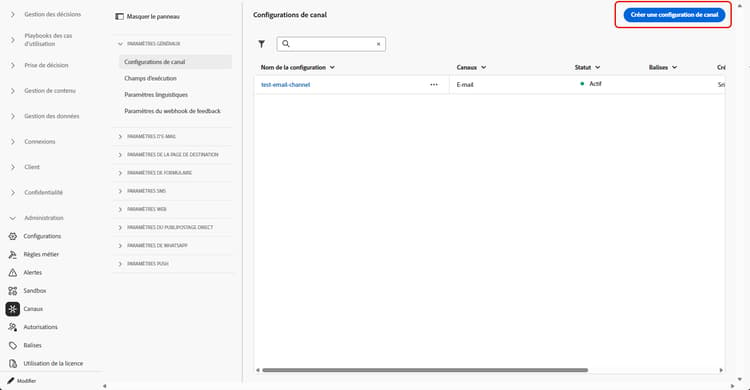
Accédez au menu Canaux > Paramètres généraux > Configurations des canaux, puis cliquez sur Créer une configuration des canaux.
-
Saisissez un nom et une description (facultatif) pour la configuration.
note NOTE Les noms doivent commencer par une lettre (A-Z). Ils ne peuvent contenir que des caractères alphanumériques. Vous pouvez également utiliser le trait de soulignement _, le point.et le trait d'union-. -
Pour attribuer des libellés d’utilisation des données personnalisés ou de base à la configuration, vous pouvez sélectionner Gérer l’accès. En savoir plus sur le contrôle d’accès au niveau de l’objet (OLAC)
-
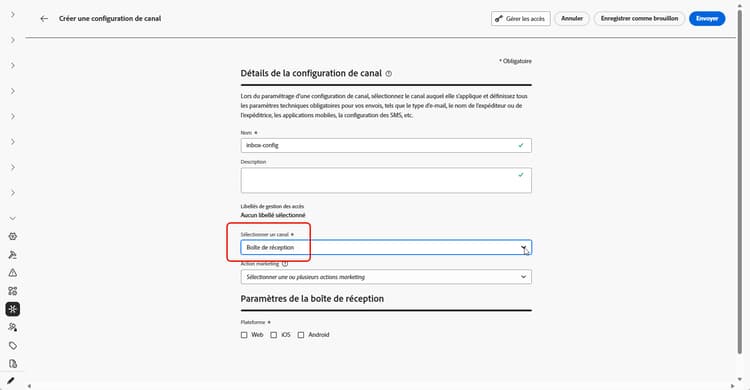
Sélectionnez le canal Boîte de réception.
-
Sélectionnez une Action marketing ou plusieurs pour associer des politiques de consentement aux messages utilisant cette configuration. Toutes les politiques de consentement associées à cette action marketing sont utilisées afin de respecter les préférences de vos clientes et clients. En savoir plus
-
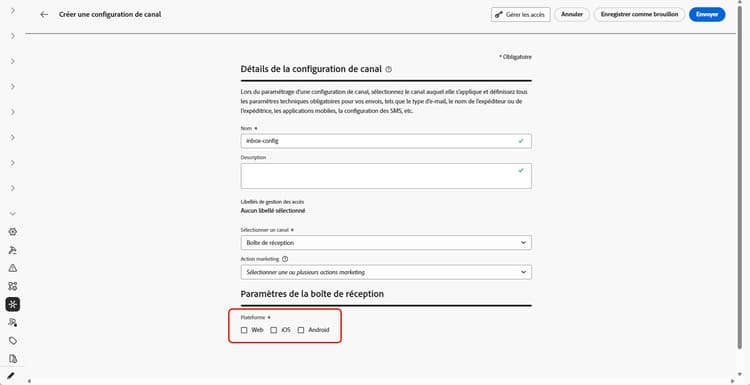
Sélectionnez la plateforme pour laquelle l’expérience de boîte de réception sera appliquée.
-
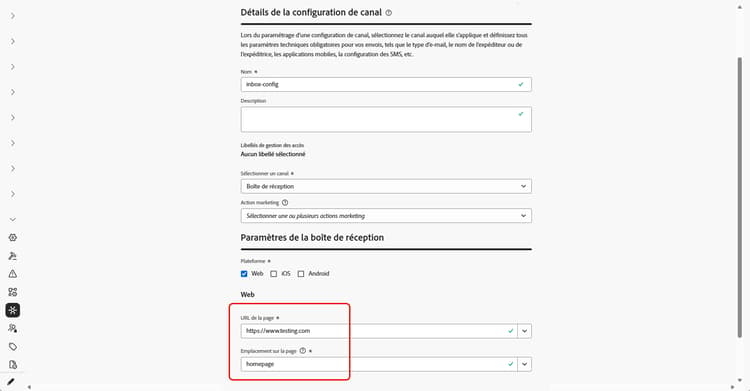
Pour le web :
-
Dans URL de la page, saisissez ou sélectionnez l’URL de la page sur laquelle la boîte de réception doit apparaître. Utilisez cette option lorsque l’expérience est limitée à une page.
-
Dans Emplacement sur la page, définissez l’emplacement sur la page, par exemple la région ou l’identifiant que votre site utilise pour la surface de boîte de réception. En savoir plus
-
-
Pour iOS et Android :
-
Dans ID de l’application, saisissez ou sélectionnez l’identifiant de votre application afin que la configuration s’applique à la version iOS ou Android appropriée.
-
Dans Emplacement ou chemin d’accès dans l’application, spécifiez l’écran, la route ou le conteneur dans lequel les utilisateurs et utilisatrices doivent ouvrir la boîte de réception.
-
-
Soumettez vos modifications.
Vous pouvez désormais sélectionner votre configuration lors de la création de votre expérience de boîte de création.
➡️Suivez les étapes décrites dans cette page.
This section contains structured knowledge intended to support interpretation, retrieval, and question answering related to this topic.
For complete understanding, this information should be combined with the documentation on this page. Neither source is intended to stand alone; the page describes the feature, while this section provides additional context that helps disambiguate terminology, intent, applicability, and constraints.
- TL;DR: This page explains how to create an Inbox channel configuration that ties the surface to consent, optional access labels, and where the inbox appears on the web or in your iOS or Android app.
Intents:
- Create an Inbox channel configuration in Channel configurations
- Associate consent policies to messages by selecting marketing action(s)
- Assign custom or core data usage labels through Manage access
- Define where the inbox appears for Web using Page URL and Location on page
- Define where the inbox appears for iOS and Android using App id and the location or path inside the app
Glossary:
- Inbox channel configuration: A configuration in Channel configurations that ties the surface to consent, optional access labels, and where the experience appears on web, iOS, or Android (product-specific)
- Marketing action: A selection that associates consent policies to messages using the configuration so customer preferences are respected (product-specific)
- Page URL: For Web, the URL of the page where the inbox should appear, used when the experience is limited to one page (product-specific)
- Location on page: For Web, the in-page placement (region or identifier your site uses for the inbox surface) (product-specific)
- App id: For iOS and Android, the identifier for your app so the configuration applies to the correct build (product-specific)
- Manage access: The option used to assign custom or core data usage labels to the configuration, related to Object Level Access Control (OLAC) (product-specific)
Guardrails:
- You must define an Inbox channel configuration in Channel configurations before you can deliver Content card experiences through the Inbox.
- Configuration names must begin with a letter (A-Z) and can only contain alpha-numeric characters plus underscore, dot, and hyphen characters.
- All consent policies associated with the selected marketing action are leveraged to respect customer preferences.
Terminology:
- Canonical name: Inbox channel configuration — Acronym: n/a — variants: Inbox configuration, channel configuration
- Synonyms: “OLAC” = “Object Level Access Control”
- Do not confuse: “Page URL” (the page URL where the inbox appears on Web) ≠ “Location on page” (the in-page placement/region or identifier for the inbox surface)
- Do not confuse: “App id” (identifier for the iOS or Android app) ≠ “Location or path inside the app” (the screen, route, or container where users open the inbox)
FAQ:
- Q: What must I create before delivering Content card experiences through the Inbox? — An Inbox channel configuration in Channel configurations.
- Q: What are the rules for naming a configuration? — The name must begin with a letter (A-Z) and can only contain alpha-numeric characters plus underscore, dot, and hyphen.
- Q: How do I associate consent to messages using this configuration? — Select marketing action(s); all consent policies associated with the marketing action are leveraged to respect customer preferences.
- Q: How do I set where the inbox appears on the web? — Enter or select the Page URL and define the in-page placement in Location on page.
- Q: How do I set where the inbox appears on iOS or Android? — Enter the App id and specify the screen, route, or container in Location or path inside the app.