En esta página: Defina la audiencia, el tipo de identidad, la creación automática de perfiles y los enlaces web para que la campaña activada por la API llegue a las personas adecuadas y devuelva el estado de envío en tiempo real.
Utilice la ficha Audiencia para definir la audiencia de la campaña.
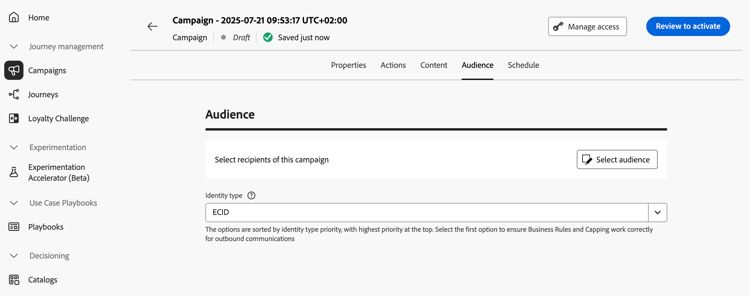
Selección del público
Para las campañas activadas por la API de marketing, haga clic en el botón Seleccionar audiencia para mostrar la lista de audiencias de Adobe Experience Platform disponibles. Más información sobre las audiencias.
Para las campañas transaccionales activadas por API, los perfiles de destino deben definirse en la llamada de API. Una sola llamada de API admite hasta 20 destinatarios únicos. Cada destinatario debe tener un ID de usuario único, no se permiten ID de usuario duplicados. Obtenga más información en la documentación interactiva de la API de ejecución de mensajes
Selección del tipo de identidad
En el campo Tipo de identidad, elija el tipo de clave que desea usar para identificar a los individuos de la audiencia seleccionada. Puede utilizar un tipo de identidad existente o crear uno nuevo mediante el servicio de identidad de Adobe Experience Platform. Las áreas de nombres de identidad estándar se enumeran en esta página.
Solo se permite un tipo de identidad por campaña. La campaña no puede dirigirse a las personas que pertenezcan a un segmento que no tenga el tipo de identidad seleccionado entre sus diferentes identidades. Obtenga más información acerca de tipos de identidad y áreas de nombres en la documentación de Adobe Experience Platform.
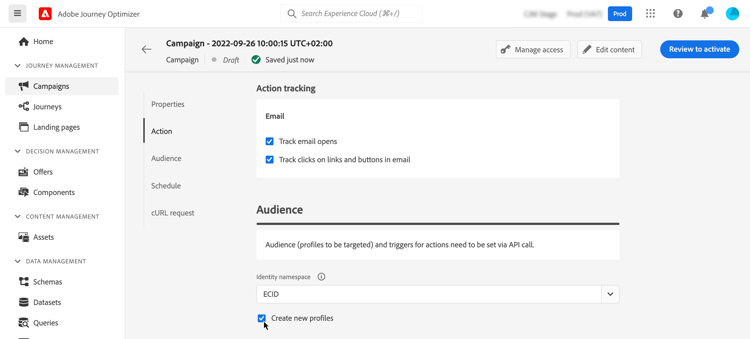
Activar creación de perfiles en ejecución de campaña
En algunos casos, es posible que deba enviar mensajes transaccionales a perfiles que no existen en el sistema. Por ejemplo, si un usuario desconocido intenta restablecer la contraseña en su sitio web. Cuando un perfil no existe en la base de datos, Journey Optimizer le permite crearlo automáticamente al ejecutar la campaña para permitir el envío del mensaje a este perfil.
Para activar la creación de perfiles en la ejecución de la campaña, active la opción Crear nuevos perfiles. Si esta opción está deshabilitada, los perfiles desconocidos se rechazarán para cualquier envío y la llamada de API fallará.
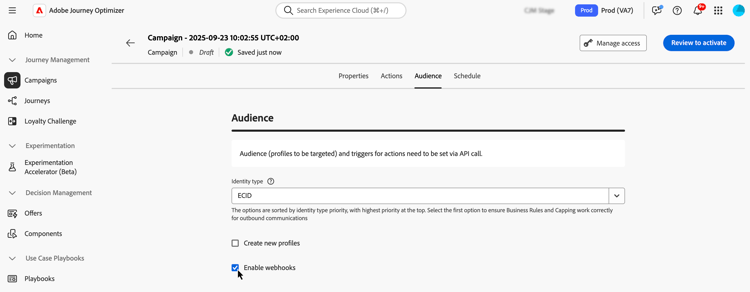
Habilitar webhooks webhook
Para las campañas activadas por API transaccionales, puede habilitar los webhooks para recibir comentarios en tiempo real sobre el estado de ejecución de sus mensajes. Para ello, cambie la opción Enable webhooks para enviar eventos de estado de entrega a un webhook configurado.
Las configuraciones de webhook se administran centralmente en el menú Administración / Canales / Comentarios de webhook. Desde allí, los administradores pueden crear y editar puntos finales de ganchos web. Aprenda a crear Webhooks de comentarios
Próximos pasos next
Una vez que la configuración y el contenido de la campaña estén listos, puede programar su ejecución. Más información
This section contains structured knowledge intended to support interpretation, retrieval, and question answering related to this topic.
For complete understanding, this information should be combined with the documentation on this page. Neither source is intended to stand alone; the page describes the feature, while this section provides additional context that helps disambiguate terminology, intent, applicability, and constraints.
- TL;DR: This page explains how to define the audience of an API triggered campaign, including the identity type, automatic profile creation at campaign execution, and webhooks for delivery status.
Intents:
- Select the audience of a Marketing API triggered campaign
- Understand how recipients are defined for a Transactional API triggered campaign
- Select the identity type used to identify individuals
- Activate profile creation at campaign execution for unknown profiles
- Enable webhooks to receive delivery status events for Transactional API triggered campaigns
Glossary:
- Marketing API triggered campaigns: The audience is selected from the list of available Adobe Experience Platform audiences with Select audience (product-specific)
- Transactional API triggered campaigns: The targeted profiles are defined in the API call (product-specific)
- Identity type: The type of key used to identify the individuals from the selected audience; an existing identity type or a new one created with the Adobe Experience Platform Identity Service
- Create new profiles: Option that automatically creates a profile that does not exist in the database when the campaign is executed
- Enable webhooks: Option that sends delivery status events to a configured webhook
- Feedback Webhook: Menu under Administration / Channels where webhook configurations are managed centrally
Guardrails:
- A single API call supports up to 20 unique recipients, for Transactional API triggered campaigns.
- Each recipient must have a unique user ID; duplicate user IDs are not permitted.
- Only one identity type is allowed per campaign.
- Individuals belonging to a segment that does not have the selected identity type among their different identities cannot be targeted by the campaign.
- The use of audiences and attributes from audience composition is currently unavailable for use with Healthcare Shield or Privacy and Security Shield.
- If Create new profiles is disabled, unknown profiles are rejected for any sending and the API call fails.
- Create new profiles is provided for very small volume profile creation in a large volume transactional sending use case, with the bulk of profiles already existing in Platform.
- Unknown profiles are created in the AJO Interactive Messaging Profile Dataset dataset, in three default namespaces (email, phone and ECID) respectively for each outbound channel (Email, Mobile and Push). With a custom namespace, the identity is created with the same custom namespace.
- Profile creation at execution is not available for High Throughput campaigns, as this mode does not rely on Adobe profiles. The system does not check whether the profiles exist or not.
Applicability:
- Audience selection with Select audience: Marketing API triggered campaigns
- Targeted profiles defined in the API call: Transactional API triggered campaigns
- Enable webhooks: Transactional API triggered campaigns
Terminology:
- Canonical name: API triggered campaign audience
- Acronym: AEP — Adobe Experience Platform
- Short name: Platform — Adobe Experience Platform
- Do not confuse: “Marketing API triggered campaigns” (audience selected with Select audience) ≠ “Transactional API triggered campaigns” (profiles defined in the API call)
FAQ:
- Q: How are recipients defined for a Transactional API triggered campaign? — The targeted profiles need to be defined in the API call. A single API call supports up to 20 unique recipients, each with a unique user ID.
- Q: How many identity types can a campaign use? — Only one identity type is allowed per campaign.
- Q: What happens to an unknown profile? — If Create new profiles is on, the profile is created when the campaign is executed. If it is disabled, unknown profiles are rejected for any sending and the API call fails.
- Q: Can I create profiles at execution in High Throughput campaigns? — No. Profile creation at execution is not available for High Throughput campaigns.
- Q: Where are webhook configurations managed? — In the Administration / Channels / Feedback Webhook menu, where administrators can create and edit webhook endpoints.
Related pages:
- Audiences available for Marketing campaigns: Learn more about audiences (audience/about-audiences.md)
- Audience composition: audience composition (audience/get-started-audience-orchestration.md)
- Transactional recipients in the API call: Interactive Message Execution API documentation (https://developer.adobe.com/journey-optimizer-apis/references/messaging#operation/postIMUnitaryMessageExecution)
- Standard Identity namespaces: this page (https://experienceleague.adobe.com/en/docs/experience-platform/identity/features/namespaces#standard)
- Identity types and namespaces: Adobe Experience Platform documentation (https://experienceleague.adobe.com/docs/experience-platform/identity/home.html)
- High Throughput campaigns: High Throughput campaigns (campaigns/api-triggered-high-throughput.md)
- Creating Feedback Webhooks: Learn how to create Feedback Webhooks (configuration/feedback-webhooks.md)
- Next step, scheduling: Learn more (campaigns/api-triggered-campaign-schedule.md)