En esta página: Establezca las fechas de inicio y finalización y el control de tarifa en la pestaña Programación para que la campaña activada por la API envíe en el momento adecuado sin saturar los sistemas descendentes.
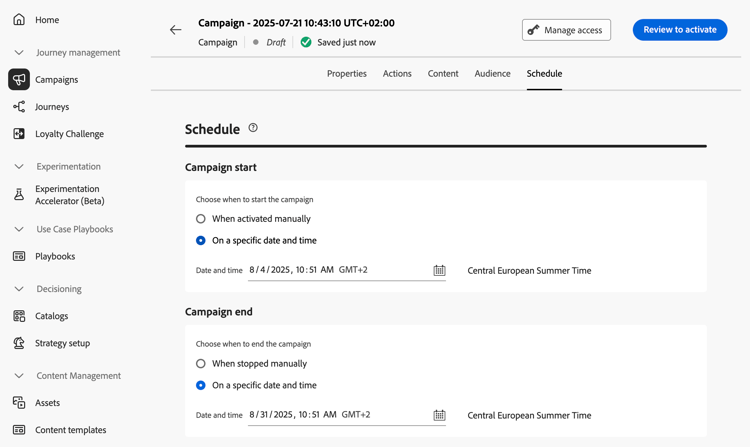
Use la ficha Programación para definir la programación de la campaña.
Establecer fechas de inicio y finalización
De forma predeterminada, las campañas activadas por API comienzan una vez activadas y finalizan en cuanto se envía el mensaje una vez. Si no desea ejecutar la campaña justo después de activarla, puede especificar una fecha y una hora a las que se debe enviar el mensaje mediante la opción Inicio de campaña.
La opción Fin de campaña le permite especificar cuándo debe dejar de ejecutarse una campaña. Fuera de las fechas especificadas, la campaña no se ejecuta.
Establecer control de velocidad
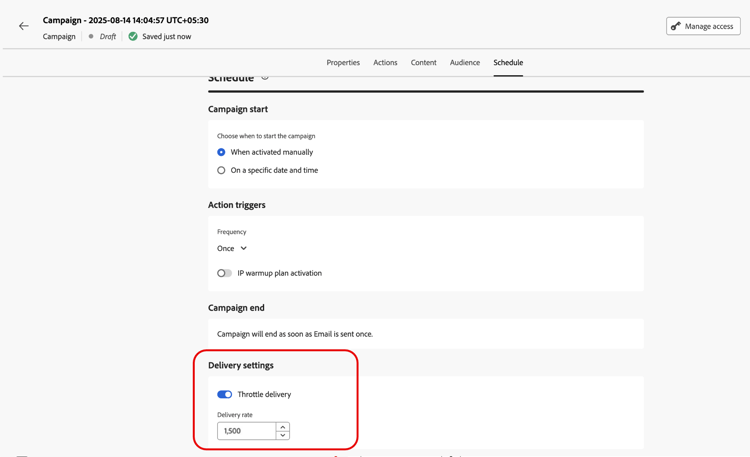
Journey Optimizer le permite habilitar el control de velocidad para acciones salientes (correo electrónico, mensajes móviles, notificaciones push).
Esta función es especialmente útil para evitar sobrecargas en sistemas descendentes, como páginas de aterrizaje o plataformas de servicio de atención al cliente. Por ejemplo, puede establecer un límite de velocidad de 165 mensajes por segundo para garantizar un envío constante sin saturar a los sistemas descendentes.
Para establecer el control de tarifa, habilite la opción Entrega acelerada en la sección Configuración de entrega y especifique la tarifa de entrega por segundo que desee.
- Tasa mínima de entrega admitida: 1 por segundo.
- Tasa máxima de entrega admitida: 2000 por segundo cuando la opción “Entrega acelerador” está habilitada.
Próximos pasos next
Una vez que la configuración y el contenido de su campaña estén listos, puede revisarlos y activarlos. Más información
This section contains structured knowledge intended to support interpretation, retrieval, and question answering related to this topic.
For complete understanding, this information should be combined with the documentation on this page. Neither source is intended to stand alone; the page describes the feature, while this section provides additional context that helps disambiguate terminology, intent, applicability, and constraints.
- TL;DR: This page explains how to schedule an API triggered campaign with start and end dates in the Schedule tab, and how to set rate control with the Throttle delivery option.
Intents:
- Understand when an API triggered campaign starts and ends by default
- Set a start date and time with Campaign start
- Set an end date and time with Campaign end
- Set a delivery rate per second with Throttle delivery
- Understand which profiles are excluded when the delivery rate is too low
Glossary:
- Campaign start: Option to specify a date and time at which the message is sent
- Campaign end: Option to specify when a campaign stops being executed
- Rate control: Feature that limits the delivery rate of outbound actions, to prevent overload on downstream systems such as landing pages or customer care platforms
- Throttle delivery: Option in the Delivery settings section that enables rate control
- Delivery rate: The number of messages per second specified when Throttle delivery is enabled
Guardrails:
- By default, API triggered campaigns start once they are triggered, and end as soon as the message has been sent once.
- Outside of the specified dates, the campaign is not executed.
- Minimum delivery rate supported: 1 per second (hard limit).
- Maximum delivery rate supported: 2000 per second when the Throttle delivery option is enabled (hard limit).
- When a delivery rate is set, the maximum timeframe for which the campaign audience can execute is 12 hours (hard limit).
- If the delivery rate does not allow all the audience to be sent the message in the 12 hour timeframe, the remaining profiles are excluded from the campaign. The count of these excluded profiles is visible in the campaign report.
Applicability:
- Rate control: outbound actions (Email, Mobile messages, Push notifications)
Terminology:
- Canonical name: API triggered campaign schedule
- Do not confuse: Campaign start (when the message is sent) ≠ Campaign end (when the campaign stops being executed)
FAQ:
- Q: When does an API triggered campaign start by default? — Once it is triggered. It ends as soon as the message has been sent once.
- Q: How do I send the message at a specific time? — Use the Campaign start option to specify a date and time.
- Q: How do I limit the delivery rate? — Enable Throttle delivery in the Delivery settings section and specify the Delivery rate per second.
- Q: What is the supported range for the delivery rate? — From 1 per second to 2000 per second.
- Q: What happens to profiles that cannot be reached in 12 hours? — They are excluded from the campaign, and their count appears in the campaign report.
Examples:
- A rate limit of 165 messages per second ensures steady delivery without overwhelming downstream systems.
Related pages:
- Next step, review and activation: Learn more (campaigns/review-activate-api-triggered-campaign.md)