En esta página: Seleccione la audiencia y el tipo de identidad en la ficha Audiencia para que la campaña de acción se dirija a las personas adecuadas.
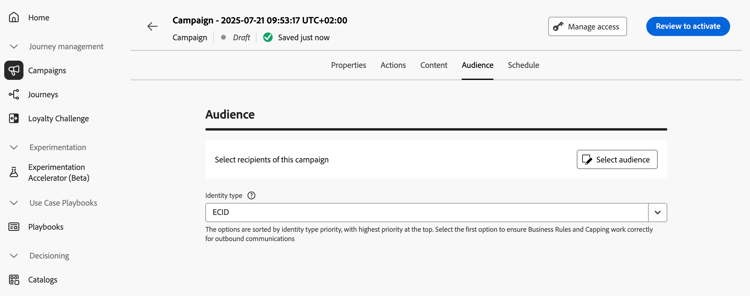
Utilice la ficha Audiencia para definir la audiencia de la campaña.
-
Selección del público
Para las campañas de marketing, haga clic en el botón Seleccionar audiencia para mostrar la lista de audiencias de Adobe Experience Platform disponibles. Más información sobre las audiencias.
note important IMPORTANT El uso de audiencias y atributos de composición de audiencias no está disponible actualmente para su uso con Healthcare Shield o Privacy and Security Shield. -
Seleccionar el tipo de identidad
En el campo Tipo de identidad, elija el tipo de clave que desea usar para identificar a los individuos de la audiencia seleccionada. Puede utilizar un tipo de identidad existente o crear uno nuevo mediante el servicio de identidad de Adobe Experience Platform. Las áreas de nombres de identidad estándar se enumeran en esta página.
Solo se permite un tipo de identidad por campaña. La campaña no puede dirigirse a las personas que pertenezcan a un segmento que no tenga el tipo de identidad seleccionado entre sus diferentes identidades. Obtenga más información acerca de tipos de identidad y áreas de nombres en la documentación de Adobe Experience Platform.
Próximos pasos next
Una vez que la audiencia de la campaña de acción esté lista, puede programar la campaña. Más información
This section contains structured knowledge intended to support interpretation, retrieval, and question answering related to this topic.
For complete understanding, this information should be combined with the documentation on this page. Neither source is intended to stand alone; the page describes the feature, while this section provides additional context that helps disambiguate terminology, intent, applicability, and constraints.
- TL;DR: This page explains how to define the audience of an Action campaign in the Audience tab by selecting an audience and an identity type.
Intents:
- Select the audience of a Marketing campaign with the Select audience button, which displays the list of available Adobe Experience Platform audiences
- Choose the identity type used to identify the individuals of the audience
- Know that only one identity type is allowed per campaign
- Know that audiences and attributes from audience composition are unavailable with Healthcare Shield or Privacy and Security Shield
Glossary:
- Identity type: The type of key used to identify the individuals from the selected audience. It can be an existing identity type or a new one created using the Adobe Experience Platform Identity Service. (product-specific)
- Identity namespaces: Standard Identity namespaces are listed in the Adobe Experience Platform documentation. (product-specific)
Guardrails:
- Only one identity type is allowed per campaign.
- Individuals belonging to a segment that does not have the selected identity type among their different identities cannot be targeted by the campaign.
- The use of audiences and attributes from audience composition is currently unavailable for use with Healthcare Shield or Privacy and Security Shield.
Terminology:
- Canonical name: Action campaign audience — variants: campaign audience
FAQ:
- Q: How many identity types can a campaign use? — Only one identity type is allowed per campaign.
- Q: Why can an individual of my audience not be targeted? — Individuals belonging to a segment that does not have the selected identity type among their different identities cannot be targeted by the campaign.
- Q: Can I create a new identity type? — Yes, in the Identity type field you can either use an existing identity type or create a new one using the Adobe Experience Platform Identity Service.
- Q: Can I use audiences from audience composition with Healthcare Shield or Privacy and Security Shield? — No, audiences and attributes from audience composition are currently unavailable for use with them.
Related pages:
- Audiences: Learn more about audiences (audience/about-audiences.md)
- Audience composition: audience composition (audience/get-started-audience-orchestration.md)
- Next step, schedule: Schedule the Action campaign (campaigns/campaign-schedule.md)