Use currency fields in Canvas Dashboards
If you have feedback regarding a possible bug or technical issue, please submit a ticket to Workfront Support. For more information, see Contact Customer Support.
Please note that this beta is not available on the following cloud providers:
- Bring Your Own Key for Amazon Web Services
- Azure
- Google Cloud Platform
Access Requirements
| table 0-row-2 1-row-0 2-row-2 3-row-2 4-row-2 layout-auto html-authored no-header | |
|---|---|
| Adobe Workfront package | Any |
| Adobe Workfront license |
Standard Plan |
| Access level configurations |
Edit access to Reports, Dashboards, and Calendars View access to Financial Data |
| Object permissions | Manage permissions for the dashboard |
For more detail about the information in this table, see Access requirements in Workfront documentation.
Prerequisites
-
You must have multiple currency types set up in your Workfront instance to use the functionality described in this article. For more information, see Set up exchange rates.
note important IMPORTANT The functionality described in this article applies only to native currency fields. Support for custom currency fields is coming soon.
Set a default currency for a Canvas Dashboard
When creating a Canvas Dashboard, you can set a default currency for the dashboard. This currency will be used to display all native currency fields in reports on the dashboard, unless the currency field is locked at the report level.
-
In the left panel, click Canvas Dashboards.
-
Click New Dashboard in the top-right corner.
-
In the Create dashboard box,
-
Specify the following:
table 0-row-2 1-row-2 2-row-2 layout-auto html-authored no-header Name Enter a name for your dashboard. We recommend using only UTF-8 characters to avoid compatibility issues. Description (Optional) Enter a description of your dashboard. Currency Choose the default currency type for the dashboard.
Users can toggle between different currency types when filtering the dashboard.
Switch between currencies on a Canvas Dashboard
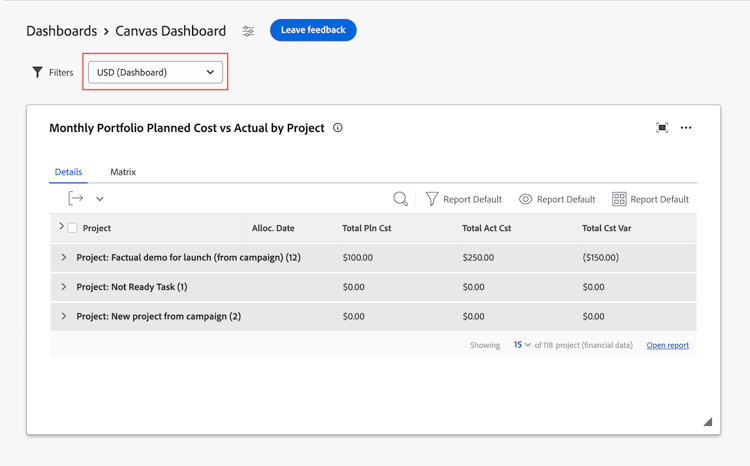
You can switch between different currency types at the dashboard level. Reports that contain currency fields will update to reflect the selected currency type.
Currency fields can be locked at the report level. If a currency field is locked, the currency type for that report will not change when you change the currency type for the dashboard.
To change the currency type for the dashboard,
-
Click the currency drop-down menu in the upper-right corner of the dashboard details page.
-
Select the desired currency type from the list.
Limitations
The following table outlines limitations when currencies are defined in the Exchanges Rates area in Setup.