Restore deleted records
You can recover deleted records from the Recently deleted area in Adobe Workfront Planning.
For information about deleting records, see Delete records.
Access requirements
| table 0-row-0 1-row-0 2-row-2 3-row-2 4-row-2 layout-auto html-authored no-header | |
|---|---|
| Adobe Workfront package |
Any Workfront and any Planning package Any Workflow and any Planning package For more information about what is included in each Workfront Planning package, contact your Workfront account representative. |
| Adobe Workfront license | Standard |
| Object permissions |
Contribute or higher permissions to a workspace and record type System Administrators have permissions to all workspaces, including the ones they did not create |
For more information about Workfront access requirements, see Access requirements in Workfront documentation.
Considerations about recovering deleted records
-
You can restore records that you or other users deleted.
-
Records are stored in the Recently deleted bin for 30 days. After 30 days, the records are permanently deleted from Workfront Planning.
-
If the deleted records are linked to other records, the linked records are not deleted, but the information from the deleted record is also deleted. Restoring the deleted records will restore the information from the connected records.
-
You can restore records in bulk.
-
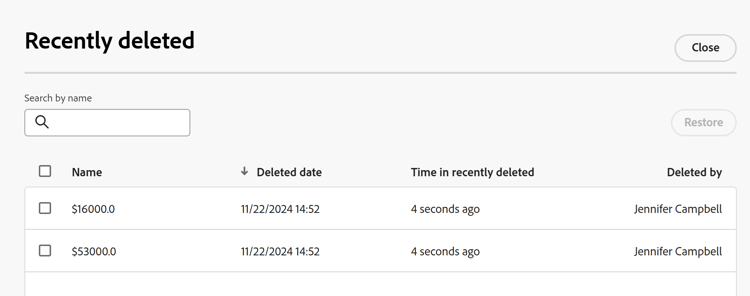
When the records are deleted the following information is stored in the Recently deleted bin:
- Name: This is the information in the Primary field of the record. For more information about record Primary fields, see Primary field overview.
- Deleted date: The time and the date when the record was deleted.
- Time in recently deleted: The time since the record was deleted. Records that were deleted more than 30 days before the current date do not display in the Recently deleted bin.
- Deleted by: The name of the user who deleted the record.
Restore deleted records
-
Go to the record type page where you have deleted records.
-
Click the Undo icon

The Recently deleted box displays.
-
Select the records you want to delete, then click Restore > Restore. You can select more than one record.
If the restore was successful, you receive a success notification at the bottom of the screen.
-
Go to the table view and review the restored records.