Constant
Constant nodes are a way to create a static value for use inside Substance graphs.
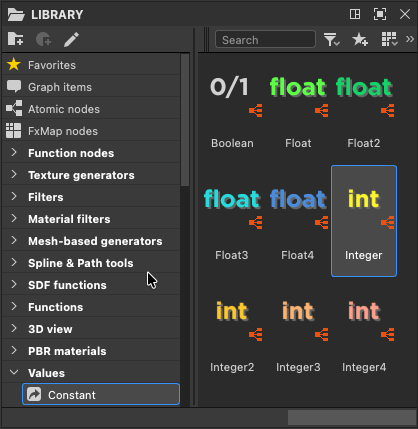
You can find these nodes in the Values > Constants section of the Library.
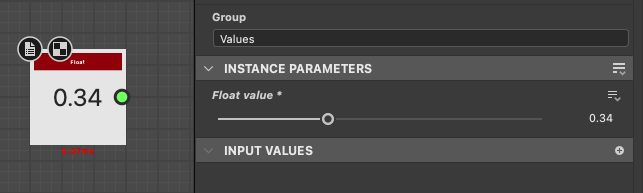
They all include a simple Value processor node generating the value.
Integers
Constant integers generate whole numbers, and have a step of 1.
They can be converted to Float, which is recommended to do when performing any operation more complex than additions, subtractions and simple comparisons.

Integer
An integer has a single component. It is useful as an index for making selections, such as:
- selecting an option presented to the user as a drop down menu (see ‘Drop down list’ in this page).
- selecting the input of a Multi switch node.
| note important |
|---|
| IMPORTANT |
| Negative integers in parameter functions are not supported. See this page in the ‘Technical issues’ section for a workaround. |

Integer2
An Integer2 node generates a static 2-component integer vector with (X, Y) components.
One common use case of Integer2 is setting to set X and Y grid sizes, as in the Tile generator node.

Integer3
An Integer3 node generates a static 3-component integer vector with (X, Y, Z) components.
Integer4
An Integer4 node generates a static 4-component integer vector with (X, Y, Z, W) components.
Floats
Constant Float values generate fractional numbers, I.e. they support values after the decimal sign, and can be adjusted in steps smaller than 1. (Default: 0.01)
Floats can be converted to Integers but they will be rounded up or down to the nearest Integer, meaning data and accuracy is lost.

Float
A Float has a single component and is very commonly used for any single value that requires precision.

Float2
A Float2 node generates a 2-component vector with (X, Y) components.
Float2 is commonly used for sampling coordinates, offset transformations and general 2D vector manipulation.

Float3
A Float3 node generates a 3-component (X, Y, Z) vector.
Float3 is mainly used when working with 3D objects and 3D scale coordinates such as in 3D SDF nodes, and as a simpler way to store RGB colors — I.e. without Alpha.

Float4
A Float4 generates a 4-component (X, Y, Z, W) vector.
Float4 is the preferred way to store and set color information where XYZW values are mapped to RGBA, such as in the Uniform color node.
Non-numerical
Boolean
A Boolean is the simplest data type there is, knowing only two states: true or false.
This type is quite common when working with toggle parameters and If/Else conditions.
Booleans are an simple and efficient way of controlling the flow of a function or graph, e.g. using a Switch Node.