Input color
In: Atomic Nodes
Description
Input nodes are a special type of node that creates a dynamic slot in your graph, allowing for any input to be connected once your Graph is used in another context.
Unlike Output nodes, you have to explicitly place either a Color, Grayscale or Value input. It is not possible to create your own “agnostic” inputs that change type depending on what is connected to them.
Input nodes are not as crucial as Output nodes: you can have perfectly functioning, advanced Graphs that have no need for an Input. Inputs are only used when you want to base your Graph or node Instance’s result on an external input, for example when creating an Instance or a Filter for Substance 3D Painter.
See also: Input grayscale, Input value

Parameters
By default an Input Color or Grayscale returns black if nothing is plugged in. You can either set a different default value, or drag an existing Bitmap Resource from the Explorer onto the Input node in your graph, to preview this data in the slot. This only works for Color and Grayscale Inputs. The default value is persistent when used in other contexts, the preview bitmap is discarded everywhere else.
If you want to see it with the outputs of another Graph, you’ll have to either export that Graph to Bitmap for the above method, or make use of “In-Context” editing.
Attributes
Inheritance
When multiple inputs are present, you need to pay attention to the way the graph will inherit its Base parameters from these inputs.
Base parameters include, among others, the Output Size, Output Format and Tiling Mode.
An input can be defined as the Primary input. This input then drives the attributes of all inputs which inheritance method is set to Relative to parent. This is the inheritance method set by default on Input nodes.
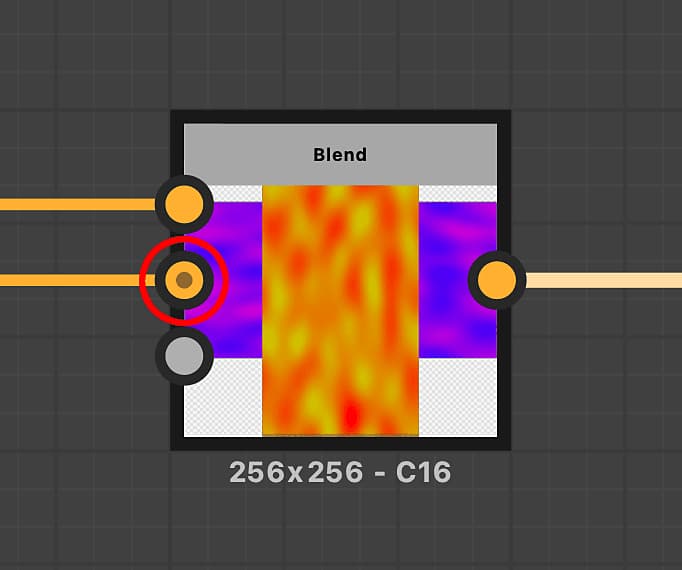
You may set an input node as a graph’s Primary input by clicking RMB on the node and selecting the Set as Primary input option in the contextual menu.
The Primary input of a node is marked with a small dark dot in the connector (circled in red in the example next to this section).
Alternatively, any input set to the Relative to input inheritance method will inherit the attributes from the node it is connected to, regardless of the Primary input.
Finally, you may override any value for a given attribute by setting its inheritance method to Absolute.
Integration attributes
Inputs are not directly sent to the 3D View, but their Usage Attributes are used by Substance 3D Painter for automatically filling slots with certain maps (mostly used with Filters).
Additionally the Usage attributes are also used with Link Creation Modes, to match the correct input and output slots.
Usage