Custom metadata support - XDM format
The Experience Edge API allows you to send media custom metadata alongside standard XDM fields in sessionStart, adStart, and chapterStart API events. Media custom metadata sent via the XDM format can be forwarded to both Adobe Analytics and Adobe Experience Platform.
For Media Collection API implementations, see Custom metadata support.
Overview
Media custom metadata can be sent in two locations within an Experience Edge request, each with different routing behaviour:
xdm.mediaCollection.customMetadata_dataCustom metadata applies to three event types:
sessionStartadStartchapterStartStructure
xdm.mediaCollection.customMetadata (Analytics + AEP)
Custom metadata is an array of name-value objects inside the mediaCollection object:
{
  "xdm": {
    "mediaCollection": {
      "customMetadata": [
        {
          "name": "_tenant.fieldName",
          "value": "fieldValue"
        }
      ]
    }
  }
}
customMetadata must be an array inside mediaCollection, not at the xdm root level.
Incorrect:
{
  "xdm": {
    "eventType": "media.sessionStart",
    "customMetadata": [...]  // ❌ Wrong location
  }
}
Correct:
{
  "xdm": {
    "eventType": "media.sessionStart",
    "mediaCollection": {
      "customMetadata": [...]  // ✅ Inside mediaCollection
    }
  }
}
_data (Analytics only)
The _data object is a special Experience Edge construct that sends data exclusively to Adobe Analytics, bypassing AEP datasets. Custom metadata must be placed under __adobe.analytics.contextData.
Unlike xdm.mediaCollection.customMetadata which uses an array of name-value objects, the _data mapping uses a flat key-value object directly under contextData:
Approach
Structure
Destination
xdm.mediaCollection.customMetadata
Array of {"name": "...", "value": "..."} objects
Analytics + AEP
_data.__adobe.analytics.contextData
Flat key-value object {"key": "value"}
Analytics only
{
  "xdm": { ... },
  "_data": {
    "__adobe": {
      "analytics": {
        "contextData": {
          "debugMode": "true",
          "internalTestFlag": "QA-Session"
        }
      }
    }
  }
}
Naming conventions
- XDM format: prefix with tenant namespace using an underscore. You can also create structures in your tenant custom field group such as
_<tenant>.<struct_name>.<field_name>. _dataformat: fields are placed under_data.__adobe.analytics.contextData— no underscore prefix required on the field name (e.g.,debugFlag)
Main content custom metadata
Sent with sessionStart. Applies to the primary media being tracked and remains available throughout ad and chapter calls. Any custom metadata defined here will be automatically merged by the media backend on the corresponding close calls. It will be included alongside any specific custom metadata defined for ads and chapters.
Request
curl -X POST "https://edge.adobedc.net/ee/va/v1/sessionStart?configId={datastreamId}" \
--header 'Content-Type: application/json' \
--data '{
  "events": [
    {
      "xdm": {
        "eventType": "media.sessionStart",
        "mediaCollection": {
          "sessionDetails": {
            "name": "Sample Video",
            "playerName": "HTML5 Player",
            "contentType": "VOD",
            "length": 3600,
            "channel": "Sports"
          },
          "playhead": 0,
          "customMetadata": [
            {
              "name": "_mycompany.contentCategory",
              "value": "Live Sports"
            },
            {
              "name": "_mycompany.leagueType",
              "value": "Professional"
            }
          ]
        },
        "timestamp": "2026-03-10T18:00:00Z"
      }
    }
  ]
}'
Ad custom metadata
Sent with adStart. Specific to each individual advertisement. The custom metadata from sessionStart is also automatically merged by the media backend on the ad close call alongside any ad-specific custom metadata defined here.
Request
curl -X POST "https://edge.adobedc.net/ee/va/v1/adStart?configId={datastreamId}" \
--header 'Content-Type: application/json' \
--data '{
  "events": [
    {
      "xdm": {
        "eventType": "media.adStart",
        "mediaCollection": {
          "sessionID": "your-session-id",
          "playhead": 30,
          "advertisingDetails": {
            "name": "Summer Sale Ad",
            "playerName": "HTML5 Player",
            "length": 30,
            "podPosition": 1
          },
          "customMetadata": [
            {
              "name": "_mycompany.campaignId",
              "value": "SUMMER2026"
            },
            {
              "name": "_mycompany.targetAudience",
              "value": "18-34"
            },
            {
              "name": "_mycompany.adFormat",
              "value": "skippable"
            }
          ]
        },
        "timestamp": "2026-03-10T18:05:30Z"
      }
    }
  ]
}'
Chapter custom metadata
Sent with chapterStart. Specific to each content chapter or segment. The custom metadata from sessionStart is also automatically merged by the media backend on the chapter close call alongside any chapter-specific custom metadata defined here.
Request
curl -X POST "https://edge.adobedc.net/ee/va/v1/chapterStart?configId={datastreamId}" \
--header 'Content-Type: application/json' \
--data '{
  "events": [
    {
      "xdm": {
        "eventType": "media.chapterStart",
        "mediaCollection": {
          "sessionID": "your-session-id",
          "playhead": 600,
          "chapterDetails": {
            "friendlyName": "Introduction",
            "length": 300,
            "index": 1,
            "offset": 600
          },
          "customMetadata": [
            {
              "name": "_mycompany.chapterType",
              "value": "tutorial"
            },
            {
              "name": "_mycompany.difficulty",
              "value": "beginner"
            }
          ]
        },
        "timestamp": "2026-03-10T18:10:00Z"
      }
    }
  ]
}'
Using the _data object (Analytics-only metadata)
Use the _data object when you need metadata in Adobe Analytics that should not be stored in AEP datasets — for example, temporary flags, debugging variables, or Analytics-specific processing hints.
Data sent via _data is not stored in Adobe Experience Platform and is not available for Real-Time CDP, Journey Orchestration, or other AEP services.
Request
curl -X POST "https://edge.adobedc.net/ee/va/v1/sessionStart?configId={datastreamId}" \
--header 'Content-Type: application/json' \
--data '{
  "events": [
    {
      "xdm": {
        "eventType": "media.sessionStart",
        "mediaCollection": {
          "sessionDetails": {
            "name": "Sample Video",
            "playerName": "HTML5 Player",
            "contentType": "VOD",
            "length": 3600
          },
          "playhead": 0,
          "customMetadata": [
            {
              "name": "_mycompany.league",
              "value": "Action"
            }
          ]
        },
        "timestamp": "2026-03-10T18:00:00Z"
      },
      "_data": {
        "__adobe": {
          "analytics": {
            "contextData": {
              "debugMode": "true",
              "testFlag": "QA-Session"
            }
          }
        }
      }
    }
  ]
}'
In this example:
_mycompany.league→ sent to both Analytics and AEPdebugModeandtestFlag(under_data.__adobe.analytics.contextData) → sent to Analytics only
Downstream data location
xdm.mediaCollection.customMetadata is the inbound API path used to send custom metadata with events. After processing, the data is forwarded to Adobe Analytics as context data variables and stored in Adobe Experience Platform under mediaReporting.customMetadata and as top-level flattened fields.
Adobe Analytics:
- After processing, custom metadata is forwarded to Adobe Analytics as context data variables. The
_tenantprefix is automatically stripped, so processing rules reference only the field path after_tenant(e.g.,_mycompany.contentCategorybecomescontentCategory) - Data sent via
_datais also forwarded to Adobe Analytics and available via processing rules - Use processing rules to map context data variables to eVars, props, or other Analytics variables. See Data variable mapping for the Adobe Experience Platform Edge Network for details.
Adobe Experience Platform:
-
Custom metadata fields must be defined as custom fields in your XDM schema (e.g.,
_mycompany) and they can be stored and queried in AEP as flattened fields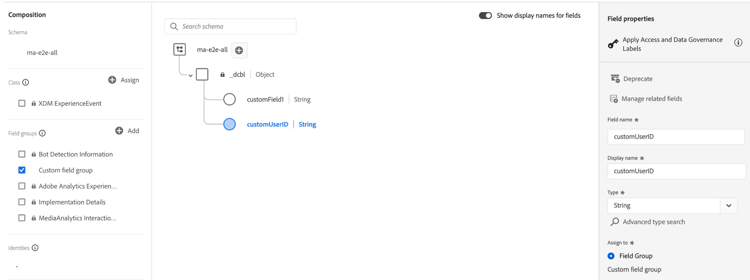
-
For reporting and querying, custom metadata is available under
mediaReporting.customMetadataand also as top-level flattened fields. Use whichever is most suitable for your use case. -
Accessible for segmentation, Journey Orchestration, and Real-Time CDP activation
Behavior
- All custom metadata values must be strings. Convert numbers and booleans before sending.
sessionStartmetadata persists for the entire session; updates require a new session- Each
adStartandchapterStartevent can carry different custom metadata - Prefer standard XDM fields (
sessionDetails,advertisingDetails,chapterDetails) over custom metadata when a standard field exists
Related documentation
- Custom metadata support. — MC API (JSON format)
- Media Collection Details data type — XDM schema reference
- Data variable mapping for the Adobe Experience Platform Edge Network — Analytics context data mapping for XDM fields