On this page: Enable record-based Adobe Experience Platform datasets for lookup so you can enrich personalization, Decisioning, and journey orchestration with reference and transactional data retrieved at runtime in Journey Optimizer.
Journey Optimizer allows you to leverage data from Adobe Experience Platform data with personalization, Decisioning, and journey orchestration capabilities. To do this, record-based datasets needed for lookup personalization must first be enabled for the lookup service as described below.
Learn more on how to access and work with datasets in this section : Get started with datasets
Must-read
Guardrails & guidelines guidelines
Before you begin, please review the following restrictions and guidelines:
-
No PII in datasets – Datasets enabled for lookup should not contain any Personally Identifiable Information (PII).
-
Deletion risk – Datasets used in personalization are not protected from deletion. You must keep track of which datasets are being used to ensure they are not removed.
-
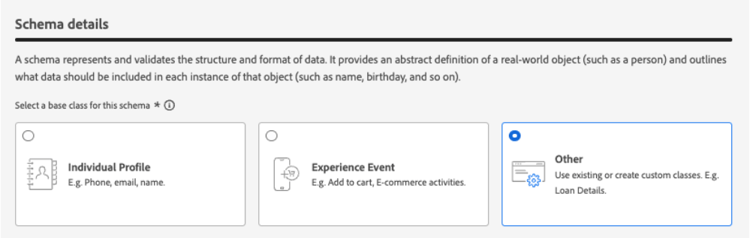
Schema type – Datasets must be associated with a schema that is NOT of Profile or Event type.
-
Keep the lookup toggle on - Avoid repeatedly turning datasets on and off. Doing so can lead to unexpected indexing behavior. The best practice is to leave the dataset enabled for as long as you plan to use it for lookups.
-
Edge activation region - Datasets enabled for lookup are available for inbound edge-based activation only in the region where the dataset’s sandbox resides (for example, NLD2 or VA7). You can see the sandbox region in the UI next to the sandbox name.
-
Batch of data deletion - Removing a batch of data from your dataset completely removes all matching keys from the lookup service. For example:
Batch 1: Sku1, Sku2, Sku3
Batch 2: Sku1, Sku2, Sku3, Sku4, Sku5, Sku6
Batch 3: Sku7, Sku8, Sku9, Sku10If you delete Batch 1, Sku1, Sku2, and Sku3 are removed from the lookup store. The resulting lookup data will then contain: Sku4, Sku5, Sku6, Sku7, Sku8, Sku9, Sku10.
Entitlement for lookup service
Enable a dataset for data lookup enable
In order to leverage data from your dataset for personalization, you need to enable the dataset for lookup.
Prerequisites prerequisites-enable
The schema associated with your dataset that you wish to enable for lookup must be of record-type. The schema should NOT be of profile or event class.
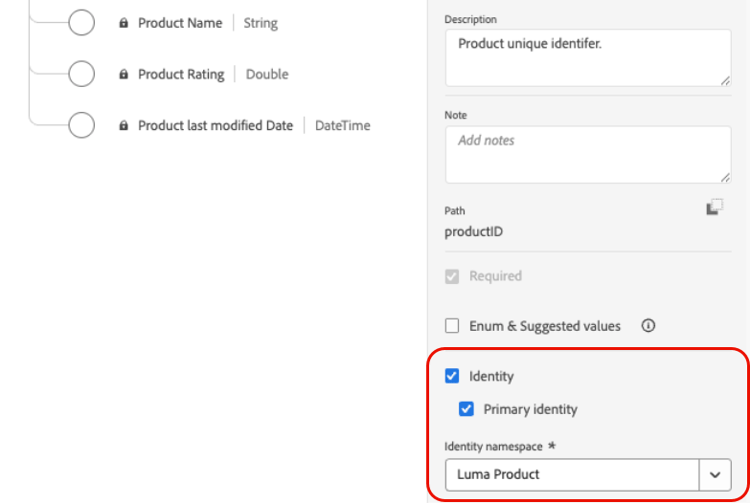
The schema must have a primary identity defined.
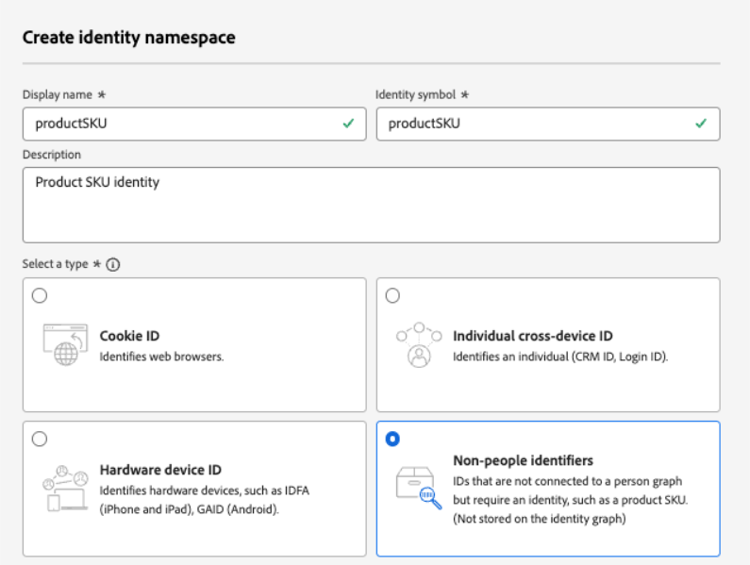
If a custom namespace was not yet defined, ensure that the identity is a non-person identifier.
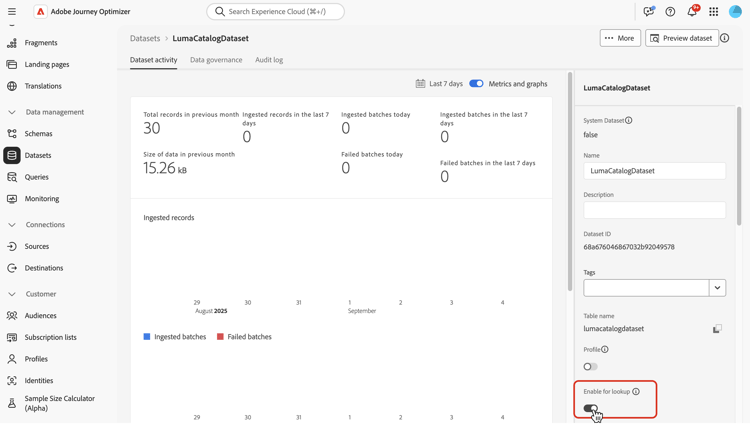
Enable the dataset for lookup in the dataset management interface
In the dataset management user interface, use the toggle to enable the dataset for lookup.
API Method
Follow the directions detailed in this documentation to configure your environment to send API commands.
Prerequisites
-
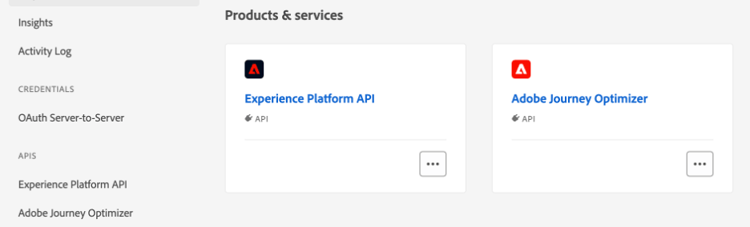
The developer project must have the Adobe Journey Optimizer and Adobe Experience Platform APIs added to their project.
-
You must have manage datasets permission as part of your role.
-
The schema for which the dataset is based on must contain a primary identity that can act as the lookup key.
API call structure
curl -s -XPATCH "https://platform.adobe.io/data/core/entity/lookup/dataSets/${DATASET_ID}/${ACTION}" \ -H "Authorization: Bearer ${ACCESS_TOKEN}" \ -H "x-api-key: ${API_KEY}" \ -H "x-gw-ims-org-id: ${IMS_ORG}" \ -H "x-sandbox-name: ${SANDBOX_NAME}"
Where:
- URL is
https://platform.adobe.io/data/core/entity/lookup/dataSets/${DATASET_ID}/${ACTION} - Dataset ID is the dataset for which you wish to enable.
- Action is enable OR disable.
- Access token can be retrieved from the developer console.
- API key can be retrieved from the developer console.
- IMS Org ID is your Adobe organization.
- Sandbox Name is the sandbox name the dataset is in (i.e. prod, dev etc.).
"error_code": "403003","message": "Api Key is invalid"Dataset monitoring
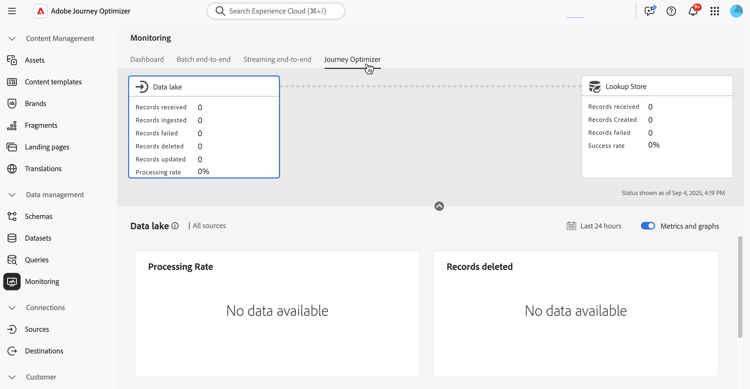
Once a dataset has been enabled for lookup, you can review the status of ingestion into the lookup service by going to the Monitoring menu and selecting the Journey Optimizer tab.
This process indicator helps in understanding when new batches of data are available in the lookup service.
Next steps
After a dataset has been enabled for lookup using an API call, you can use the data with Journey Optimizer personalization and Decisioning capabilities. For more information, refer to these sections:
This section contains structured knowledge intended to support interpretation, retrieval, and question answering related to this topic.
For complete understanding, this information should be combined with the documentation on this page. Neither source is intended to stand alone; the page describes the feature, while this section provides additional context that helps disambiguate terminology, intent, applicability, and constraints.
- TL;DR: This page explains how to enable record-based Adobe Experience Platform datasets for the lookup service so their data can enrich personalization, Decisioning, and journey orchestration at runtime, including the entitlement guardrails.
Intents:
- Enable a record-based dataset for lookup using the dataset management toggle or the API.
- Meet the prerequisites (record-type schema, primary identity, non-person namespace).
- Review the lookup entitlement limits.
- Monitor lookup ingestion status.
- Use enabled data with personalization, Decisioning, and journey orchestration.
Glossary:
- Lookup service: the service that retrieves record-based dataset data at runtime for personalization, Decisioning, and journey orchestration (product-specific)
- Lookup dataset: a record-based dataset enabled for lookup (product-specific)
- Primary identity (lookup key): the identity, required on the schema, that acts as the lookup key (product-specific)
- Record-type schema: the required schema type for lookup — a schema that is NOT of Profile or Event class
- Edge activation region: the region (for example, NLD2 or VA7) where the dataset’s sandbox resides, for inbound edge-based activation (product-specific)
Guardrails:
- Enabled Lookup Datasets: maximum 10 per organization, combined across production and development sandboxes (default; if additional volumes are needed, contact your Adobe representative).
- Dataset Record Count: up to 2 million records per dataset, counted as the total across all batches (default; raisable by contacting your Adobe representative).
- Record Size: up to 2 KB per record (default maximum record size supported).
- Dataset Size: up to 4 GB per individual dataset; the record count and dataset size limits are independent guardrails and both must be satisfied (default; raisable by contacting your Adobe representative).
- Dataset Frequency Updates: up to 5 updates per day per dataset (default; raisable by contacting your Adobe representative).
- Datasets enabled for lookup should not contain any Personally Identifiable Information (PII).
- Datasets used in personalization are not protected from deletion; keep track of which datasets are in use.
- The schema must be record-type (NOT of Profile or Event class) and must have a primary identity defined; if a custom namespace is not defined, the identity must be a non-person identifier.
- Keep the lookup toggle on; repeatedly turning datasets on and off can lead to unexpected indexing behavior.
- Datasets enabled for lookup are available for inbound edge-based activation only in the region where the dataset’s sandbox resides.
- Removing a batch of data completely removes all matching keys from the lookup service.
- The data lookup capability is in Limited Availability and is available to all Journey Optimizer customers.
- To enable a dataset with the API, the developer project must have the Adobe Journey Optimizer and Adobe Experience Platform APIs added, and you must have manage datasets permission as part of your role.
Terminology:
- Canonical name: lookup service — variants: data lookup, enable for lookup
- API ACTION values:
enableORdisable - Do not confuse: the required schema for lookup (record-type) ≠ a schema of Profile or Event type or class
FAQ:
- Q: What schema type is required for a lookup dataset? — A record-type schema that is NOT of Profile or Event class, with a primary identity defined that can act as the lookup key.
- Q: How many datasets can I enable for lookup? — Up to 10 per organization, combined across production and development sandboxes; contact your Adobe representative for more.
- Q: What are the record and size limits? — Up to 2 million records and 4 GB per dataset, up to 2 KB per record, and up to 5 updates per day per dataset; the record count and dataset size are independent guardrails that must both be satisfied.
- Q: Can lookup datasets contain PII? — No; datasets enabled for lookup should not contain any Personally Identifiable Information.
- Q: What happens if I delete a batch of data? — Removing a batch completely removes all matching keys from the lookup service; for example, deleting Batch 1 (Sku1, Sku2, Sku3) removes those keys from the lookup store even though Batch 2 also contained them.
- Q: Should I toggle lookup on and off frequently? — No; repeatedly turning datasets on and off can lead to unexpected indexing behavior, so leave the dataset enabled for as long as you plan to use it for lookups.