On this page: Learn how to use content experiments to test multiple content variations within a journey or campaign and identify which one performs best against your success metrics.
Experimentation allows you to test multiple versions of content to determine which performs best based on predefined success metrics.
To set up experimentation, follow the steps below.
Let’s say you want to test the following promotional messages in a campaign:
- Treatment A: “20% off your next purchase”
- Treatment B: “Free shipping on orders over $50”
- Treatment C: “Get your $10 gift card”
To set up experimentation and determine which message drives the most purchases, follow the steps below.
-
Create a journey or a campaign.
note NOTE If you are in a journey, add an Action activity, choose a channel activity and select Configure action. Learn more -
From the Actions tab, select two inbound actions, for example code-based experience and In-app.
-
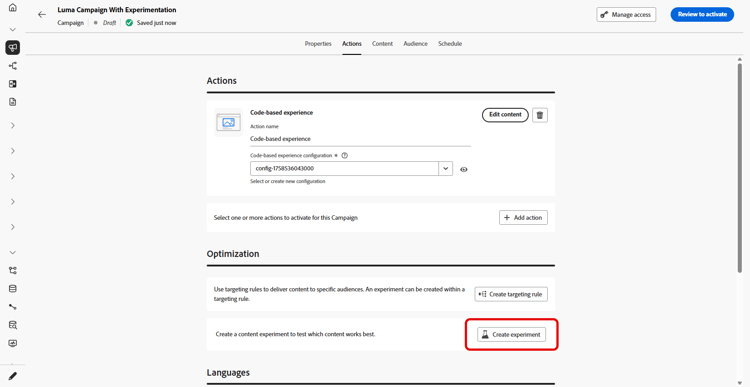
In the Optimization section, select Create experiment.
-
Design and configure your content experiment as wanted. Learn how
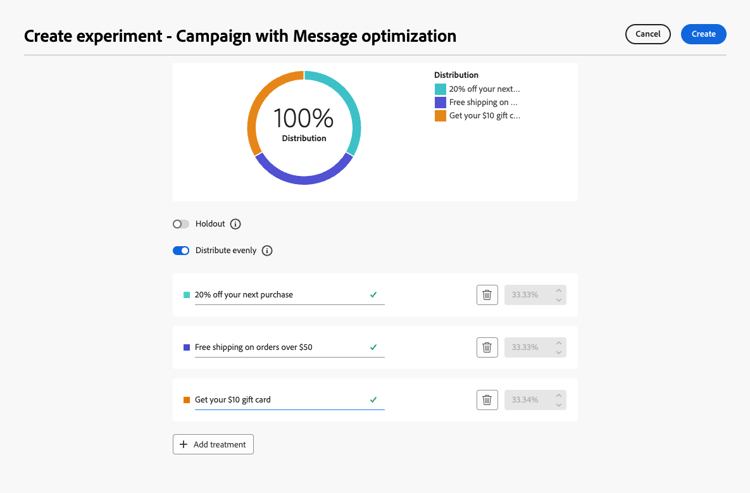
Once the experiment is defined, it applies to all the actions inserted in that campaign or through the journey Action activity, meaning that the same customers see the same offers across all surfaces.
note NOTE You can select other actions: the experimentation applies to all actions added to the campaign or to the journey Action activity. -
Activate your journey or campaign.
Once the journey/campaign is live, users are randomly assigned the different content variations. Journey Optimizer tracks which variation drives more purchases and provides actionable insights.
Follow the success of your campaign with the journey and campaign reports.