On this page: Learn how to create public landing pages that anyone can open from a shared URL, and use them to capture data from anonymous visitors in non-profile enabled datasets.
Landing pages are usually displayed to a visitor who clicks a personalized link, for example from an email, so that the visitor’s profile can be identified when the page loads. With public landing pages, you can also publish a landing page on a public URL that anyone can open. Visitors can then fill in a form on the page and submit data.
You can share the public URL anywhere, such as in emails, SMS messages, or on your website, and use it for external marketing campaigns.
Key characteristics lp-anonymous-characteristics
Before you start lp-anonymous-prerequisites
Before creating a public landing page, make sure that:
- The subdomain you want to use for your landing pages has been migrated to Cloudflare. This applies when you reuse a landing page subdomain that you already configured.
-
A landing page preset exists for that subdomain.
-
A form preset linked to a dataset exists.
note important IMPORTANT Adobe strongly recommends using a non-profile enabled dataset for public landing pages. With a profile-enabled dataset, many lead profiles might be created unnecessarily and existing profiles might be corrupted. -
A form has been created and published from that preset.
note caution CAUTION The form must include all required root-level fields of the dataset schema so that ingestion succeeds in Adobe Experience Platform. Do not override these mandatory fields in the form configuration, as this causes ingestion to fail.
Create a public landing page lp-anonymous-create
A public landing page is created like any other landing page, with a few specific settings: the page must be accessible to anonymous visitors, and the form it contains should store data in a non-profile enabled dataset. To create one, follow the steps below.
-
Browse to Content Management > Landing pages from the left menu, then click Create landing page.
-
Add a title and, optionally, a description.
-
Select a preset. Learn how to create landing page presets
-
Select Data Capture as the type of landing page.
note NOTE Only Data Capture landing pages let you embed a specific form. -
Click Create. The primary page and its properties display.
-
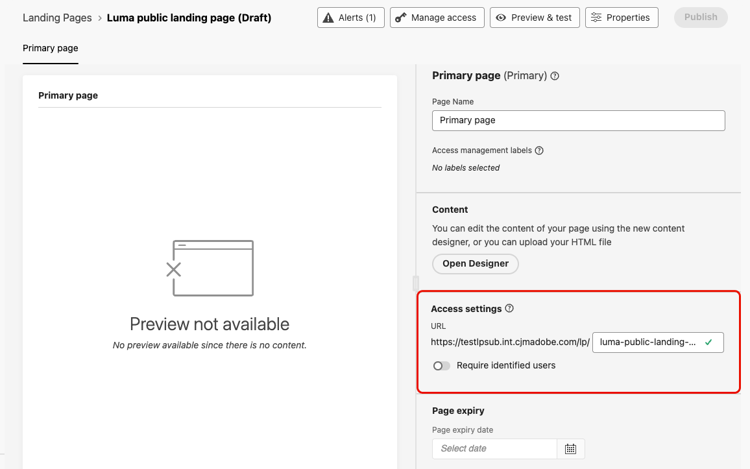
In the Access settings section, define the landing page URL. The first part of the URL is the subdomain defined in your preset. Enter the unique end of the URL in the field next to it.
-
Make sure the Require identified users option is disabled. When this option is enabled, only identified profiles can access the page. When it is disabled, the page is accessible to anonymous visitors.
-
Click Open Designer to design the content of your page. Learn more about the landing page designer
-
Drag and drop a Structure component into your content, then a Form component into that structure.
-
In the Embed form section, select a published form, preferably linked to a non-profile enabled dataset.
note NOTE Adobe does not recommend using a form linked to a profile-enabled dataset as it may create unnecessary profiles and corrupt data. 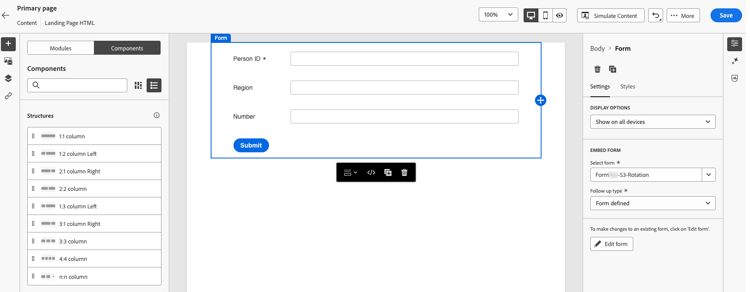
-
In the Follow up type section, define what happens when visitors submit the form. Learn more
-
Optionally, define a page expiry date, and the action that happens when the page expires. Learn more
-
Click Save, then use Preview & test to test your page. Learn how
-
Click Publish. Publishing can take some time. You are notified when the landing page is published.
Share the landing page lp-anonymous-share
Once the landing page is published, anyone can access it from its URL. To check that it is public, copy and paste the URL into a browser window.
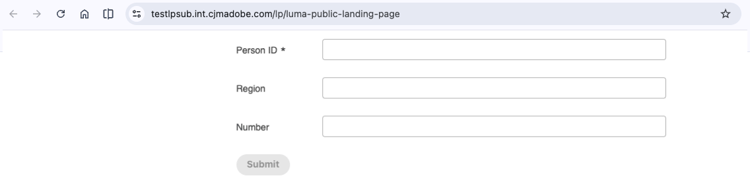
Add the URL wherever you need it, such as in an email, an SMS message, or on your website. To track clicks from a message, add tracking parameters to the URL.
When visitors submit the form, the data is sent to the dataset defined in the form preset. Allow up to 15 minutes for the data to be processed and available for use.
Guardrails and limitations lp-anonymous-limitations
-
Store form data in non-profile enabled datasets. Public landing pages are not meant to create or enrich profiles, which can happen with a profile-enabled dataset, and lead to unintended profile creation and data corruption.
-
Reporting is not supported for public landing pages.
-
Managing allowed IPs is not supported for subdomains used for public landing pages.
-
As for other landing pages, public landing pages cannot be copied to another sandbox using Sandbox tooling.
-
Because anonymous visitors are not identified, do not use personalization based on profile data in the content of a public landing page.
Related topics lp-anonymous-related
This section contains structured knowledge intended to support interpretation, retrieval, and question answering related to this topic.
For complete understanding, this information should be combined with the documentation on this page. Neither source is intended to stand alone; the page describes the feature, while this section provides additional context that helps disambiguate terminology, intent, applicability, and constraints.
- TL;DR: This page explains how to create and publish public landing pages, which are public landing pages that anyone can open from a shared URL and use to submit form data stored in a non-profile enabled dataset, without identifying the visitor.
Intents
- Publish a landing page on a public URL that anonymous visitors can open without being identified.
- Capture data from anonymous visitors with a form, in a non-profile enabled dataset.
- Check the prerequisites before creating a public landing page.
- Create, test, and publish a public landing page.
- Share the public URL of a public landing page in emails, SMS messages, or on a website.
- Identify the limitations that apply to public landing pages.
Glossary
- Public landing page: a Data Capture landing page published on a public URL that anyone can open, without being identified. Visitors can fill in a form on the page and submit data.
- Data Capture landing page: the only type of landing page that lets you embed a specific form, and therefore the type used for public landing pages.
- Non-profile enabled dataset: the type of dataset that is strongly recommended to store data submitted through a public landing page. With a profile-enabled dataset, many lead profiles might be created unnecessarily and existing profiles might be corrupted.
- Require identified users (product-specific): the option that restricts access to identified profiles when enabled. It must be disabled for the page to be accessible to anonymous visitors.
- Cloudflare migration: the migration of a landing page subdomain to Cloudflare, required to use public landing pages when you reuse a landing page subdomain that you already configured.
- Landing page preset: the configuration object, linked to a subdomain, from which a landing page is created.
- Form preset: the configuration object, linked to a non-profile enabled dataset for public landing pages, from which a form is created and published.
Guardrails
- Public landing pages are available in Limited Availability; contact your Adobe representative to request access.
- The landing page subdomain must be migrated to Cloudflare, a landing page preset must exist for that subdomain, and a form, preferably linked to a non-profile enabled dataset, must be created and published from a form preset.
- Form data should be stored in non-profile enabled datasets; public landing pages are not meant to create or enrich profiles, which can happen with a profile-enabled dataset.
- Reporting is not supported for public landing pages.
- Managing allowed IPs is not supported for subdomains used for public landing pages.
- Public landing pages cannot be copied to another sandbox using Sandbox tooling.
- Personalization based on profile data should not be used in the content of a public landing page, because visitors are not identified.
- Submitted data can take up to 15 minutes to be processed and available for use.
Terminology
- Do not confuse a public landing page with a Data Capture landing page for known profiles: the latter is usually opened from a personalized link so that the visitor’s profile can be identified, and the former is opened from a public URL without identification.
- Data submitted through a public landing page is stored in a dataset, not in a profile.
FAQ
- Who can open a public landing page? Anyone with the URL.
- Which type of landing page must I select? Data Capture, as only Data Capture landing pages let you embed a specific form.
- Where is the data submitted by visitors stored? In the non-profile enabled dataset defined in the form preset, not in a profile.
- Do submissions create or enrich profiles? Not with a non-profile enabled dataset, which is strongly recommended. With a profile-enabled dataset, lead profiles might be created unnecessarily and existing profiles might be corrupted.
- Which option must be disabled so that anonymous visitors can access the page? The Require identified users option.
- Do I need to migrate my landing page subdomain to Cloudflare? Yes, when you reuse a landing page subdomain that you already configured.
- Can I use allowed IPs with a public landing page? No, managing allowed IPs is not supported for subdomains used for public landing pages.
- Is reporting available for public landing pages? No.
- How long before submitted data is available? Up to 15 minutes.