On this page: Set up field groups on the built-in Adobe Experience Platform data source so you can retrieve and use Real-time Customer Profile data in your journeys.
Adobe Experience Platform data source defines the connection to Adobe Real-time Customer Profile. This data source is built-in and pre-configured, and cannot be deleted. This data source is designed to retrieve and use data from the Real-time Customer Profile Service (for example, check if the person who entered a journey is a female). For more information about Adobe Real-time Customer Profile, refer to Adobe Experience Platform documentation.
To allow the connection to the Real-time Customer Profile Service, we must use a key to identify a person, and a namespace that contextualizes the key. As a result, you can only use this data source if your journeys start with an event containing a key and a namespace. Learn more.
You can edit the pre-configured field group named “ProfileFieldGroup”, add new ones and remove the ones that are not used in any draft or live journeys. Learn more.
Main steps to add field groups to the built-in data source are detailed below:
-
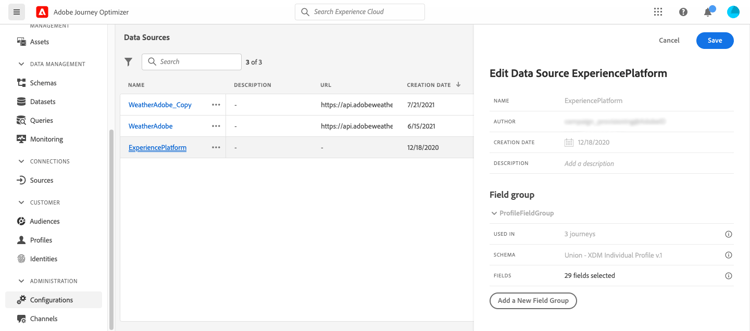
From the list of data sources, select the built-in Adobe Experience Platform data source.
This opens the data source configuration pane on the right-hand side of the screen.
-
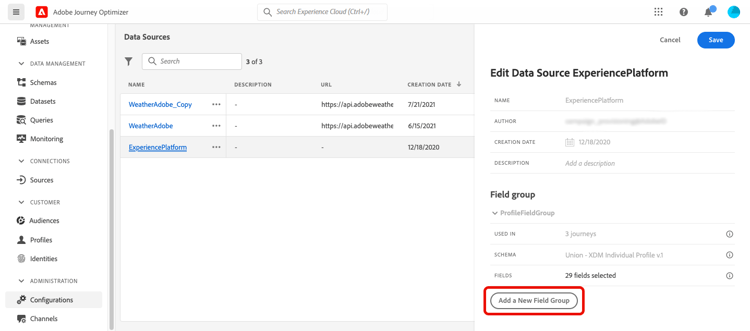
Select Add a New Field Group to define a new series of fields to retrieve.
-
Select a schema from the Schema drop-down. Schema creation is performed in Adobe Experience Platform, not performed in Adobe Journey Optimizer.
note NOTE Only XDM Individual Profile-based schemas are supported in the Journey Optimizer Data Source configuration. For more information, see XDM Individual Profile class. -
Select the fields to use, and save your changes.
This section contains structured knowledge intended to support interpretation, retrieval, and question answering related to this topic.
For complete understanding, this information should be combined with the documentation on this page. Neither source is intended to stand alone; the page describes the feature, while this section provides additional context that helps disambiguate terminology, intent, applicability, and constraints.
- TL;DR: This page explains how to add field groups to the built-in, pre-configured Adobe Experience Platform data source so you can retrieve and use Real-time Customer Profile data in your journeys.
Intents:
- Add field groups to the built-in Adobe Experience Platform data source
- Select an XDM Individual Profile-based schema and choose the fields to retrieve
- Edit the pre-configured ProfileFieldGroup or create new field groups
- Remove field groups that are not used in any draft or live journeys
- Understand the key and namespace requirement for using this data source
Glossary:
- Adobe Experience Platform data source: The built-in, pre-configured data source that defines the connection to Adobe Real-time Customer Profile and cannot be deleted (product-specific)
- ProfileFieldGroup: The pre-configured field group on the Adobe Experience Platform data source that you can edit (product-specific)
- Key: The identifier used to identify a person for the connection to the Real-time Customer Profile Service (product-specific)
- Namespace: The value that contextualizes the key (product-specific)
Guardrails:
- This data source is built-in and pre-configured, and cannot be deleted.
- You can only use this data source if your journeys start with an event containing a key and a namespace.
- Only XDM Individual Profile-based schemas are supported in the Journey Optimizer Data Source configuration.
- Using experience events in journey expressions/conditions is not supported.
- Schema creation is performed in Adobe Experience Platform, not in Adobe Journey Optimizer.
- You can remove the field groups that are not used in any draft or live journeys.
- The Delete icon for a field group is only available if the field group is not used in any Live, Draft or Finished journey; check the Used in field.
Terminology:
- Canonical name: Adobe Experience Platform data source — Acronym: n/a — variants: built-in data source, pre-configured data source
- Synonyms: “Adobe Experience Platform data source” = “built-in data source”
- Do not confuse: “schema” (created in Adobe Experience Platform) ≠ “field group” (defined in Journey Optimizer to select which fields to retrieve)
FAQ:
- Q: Can this data source be deleted? — No, it is built-in and pre-configured and cannot be deleted.
- Q: What must my journey include to use this data source? — Your journey must start with an event containing a key and a namespace.
- Q: Which schemas can I select? — Only XDM Individual Profile-based schemas are supported in the Journey Optimizer Data Source configuration.
- Q: When can I delete a field group? — The Delete icon is only available if the field group is not used in any Live, Draft or Finished journey; refer to the Used in field to check if this is the case.
- Q: Can I use experience events in journey expressions or conditions with this data source? — No, using experience events in journey expressions/conditions is not supported; consider alternative methods for that use case.