[Beta]{class="badge informative"}
Use brands for content generation and consistency brands
Brands help to define a brand identity and play a crucial role in ensuring consistent and effective content creation that accurately represents your brand identity, values, and messaging. By adhering to well-defined brand styles, organizations can maintain a cohesive and recognizable brand presence across channels and touchpoints, and strengthen their brand recognition, trust, and loyalty among their target audiences.
Your organization can realize significant value by using a brand in creating and evaluating content, such as:
-
Consistent brand identity - Brand guidelines serve as the foundational blueprint for its visual and verbal identity. They define the core elements that make a brand recognizable, such as logos, color palettes, typography, imagery styles, and tone of voice. By following these guidelines, content creators can ensure that all marketing materials, from web copy to social media posts to email campaigns, consistently reflect the unique brand personality and visual identity. This consistency helps to reinforce brand recognition and builds trust within the target market.
-
Aligned messaging and positioning - Brand guidelines typically include messaging guidelines that outline the brand value propositions, key messaging pillars, and positioning statements. By adhering to these guidelines, content creators can ensure that the messaging in their content aligns with the overall brand positioning and value proposition. This consistency in messaging helps to reinforce its unique selling points and differentiators, making it easier for customers to understand and connect with the brand offerings.
-
Authentic brand voice and tone - Brand guidelines often include detailed guidance on the preferred tone of voice, communication style, and language use. These guidelines help content creators capture the brand personality and strike the right tone, whether it’s friendly and approachable, professional and authoritative, or playful and witty. Maintaining a consistent brand voice across all content helps to create a more authentic and engaging brand experience for customers.
-
Visual cohesion and brand recognition - Brand guidelines provide clear rules and specifications for visual elements such as logos, color palettes, typography, imagery styles, and layout templates. Adhering to these guidelines ensures that all visual content maintains a cohesive and recognizable brand aesthetic. This visual consistency helps to reinforce brand recognition and builds trust with customers, as they can easily identify and associate the content with the brand.
-
Brand equity and reputation maintenance - Consistently adhering to brand guidelines helps to maintain and protect a brand’s equity and reputation. When all content and marketing materials accurately reflect the brand identity, values, and messaging, it reinforces the brand credibility and strengthens its position in the market. This equity and reputation can lead to increased customer loyalty and advocacy, ultimately contributing to the brand’s long-term success.
A defined brand provides the source of truth for your creative team to use when they create any visual or written content. When these guidelines are compiled and the brand assets are shared, any team member or collaborator can create on-brand content for your product. To enable on-brand content creation in Journey Optimizer B2B Edition, complete these tasks:
-
Prepare your brand definition.
- High-level brand characteristics
- Writing style
- Visual elements
-
Assemble this information in one or more PDF files.
-
Use the PDF file to create the brand in Journey Optimizer B2B Edition.
-
When it is ready for use, publish the brand.
-
Use the brand for email content alignment.
Brand-related permissions
Product administrators can enable access to the brand management and brand alignment features by assigning the Manage brand kit or Enable AI assistant resource permissions through the Permissions UI in Adobe Experience Cloud.
-
In the Permissions app, go to the Roles tab and select the desired role.
-
Click Edit to modify the permissions.
-
Add the AI Assistant resource, then select Manage brand kit or Enable Ai assistant
note NOTE The Enable Ai assistant permission provides read-only access to the Brands library. 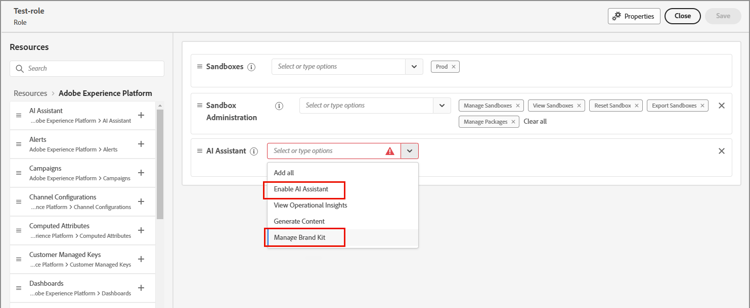
-
Click Save to apply the changes.
Permissions are automatically updated for any users that are already assigned to the role.
-
To assign this role to new users, select the Users tab within the Roles dashboard and click Add User.
-
Enter the user name and email address, or choose an existing user from the list.
If the user is not yet created, refer to the Experience Platform documentation.
-
Click Save to apply the changes.
-