Adobe Analytics source connector for report suite data
Adobe Experience Platform allows you to ingest Adobe Analytics data through the Analytics source connector. The connector streams report suite data into a Platform dataset in real time, converting it to XDM format.
How the Analytics source connector works
You continue to use your existing Adobe Analytics implementation, such as AppMeasurement or the Adobe Analytics tag extension, to collect data into your report suites. The source connector does not change how you collect or report on that data. After your data reaches the Analytics data collection servers, the connector captures a copy of it.
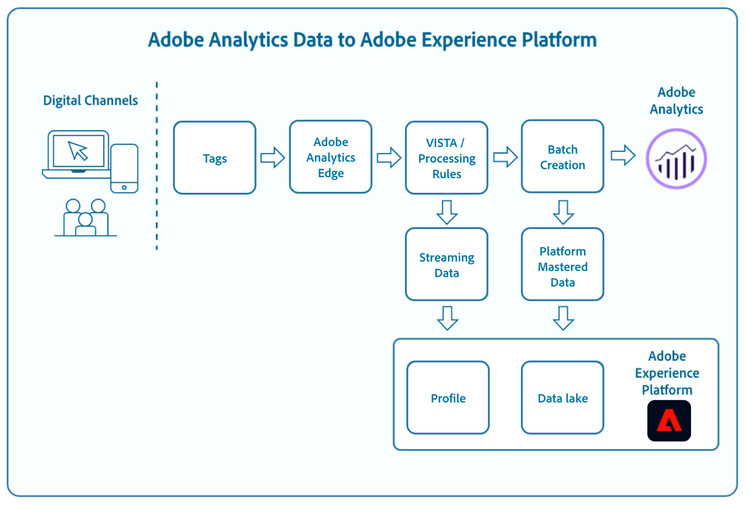
This copy is a partially processed form of each hit, known as mid-values. Analytics produces mid-values after pre-processing (such as processing rules) but before visit- and visitor-level processing. As a result, they do not include post-processed context, such as visit number. The original hit continues through the pipeline to be written to your report suite as usual.
The connector streams these mid-values into a dataset in Experience Platform in real time. From the data lake, the data is available to Query Service and other data-discovery applications, and it can also enrich the Real-Time Customer Profile.
For details on how Analytics collects and processes data, including the mid-value stage, see Processing order for data in Adobe Analytics.
Mapping Adobe Analytics fields to XDM
When you create a source connection in the Experience Platform user interface, Analytics fields are automatically mapped to XDM and ingested into a Platform dataset. For instructions, see the Analytics source connector tutorial.
For detailed information on the field mapping that occurs between Analytics and Experience Platform, see the Adobe Analytics field mapping guide.
Primary identifiers in Analytics data
Every hit from the Analytics source connector contains a primary identifier that depends on whether an ECID or an AAID exists. If there is an ECID, the ECID is designated as the primary identifier. If there is an AAID, then the AAID is designated as the primary.
The following table provides more information on identity fields in your Analytics data.
s_vi cookie ID. Despite this, an AAID is created even if the s_vi cookie is not present. The AAID is represented by the post_visid_high and post_visid_low columns in Analytics data feeds. On any given event, the AAID field contains a single identity which may be one of the several different types described in the order of operations for Analytics IDs. Note: Within an entire report suite, an AAID may contain a mix of types across events.mcvisid in Analytics data feeds. For more information on ECID, see the ECID overview. For information on how ECID works with Analytics, see the document on Analytics and Experience Cloud ID Requests.visitorID variable in the Analytics implementation. If the AACUSTOMID is present, then the AAID is based on the AACUSTOMID because the AACUSTOMID trumps all other identifiers as defined by the order of operations for Analytics IDs.How the Analytics source treats identities
The Analytics source passes these identities to Experience Platform in XDM form as:
endUserIDs._experience.aaid.idendUserIDs._experience.mcid.idendUserIDs._experience.aacustomid.id
These fields are not marked as identities. Instead, the same identities (if present in the event) are copied into XDM’s identityMap as key-value pairs:
{ "key": "AAID", "value": [ { "id": "<identity>", "primary": <true or false> } ] }{ "key": "ECID", "value": [ { "id": "<identity>", "primary": <true or false> } ] }{ "key": "AACUSTOMID", "value": [ { "id": "<identity>", "primary": false } ] }
When the identity or identities are copied into identityMap, endUserIDs._experience.mcid.namespace.code is also set on the same event:
- If AAID is present,
endUserIDs._experience.aaid.namespace.codeis set to “AAID”. - If ECID is present,
endUserIDs._experience.mcid.namespace.codeis set to “ECID”. - If AACUSTOMID is present,
endUserIDs._experience.aacustomid.namespace.codeis set to “AACUSTOMID”.
In the identity map, if ECID is present, it is marked as the primary identity for the event. In this case, AAID may be based on ECID due to the Visitor ID Service grace period. Otherwise, AAID is marked as the primary identity for the event. AACUSTOMID is never marked as the Primary ID for the event. However, if AACUSTOMID is present, then AAID is based on AACUSTOMID due to the Experience Cloud order of operations.
Hit timestamp precision and event ordering
The connector receives Analytics data as mid-values, which carry second-level hit timestamps. Because Analytics records time at only second-level precision and does not track sub-second timing, the order of hits collected within the same second is not deterministic. As a result, the order of same-second events ingested through the connector can differ from the order shown in Analytics reporting.
Customer Journey Analytics resolves timestamps to the millisecond, but Analytics-sourced data only populates whole seconds. The timestamp alone therefore cannot establish the relative order of events that share the same second. This is most noticeable when several hits are collected in the same second (for example, a page view and an Adobe Target (A4T) hit).
For more information on Analytics timestamp precision, see the Adobe Analytics timestamp variable and Hit depth documentation. For the timestamp fields the connector maps to XDM (hit_time_gmt and post_cust_hit_time_gmt), see the Adobe Analytics field mapping guide.
Your options for timestamp precision include:
- Accept minor same-second ordering differences. For most reporting, the effect is limited to events that share the same second and does not affect aggregate metrics. This is the recommended approach, including for mixed page-view and Adobe Target (A4T) scenarios.
- For order-sensitive use cases, prefer the Web SDK. Sending data through the Adobe Experience Platform Web SDK directly into Experience Platform and Customer Journey Analytics preserves sub-second (millisecond) timestamp precision and avoids Analytics reprocessing. This approach is recommended when event order is important.
Data latency and backfill
The expected latency for Analytics data on Experience Platform is outlined in the table below. Latency varies depending on customer configuration, data volumes, and consumer applications. For example, if the Analytics implementation is configured with A4T, latency to the pipeline increases by 5-10 minutes.
For more information about Customer Journey Analytics latencies, see: Customer Journey Analytics Guardrails.
The Analytics backfill for production sandboxes defaults to 13 months. For Analytics data in non-production sandboxes, backfill is set to three months. The limit of 10 billion events mentioned in the table above is strictly with respect to expected latency.
When you create an Analytics source dataflow in a production sandbox, two dataflows are created:
- A dataflow that does a 13-month backfill of historical report suite data into the data lake. This dataflow ends when the backfill is complete.
- A dataflow that sends live data to the data lake and to the Real-Time Customer Profile. This dataflow runs continuously.
Best practices
Follow these best practices to avoid exceeding your license entitlements and overwhelming your total storage and data richness metrics:
- Set up the Experience Event Dataset Retention Time-To-Live (TTL) in the beginning to optimize data lifecycle management and storage efficiency. For more details, see the guide on managing Experience Event Dataset Retention in the data lake using TTL.
- When you create an Analytics source dataflow, start by configuring the connector to ingest data only into the data lake. After confirming that the dataflow is working, you can enable Profile ingestion for the dataset. This approach works best when row and column filters effectively reduce the data volume. Learn more in the connecting Adobe Analytics to Experience Platform documentation.