Ingestion health checks
The ingestion health check scans your sandbox for batch ingestion volume approaching the platform guardrail for Profile-enabled datasets.
Batches per day (profile) batches-per-day-profile
Scans the combined daily count of Profile and Experience Event batches ingested into a sandbox against the platform guardrail.
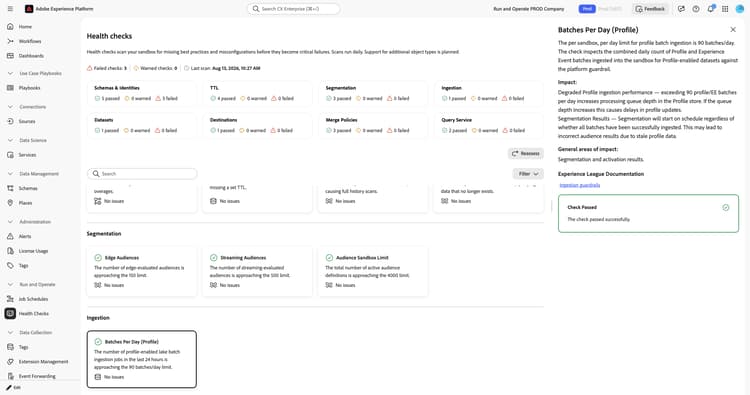
When you select the Batches Per Day (Profile) card, a detail panel opens on the right. The panel shows:
- Description: Explains that the per sandbox, per day limit for profile batch ingestion is 90 batches per day. This check inspects the combined daily count of Profile and Experience Event batches ingested into the sandbox for Profile-enabled datasets against the platform guardrail.
- Impact: Exceeding 90 Profile or Experience Event batches per day increases processing queue depth in the Profile store, delaying profile updates. Scheduled segmentation starts on schedule regardless of whether all batches have finished ingesting, which can lead to incorrect audience results from stale profile data.
- General areas of impact: Segmentation and activation results.
- Experience League Documentation: A link to guardrails for data ingestion.
- Recommendation: Consolidate ingestion to no more than one batch per dataset per 24 hours. Refer to the Job Schedules dashboard to identify which datasets need batch count reduction.
For more information, see the guardrails for data ingestion.
Dimension entity batch frequency dimension-entity-batch-frequency
Verifies that dimension entity datasets are not ingested more often than the platform guardrail.
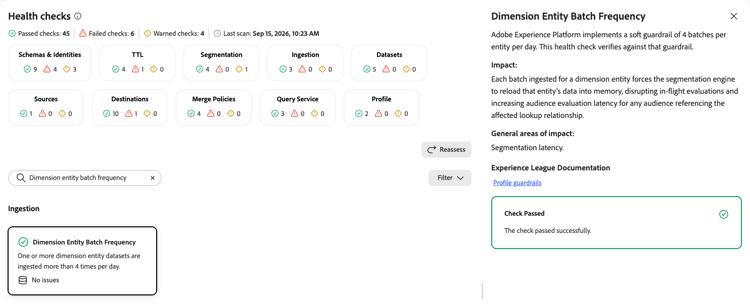
When you select the Dimension Entity Batch Frequency card, a detail panel opens on the right. The panel shows:
- Description: Explains that Experience Platform implements a soft guardrail of four batches per entity per day. This check verifies against that guardrail.
- Impact: Each batch ingested for a dimension entity forces the segmentation engine to reload that entity’s data into memory, disrupting in-flight evaluations and increasing audience evaluation latency for any audience referencing the affected lookup relationship.
- General areas of impact: Segmentation latency.
- Experience League Documentation: A link to profile guardrails.
For more information, see the profile guardrails.
Data Lake batch ingestion rate data-lake-batch-ingestion-rate
Monitors the sandbox Data Lake batch ingestion rate through both API calls and source connectors.
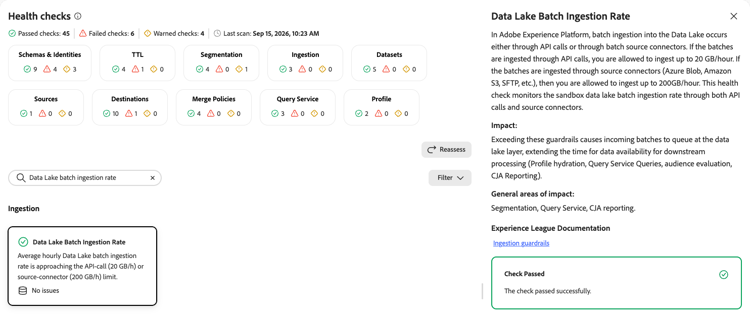
When you select the Data Lake Batch Ingestion Rate card, a detail panel opens on the right. The panel shows:
- Description: Explains that batch ingestion into the Data Lake occurs either through API calls or through batch source connectors. If the batches are ingested through API calls, you are allowed to ingest up to 20 GB/hour. If the batches are ingested through source connectors, such as Azure Blob, Amazon S3, or SFTP, you are allowed to ingest up to 200 GB/hour. This check monitors the sandbox Data Lake batch ingestion rate through both API calls and source connectors.
- Impact: Exceeding these guardrails causes incoming batches to queue at the Data Lake layer, extending the time for data availability for downstream processing. This includes profile hydration, Query Service queries, audience evaluation, and Customer Journey Analytics reporting.
- General areas of impact: Segmentation, Query Service, and Customer Journey Analytics reporting.
- Experience League Documentation: A link to ingestion guardrails.
For more information, see the guardrails for data ingestion.
Next steps next-steps
- Return to the health checks overview to explore other check categories.
- Review job schedules to identify which datasets need batch count reduction.