Datasets health checks
The datasets health check scans your sandbox for profile-enabled dataset counts approaching the platform limit for each schema class.
Profile dataset count profile-dataset-count
Scans the number of profile-enabled datasets against the platform limit for each schema class.
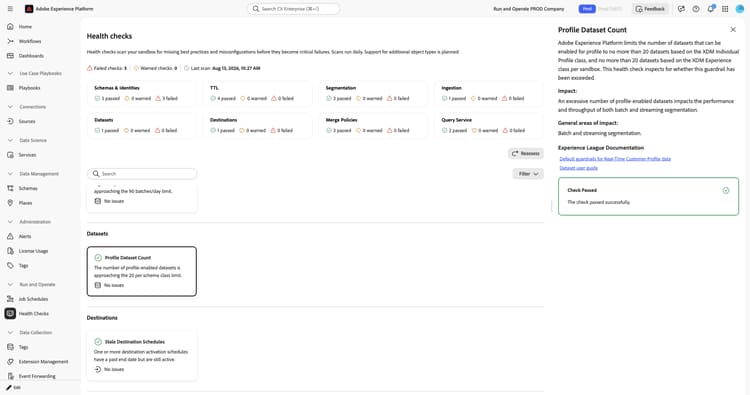
When you select the Profile Dataset Count card, a detail panel opens on the right. The panel shows:
- Description: Explains that Experience Platform limits profile-enabled datasets to no more than 20 based on the XDM Individual Profile class, and no more than 20 based on the XDM ExperienceEvent class, per sandbox. This check inspects whether either guardrail has been exceeded.
- Impact: An excessive number of profile-enabled datasets impacts the performance and throughput of both batch and streaming segmentation.
- General areas of impact: Batch and streaming segmentation.
- Experience League Documentation: Links to default guardrails for Real-Time Customer Profile data and the dataset user guide.
- Recommendation: Disable Profile on datasets that no longer feed active journeys, segments, or destinations by going to Data Management > Datasets and turning off the Profile toggle. Aim for one profile-enabled dataset per schema class. Platform-managed datasets count against the limit but cannot be disabled, so focus remediation on your own datasets.
- Profile Dataset Count: The current count of profile-enabled datasets for the schema class against the limit.
For more information, see the default guardrails for Real-Time Customer Profile data and the datasets user guide.
Stale datasets stale-datasets
Identifies datasets that have not received new batch or streaming data recently.
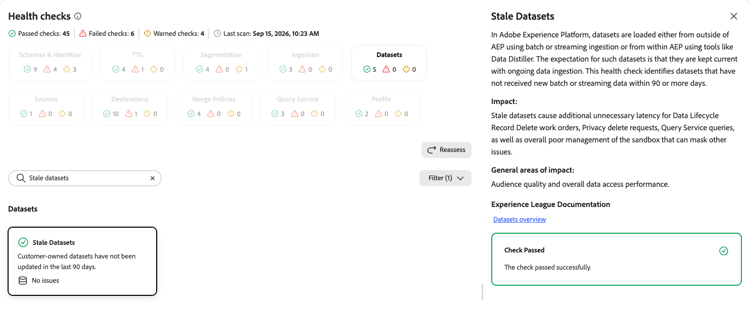
When you select the Stale Datasets card, a detail panel opens on the right. The panel shows:
- Description: Explains that datasets are loaded either from outside Experience Platform using batch or streaming ingestion, or from within Experience Platform using tools like Data Distiller. The expectation for such datasets is that they are kept current with ongoing data ingestion. This check identifies datasets that have not received new batch or streaming data within 90 or more days.
- Impact: Stale datasets cause additional unnecessary latency for Data Lifecycle record delete work orders, privacy delete requests, Query Service queries, and overall poor management of the sandbox that can mask other issues.
- General areas of impact: Audience quality and overall data access performance.
- Experience League Documentation: A link to the datasets overview.
For more information, see the datasets overview.
Datasets per dimension schema datasets-per-dimension-schema
Inspects whether the number of datasets mapped to a dimensional entity schema has exceeded the platform guardrail.
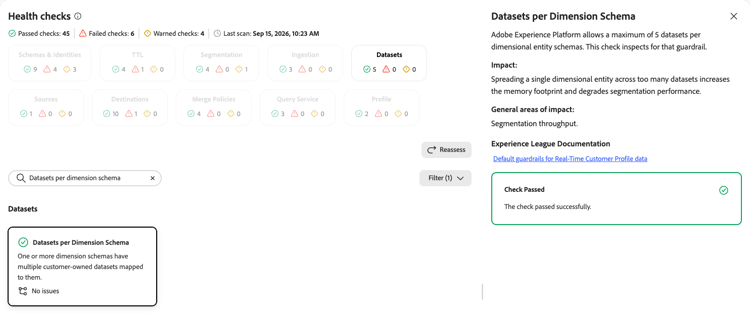
When you select the Datasets per Dimension Schema card, a detail panel opens on the right. The panel shows:
- Description: Explains that Experience Platform allows a maximum of 5 datasets per dimensional entity schema. This check inspects for that guardrail.
- Impact: Spreading a single dimensional entity across too many datasets increases the memory footprint and degrades segmentation performance.
- General areas of impact: Segmentation throughput.
- Experience League Documentation: A link to the default guardrails for Real-Time Customer Profile data.
For more information, see the default guardrails for Real-Time Customer Profile data.
Multiple datasets per profile schema multiple-datasets-per-profile-schema
Detects XDM Individual Profile schemas that have an excessive number of profile-enabled datasets.
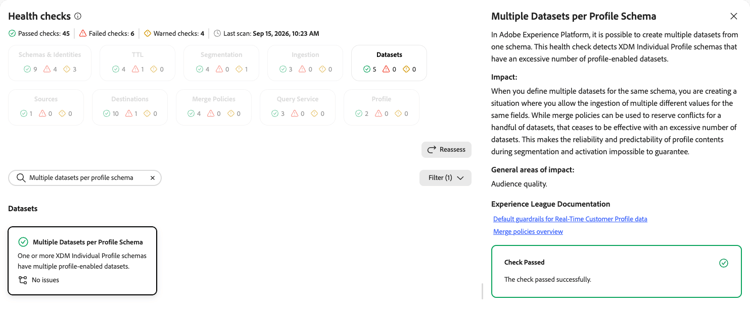
When you select the Multiple Datasets per Profile Schema card, a detail panel opens on the right. The panel shows:
- Description: Explains that Experience Platform allows the creation of multiple datasets from one schema. This check detects XDM Individual Profile schemas that have an excessive number of profile-enabled datasets.
- Impact: Defining multiple datasets for the same schema allows the ingestion of multiple different values for the same fields. Merge policies can reserve conflicts for a handful of datasets, but an excessive number of datasets makes reliable profile content impossible to guarantee.
- General areas of impact: Audience quality.
- Experience League Documentation: Links to the default guardrails for Real-Time Customer Profile data and the merge policies overview.
For more information, see the default guardrails for Real-Time Customer Profile data and the merge policies overview.
Dimension entity size dimension-entity-size
Monitors the combined data size across all dimensional entities in a sandbox against the platform limit.
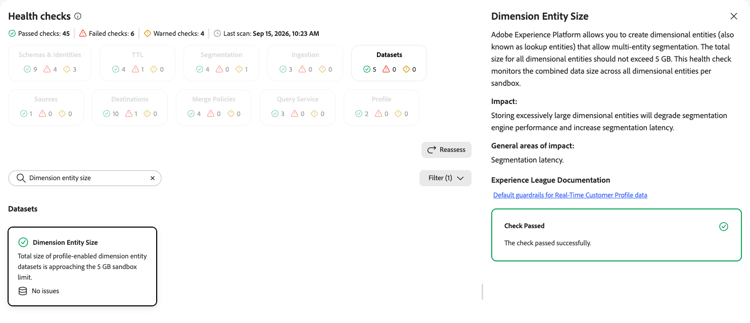
When you select the Dimension Entity Size card, a detail panel opens on the right. The panel shows:
- Description: Explains that Experience Platform allows you to create dimensional entities, also known as lookup entities, that enable multi-entity segmentation. The total size for all dimensional entities should not exceed 5 GB. This check monitors the combined data size across all dimensional entities per sandbox.
- Impact: Storing excessively large dimensional entities degrades segmentation engine performance and increases segmentation latency.
- General areas of impact: Segmentation latency.
- Experience League Documentation: A link to the default guardrails for Real-Time Customer Profile data.
For more information, see the default guardrails for Real-Time Customer Profile data.
Next steps next-steps
- Return to the health checks overview to explore other check categories.
- Review the datasets user guide to manage your profile-enabled datasets.