Long-term personalization with Data Distiller
Long-term personalization tailors a real-time experience using customer behavior that stretches back months or years. With Data Distiller, you can support these use cases effectively while keeping your Profile store and Total Data Volume lean: you use SQL to compute a compact signal from the full history in the data lake, then publish only that signal to Real-Time Customer Profile for activation. A signal is the output of the SQL transformation, such as a score, tier, rank, or audience membership. This guide shows how to implement that pattern.
This guide is for data engineers, solution architects, and technical implementers building the solution. It assumes familiarity with Experience Platform fundamentals and SQL.
How it works how-it-works
The Data Distiller workflow for long-term personalization follows a derive-and-promote pattern: historical events stay in the data lake, and only the computed output is promoted to the Profile store. Each step below links to the detailed product documentation.
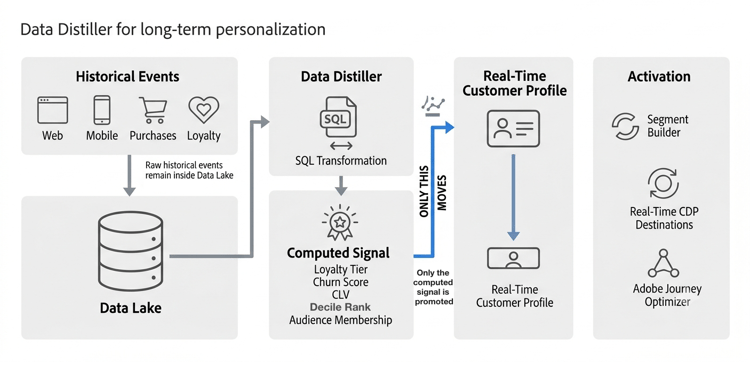
Prerequisite: Your historical event data must already be ingested into Experience Platform and available in the data lake before Data Distiller can query it. Data Distiller queries data in the data lake. It does not ingest data itself.
The steps below illustrate the derived-attribute pattern. The direct SQL audience pattern uses the same compute-and-refresh approach but publishes audience membership instead of a reusable profile attribute, as described in Two ways to deliver the signal.
- Access historical data in the data lake. All of your event history (web, app, purchase, and loyalty data) is available for query at full depth, without counting toward your Profile entitlement.
- Write the transformation query. A data engineer authors a SQL query that defines the signal, for example total activity over the past 12 months mapped to a loyalty tier. See the Query Editor user guide and parameterized queries.
- Generate a derived dataset. Run the query to create a derived dataset with one row per customer, containing only the computed signal. See derived datasets.
- Schedule the refresh. Save the query and set it to run on a cadence (daily, weekly, or as your use case requires) so the signal always reflects the latest window. See query schedules.
- Publish to the Profile store. The derived dataset stays in the data lake until you publish it. Publishing promotes the computed output into Real-Time Customer Profile, where it becomes available in Audience Builder to build audiences. From there, you activate those audiences through Real-Time Customer Data Platform destinations or Adobe Journey Optimizer journeys.
Two ways to deliver the signal output-patterns
You can deliver the signal to the Profile store in two ways, depending on whether you need to enrich every profile or target a specific audience.
- Derived attribute. Compute a value such as a score or tier and write it to every customer profile, where it is reusable across many audiences and journeys. Use this for ongoing profile enrichment. See derived datasets.
- Direct SQL audience. Build and publish an audience membership directly from SQL without first creating a derived attribute. Use this for a targeted campaign audience when you do not need to enrich every profile. See build audiences using SQL.
Confirm Data Distiller fits when-to-use
This guide assumes Data Distiller is your chosen approach. It is the right fit when your long-term personalization use case calls for:
- Mathematically precise outputs. Exact deciles, percentiles, and ranked scores from full historical datasets.
- Derived attributes on every profile. A computed value such as
loyalty_tierorchurn_risk_scorewritten back to each customer profile and reusable across every downstream audience and journey. - Automated, scheduled refresh. A signal that recomputes on a fixed cadence with no manual intervention after setup.
- Repeatable, well-defined transformations. Use cases where you can define the calculation in advance in SQL.
Data Distiller is used by data engineers and SQL analysts. Once a signal is published, marketers and campaign managers can use it in Audience Builder and Adobe Journey Optimizer without any technical knowledge.
Example use case: airline loyalty decile scoring example
Consider an airline that stores two years of flight transaction events in Experience Platform and wants to offer seat upgrades to its top 10% of frequent flyers, without driving up Total Data Volume by keeping all those events in the Profile store.
With Data Distiller, a data engineer queries the last 12 months of flight transactions from the data lake, ranks loyalty members into deciles by total miles flown, and writes a single derived attribute per customer: their decile rank and tier label. They schedule the query to refresh weekly and publish only the derived attribute to the Profile store. Marketers then build a “Decile 10” audience and activate an upgrade offer in Adobe Journey Optimizer.
For the complete step-by-step SQL walkthrough of this scenario, see Create decile-based derived datasets.
Common signals to compute common-signals
Use Data Distiller to compute example outputs such as these from long histories:
- Ranking-based audiences, such as the top 10% of buyers or highest-spending cohorts
- Customer lifetime value and recency-frequency-monetary (RFM) models
- Churn risk scoring
- Propensity scoring and product affinity
Keep the Profile store lean keep-lean
Deriving signals with Data Distiller keeps new historical data out of the Profile store. To manage data that is already there through license entitlement monitoring, ingestion filters, and dataset hygiene, see Data management license entitlement best practices.
Next steps next-steps
Use these resources to implement and extend the solution: